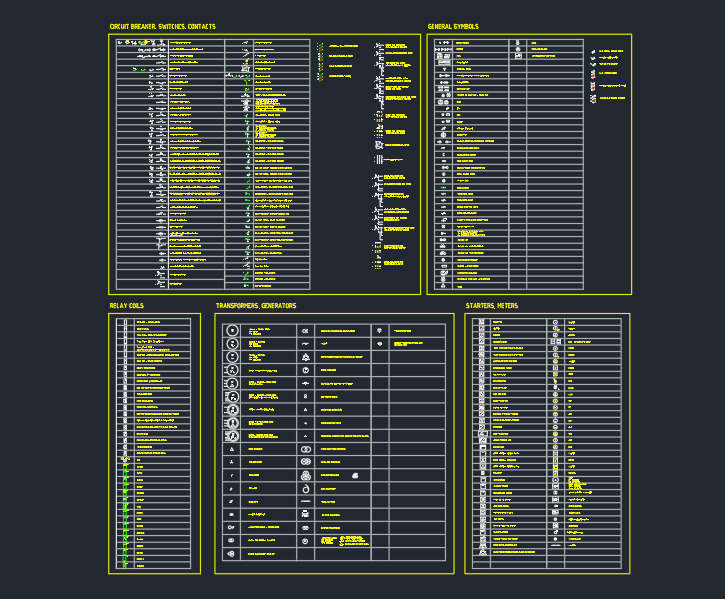
Electrical symbols are the visual language of electrical drafting. A well-organized symbol library helps architects, engineers, and designers communicate circuit intent, equipment locations, and wiring relationships without redrawing common graphic elements for every project.
This Electrical Symbols DWG resource is intended for CAD workflows involving schematics, circuit diagrams, wiring layouts, and electrical plans. Use it as a drafting reference alongside your project template, office conventions, and the requirements that govern the drawing package.
Explore our comprehensive collection of Electrical Symbols in DWG format, designed specifically for architects, engineers, and designers. This CAD Block file includes a wide range of standardized symbols for electrical schematics, circuit diagrams, and wiring layouts. Perfect for streamlining your electrical design projects, these symbols ensure accuracy and adherence to industry standards. Fully compatible with AutoCAD and other leading CAD software, this DWG file allows for easy integration into your existing projects. Enhance your workflow, improve clarity in your electrical plans, and save valuable drafting time with this essential resource.
Please log in or register to download this file.
How Electrical Symbols DWG blocks support drafting
Reusable CAD blocks can improve consistency across drawing sheets and reduce repetitive drafting work. They also make it easier to develop electrical legends, coordinate symbols with architectural backgrounds, and keep plan graphics readable during design revisions.

Useful drawing applications
- Schematics: Place recognizable symbols to describe circuit relationships and system intent.
- Wiring layouts: Use symbol graphics to clarify device locations and connections in plan documentation.
- Electrical plans: Coordinate symbols with rooms, equipment layouts, panels, and other building information.
- Legends: Compare the supplied graphics with the project legend so the meaning of each symbol remains clear to reviewers and contractors.
Practical CAD review before use
Before incorporating a block into a deliverable, inspect its layer behavior, insertion appearance, orientation, and compatibility with the current drawing setup. Check whether the graphic matches the visual conventions already used in the project, including linework, annotation, and symbol presentation.
Electrical symbols should communicate design intent; they do not replace circuit calculations, equipment coordination, code review, or an engineer’s project-specific decisions. For related drafting work, consider this resource together with electrical legends, single-line diagram concepts, panel documentation, lighting plans, power plans, and cable or conduit drawing practices.
Why a consistent symbol library matters
Consistency helps different contributors interpret the same drawing with less ambiguity. A shared DWG reference can also support faster updates when layouts change, provided the drafting team reviews symbol meaning and placement after each coordination revision.

Frequently asked questions
What is an Electrical Symbols DWG file?
It is a DWG-format CAD resource containing electrical symbol graphics for use in schematics, circuit diagrams, wiring layouts, and related electrical drawings.
Who can use these electrical CAD blocks?
The resource is intended for architects, engineers, designers, and CAD technicians who prepare or coordinate electrical drawing documentation.

Can the file be used with AutoCAD?
Yes. The source describes the file as compatible with AutoCAD and other leading CAD software. Confirm compatibility with the version and configuration used by your project team.
Should the symbols be checked before issuing a drawing?
Yes. Review each symbol against the project legend, office drafting standards, client requirements, and applicable design criteria. Do not assume that a downloaded symbol automatically satisfies every project or jurisdictional requirement.
Can these blocks replace electrical design review?
No. CAD symbols support graphic communication, but they do not replace engineering judgment, design calculations, coordination, code review, or approval by the responsible project professional.





Leave a Reply
You must be logged in to post a comment.