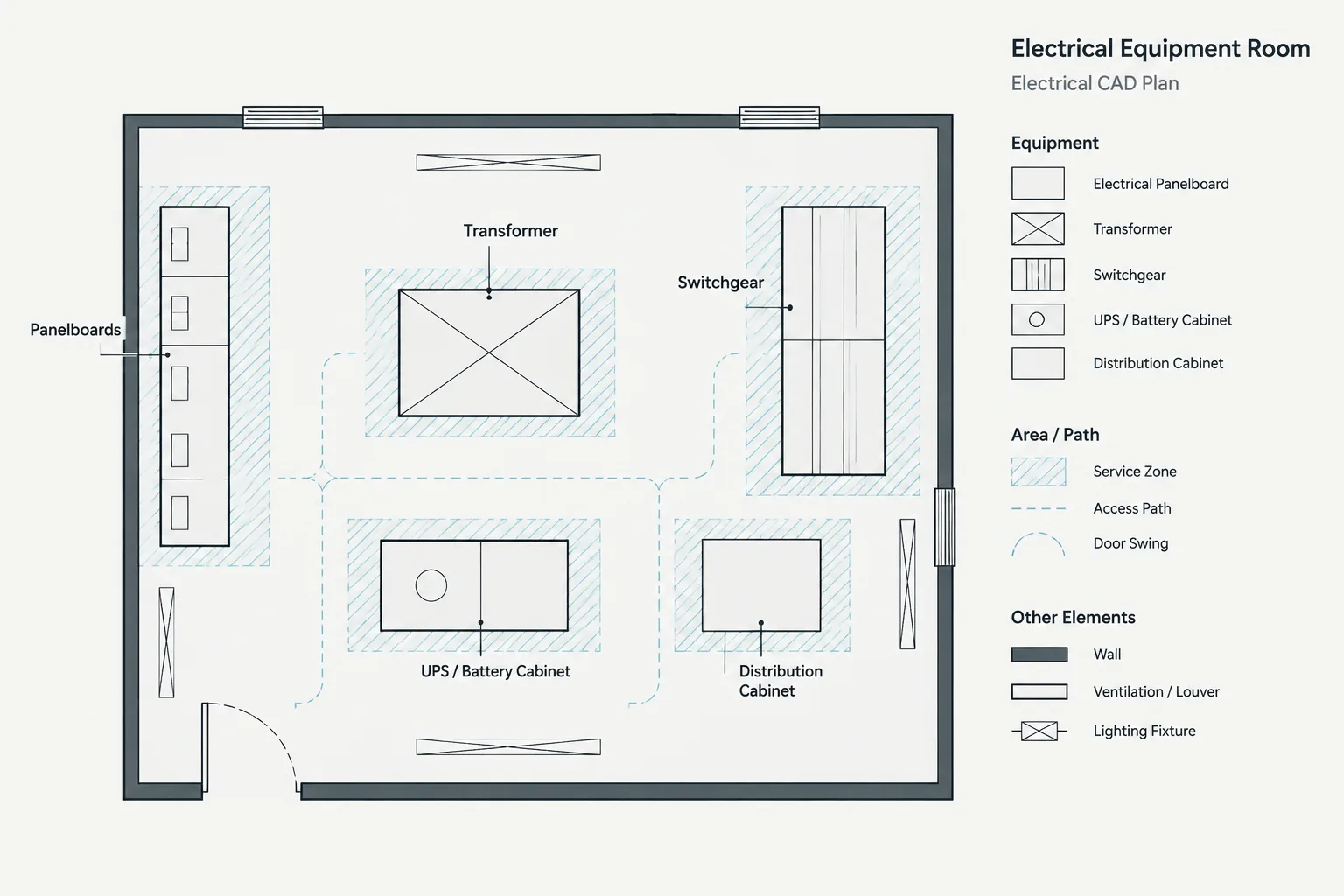
Electrical clearance zones in CAD help project teams see the difference between the space occupied by equipment and the surrounding space reserved for operation, access, airflow, or maintenance. The graphics are most useful when each boundary has a defined purpose, a traceable information source, and a visible review status.
This reference explains a verification-first drafting workflow. It focuses on classifying zones, organizing CAD layers, coordinating related views, and preventing preliminary assumptions from being mistaken for confirmed project requirements.
Electrical equipment footprints show where components are located, but they rarely communicate every area that must remain usable around the equipment. Designers may also need to document working space, access paths, door movement, ventilation zones, maintenance reach, and component-removal paths. Representing these areas as electrical clearance zones in CAD makes coordination easier, provided the drawing clearly distinguishes verified requirements from preliminary planning information.
A clearance outline should not be treated as proof that a layout complies with applicable requirements. Its size and shape may depend on the equipment, installation conditions, manufacturer documentation, project criteria, and governing rules. The drafter’s role is to represent verified information accurately, preserve its source, and make conflicts visible to the project team.
Equipment Footprints and Clearance Zones Are Different
An equipment footprint represents the physical area occupied by an enclosure, cabinet, transformer, panel, switchboard, control assembly, or other component. A clearance or access zone represents adjacent space needed for a particular purpose.
Combining both concepts into one outline creates ambiguity. A reviewer may not know whether a line indicates the enclosure edge, a required working boundary, an open door, or a general coordination allowance. Use separate CAD objects and, where practical, separate layers for the equipment and its surrounding zones.
| Drawing element | Primary purpose | Common documentation source |
|---|---|---|
| Equipment footprint | Locates the physical enclosure or assembly | Verified equipment data, approved layout information, or a clearly identified placeholder |
| Working or service zone | Reserves usable area for operation or service | Project criteria and applicable requirements |
| Door-swing envelope | Shows the movement of hinged doors or panels | Manufacturer documentation or verified equipment configuration |
| Removal path | Identifies space needed to extract a component | Manufacturer information and maintenance planning |
| Ventilation zone | Protects airflow and heat-rejection areas | Manufacturer documentation and mechanical coordination |
| Access route | Shows how personnel or replacement equipment reaches the location | Project planning and multidisciplinary coordination |
Classify the Zone Before Drawing It
The word clearance is often used too broadly. Before creating geometry, identify what the reserved area actually represents. Different zones can overlap physically while serving different purposes.
Working and operating space
This zone communicates an area intended to remain available in front of or around equipment. It should be based on verified project criteria rather than copied from an unrelated detail or generic CAD block. If the requirement is unresolved, label the zone as preliminary and assign it a review status.
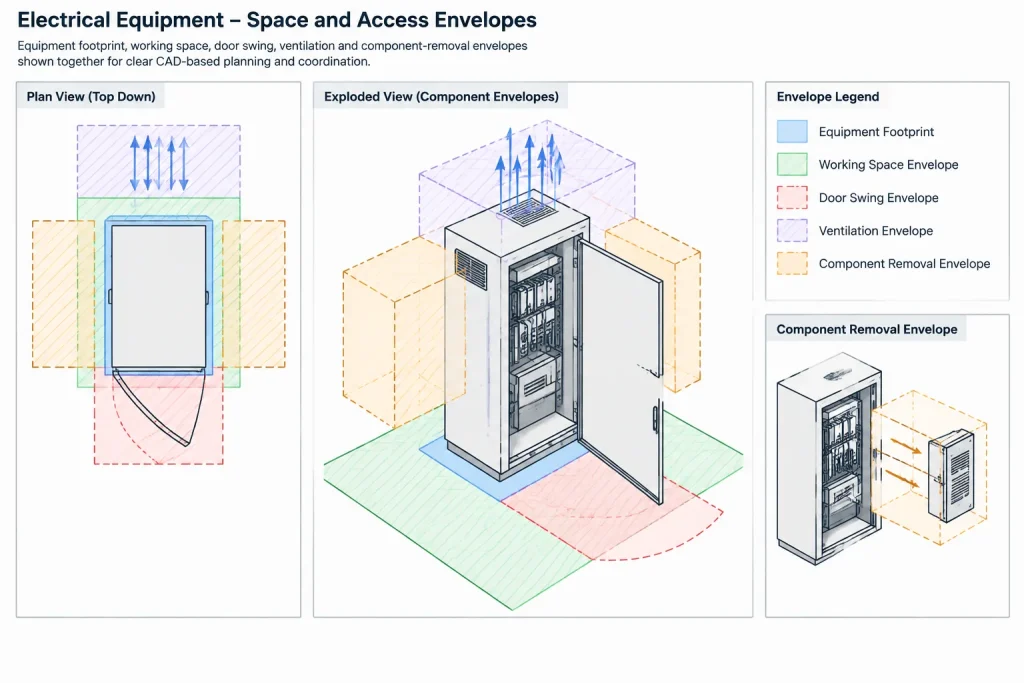
Door and panel movement
A door-swing arc is useful for detecting conflicts with walls, nearby equipment, curbs, columns, and other doors. Confirm the hinge side and equipment orientation before relying on the arc. A generic rectangle cannot establish how a specific enclosure opens.
Maintenance and component-removal space
Some assemblies require room to withdraw internal components, remove covers, replace filters, or transport large parts. This envelope may extend in a different direction from the normal operating zone. When the removal path is important, show both its horizontal extent and any relevant elevation or sectional condition.
Ventilation and heat-rejection zones
Intake and exhaust areas can be affected by walls, louvers, adjacent equipment, and mechanical systems. Do not infer these areas from the apparent shape of an enclosure. Use verified product information and coordinate the representation with mechanical and architectural drawings.
Personnel and equipment access routes
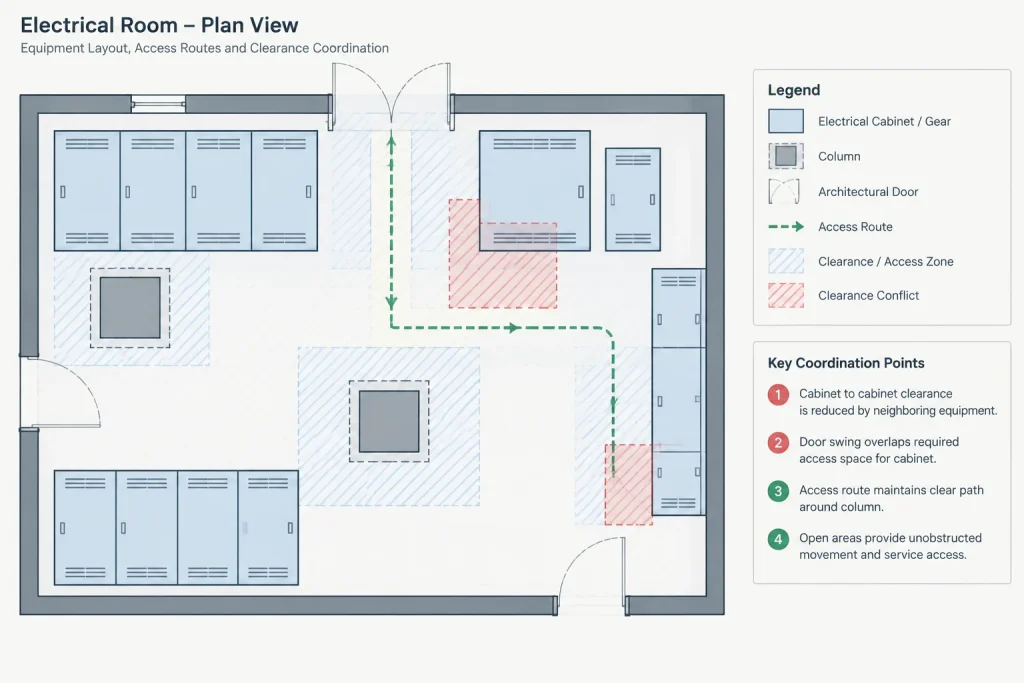
A clear area directly in front of equipment is not useful if it cannot be reached. Review doors, corridors, steps, overhead restrictions, removable wall panels, and the path from the delivery point. Large replacement components may require a different access route than personnel.
Build a Layered CAD Representation
A reliable workflow keeps each information type independently controllable. The exact layer names should follow the project standard, but the layer structure should distinguish physical objects from coordination graphics.
- Equipment layer: verified physical footprints and enclosure outlines.
- Clearance layer: working, service, or operational envelopes.
- Movement layer: door swings, pullout paths, and removable-panel movement.
- Access layer: personnel routes and equipment-removal paths.
- Annotation layer: zone labels, source notes, status markers, and review comments.
- Conflict layer: temporary graphics used to identify unresolved overlaps.
Use a restrained linetype or transparent hatch that remains visible without masking architectural backgrounds or electrical equipment. The equipment footprint should normally read more strongly than its coordination envelope. Test the result at the plotted sheet scale rather than judging it only in a close model-space view.
Place clearance geometry in model space when it belongs to the coordinated project layout. Avoid drawing a clearance only in a viewport, because paper-space graphics can become detached from the equipment when the model changes.
Keep Clearance Data Separate from the Symbol Block
Embedding every zone inside an equipment block may seem convenient, but it can hide assumptions. A block copied from another project might contain an obsolete or inapplicable envelope. It may also be difficult to display one zone while suppressing another.
For project-specific equipment, a controlled block family can include optional visibility states or clearly named nested objects, but each envelope still needs verification. An alternative is to keep the footprint block and clearance polylines separate, linked by a common equipment tag. This approach makes it easier to revise the envelope without altering the symbol definition.
Whichever method is used, record the status of the information. Useful status descriptions include:
- Preliminary planning allowance
- Pending equipment selection
- Based on current vendor information
- Verified for the scheduled equipment configuration
- Requires discipline review
Status language should be specific enough to guide reviewers. Avoid labels such as “typical clearance” when the drawing does not identify what makes the condition typical.
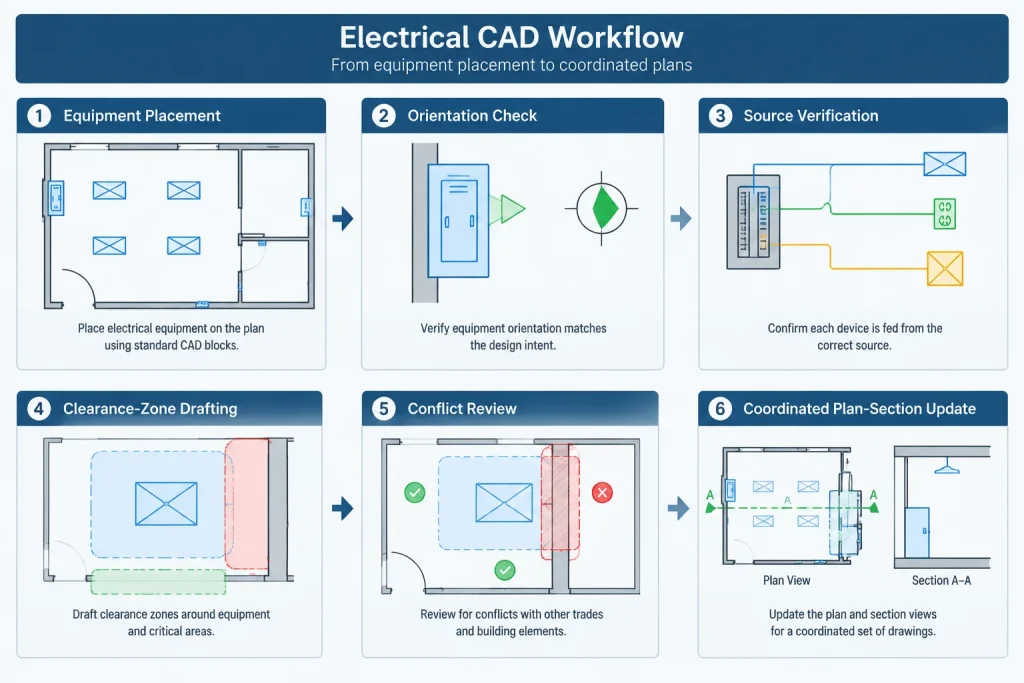
A Verification-First Drafting Workflow
- Place the equipment footprint. Use the best available layout information and identify placeholders clearly.
- Confirm orientation. Check the front, rear, hinge side, cable-entry areas, removable panels, and service faces.
- Identify each required zone. Separate working space, door movement, ventilation, and removal access rather than drawing one unexplained boundary.
- Record the source. Associate the zone with a reviewed submittal, project criterion, equipment schedule entry, or coordination decision.
- Draw the envelope on a controlled layer. Use closed polylines where area-based checking or automated comparison may be useful.
- Run visual conflict checks. Review walls, doors, columns, piping, ducts, structural elements, other electrical equipment, and storage areas.
- Review access beyond the envelope. Trace the path to the room entrance and, when relevant, the path through the building.
- Coordinate related views. Carry critical conditions into elevations, sections, room layouts, and details.
- Update the status. Replace preliminary zones when verified information becomes available and document the change through the normal revision process.
Coordination Conflicts to Look For
Clearance conflicts are not limited to visible plan obstructions. A plan may appear open while an overhead duct, low beam, sloped ceiling, housekeeping base, or raised curb affects usability. Review the condition in more than one view when height or vertical movement matters.
- Equipment doors colliding with room doors or adjacent enclosure doors
- Service zones extending through walls, columns, or fixed casework
- Removal paths blocked by permanent building elements
- Ventilation areas facing nearby obstructions
- Access routes narrowed by other equipment or storage
- Floor-mounted equipment conflicting with pads, curbs, drains, or housekeeping features
- Overhead systems occupying space needed for lifting or component removal
- Clearance graphics becoming outdated after equipment is moved
When zones overlap, do not assume the overlap is acceptable merely because both areas are empty. Determine whether the activities can coexist and whether access must be maintained simultaneously.
Annotating the Drawing Without Overloading It
Not every zone requires a long note on the plan. A short zone identifier can reference a legend, equipment schedule, or dedicated coordination detail. For example, the drawing can distinguish a service zone from a removal path through separate linetypes and concise labels.
The legend should explain graphic meaning, not declare compliance. Notes should direct users to the controlling information and state when dimensions or configurations require confirmation. If dimensions are shown, they should be traceable to a verified source and coordinated with the drawing scale and equipment orientation.
Final Quality-Control Review
Before issuing the drawing, isolate the equipment and clearance layers for a focused review. Confirm that every displayed zone belongs to the correct equipment, moves with its associated footprint, and has a known information status. Look for orphaned clearance outlines left behind after equipment revisions.
Then review the normal plotted view. Clearance graphics must remain understandable without dominating the construction information. Confirm that screened backgrounds, hatches, masks, and viewport settings do not hide important boundaries.
Electrical clearance zones in CAD are most valuable as coordination and verification tools. They reveal spatial assumptions early, connect equipment information to room layouts, and help reviewers understand why surrounding space has been reserved. Their reliability depends not on the complexity of the CAD block, but on clear classification, controlled graphics, documented sources, and disciplined updates.
Make Clearance Information Traceable Through Revisions
A clearance boundary can remain graphically correct while becoming technically outdated. Equipment substitutions, orientation changes, room revisions, and updated manufacturer information can all affect the surrounding zones. For that reason, clearance review should be connected to the same revision workflow used for equipment footprints, schedules, and coordinated room layouts.
Use a consistent zone identity
Associate each envelope with an equipment tag or another controlled identifier. The relationship should remain understandable when the clearance layer is isolated, when the equipment is moved, and when a reviewer compares plan, elevation, and schedule information. Avoid relying only on proximity because nearby zones can be confused when a room contains several pieces of equipment.
Preserve source and status information
The drawing does not need to display a lengthy source note beside every boundary. Source references and review status can be maintained through concise labels, object data, block attributes, schedules, or project tracking records. The selected method should allow the team to distinguish verified information from planning allowances without interpreting linework alone.
Include zones in change reviews
When equipment changes, review more than its footprint. Recheck its service faces, door movement, ventilation relationship, removal direction, and access route. When architectural or mechanical backgrounds change, compare those revisions against the clearance and access layers even if the electrical equipment itself has not moved.
Suggested CAD Handoff Checks
- Confirm that each zone is associated with the intended equipment.
- Verify that the zone type is identified by a label, legend, layer, or other controlled graphic method.
- Check whether the information is preliminary, pending review, or verified.
- Confirm that equipment orientation agrees across plans, elevations, schedules, and details.
- Look for clearance objects left at previous equipment locations.
- Review access routes separately from the immediate equipment envelope.
- Check plotted output for hidden, merged, or overly dominant graphics.
- Flag unresolved conflicts rather than adjusting verified boundaries without authorization.
This handoff review makes the CAD file more useful to later users. It also reduces the risk that an unexplained outline will be copied into another drawing and treated as a universal requirement.
Frequently Asked Questions
Is an equipment footprint the same as a clearance zone?
No. The footprint represents the physical equipment, while a clearance zone represents adjacent space reserved for a defined purpose. Keeping them separate makes the drawing easier to review and revise.
Should clearance geometry be included inside an equipment block?
It can be managed through a controlled block system, but embedded geometry still requires project-specific verification. Separate polylines linked to the equipment tag may provide clearer status control and easier revision.
Can a generic CAD block establish the required clearance?
No. A generic block may support preliminary coordination, but it does not confirm the requirements for selected equipment or a particular installation condition. The source and status of the envelope should be documented.
Why should door swings and removal paths be shown separately?
They represent different movements and may extend in different directions. Separate graphics help reviewers identify conflicts that could be hidden by one combined boundary.
When is a plan view insufficient?
An elevation, section, or coordinated room view may be necessary when overhead systems, lifting space, removable components, curbs, ceilings, or other vertical conditions affect access or maintenance.
What should happen when clearance information is not verified?
Show it only as a clearly identified planning allowance or preliminary zone, record its review status, and update it when controlled information becomes available. The drawing should not imply that an unresolved envelope demonstrates compliance.


Leave a Reply
You must be logged in to post a comment.