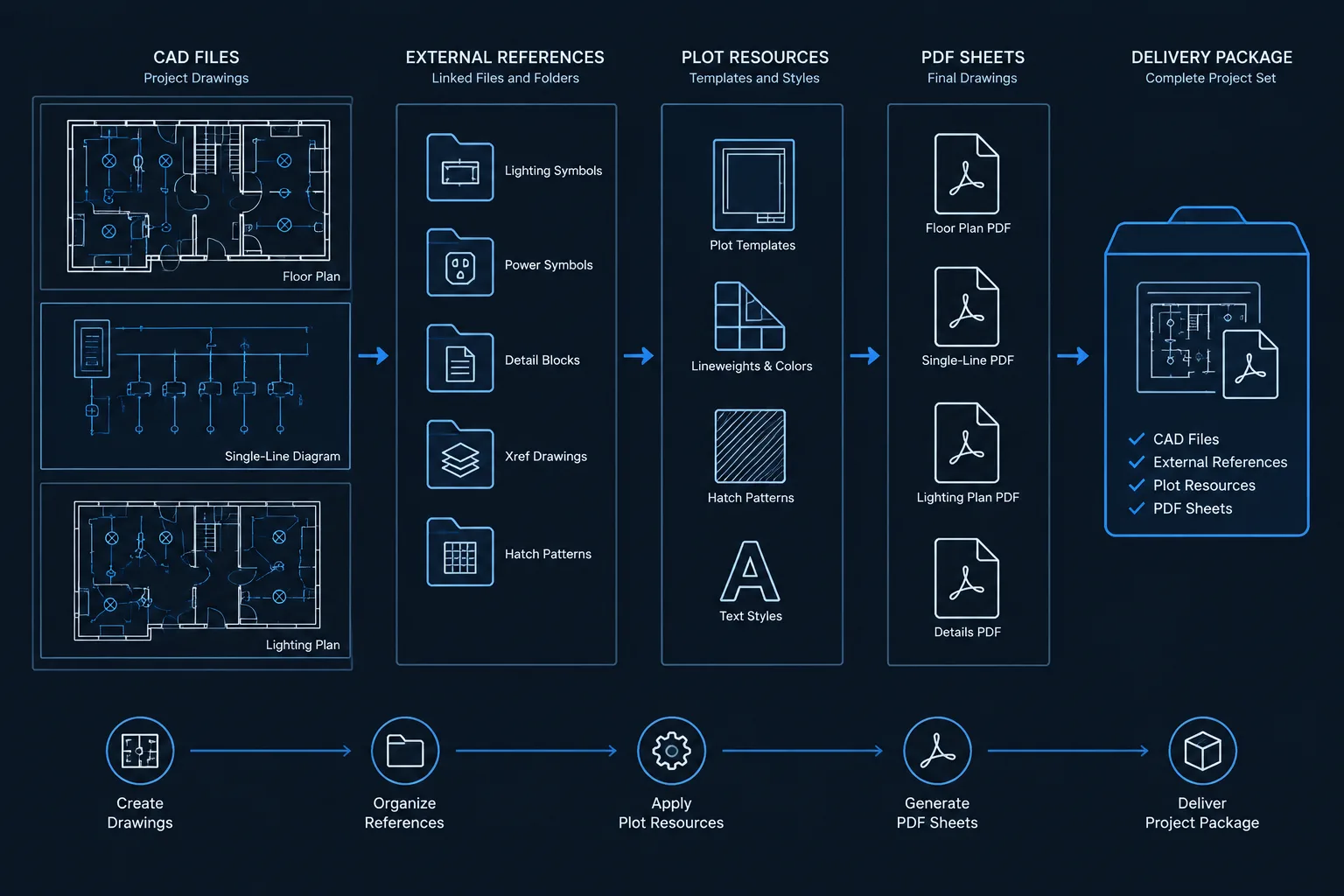
An electrical CAD file handoff should be treated as a controlled documentation package rather than a collection of DWG files. The recipient needs drawings that can be identified, opened, interpreted, and compared with the formal issue without relying on the sender’s production environment.
This guide explains how to define the deliverable, preserve necessary drawing intelligence, manage references and support files, screen out unissued content, and verify the package from the recipient’s perspective. Project agreements, document-control procedures, licensing restrictions, and authorization requirements should govern the final scope.
An electrical CAD file handoff is more than sending the latest drawing files. A useful deliverable must open predictably, retain its references, communicate its issue status, and avoid exposing unrelated working information. Whether files are being transferred to another consultant, a contractor, an owner, or an archive, the handoff process should be deliberate and documented.
The correct deliverable depends on project agreements and recipient needs. Some recipients need editable model files for coordination. Others need only record PDFs, selected backgrounds, or a formally issued drawing package. Never assume that every internal working file belongs in the deliverable. Confirm the required formats, file scope, naming rules, and permitted content before preparing the package.
Start by Defining the Handoff Scope
Before cleaning any files, identify what the recipient is expected to do with them. A consultant coordinating a ceiling plan may need different information than an owner maintaining a record archive. The purpose of the transfer determines which files, references, and supporting resources are necessary.
A clear handoff scope should answer questions such as:
- Are the files being issued for coordination, construction documentation, record use, or reference only?
- Which electrical disciplines and drawing areas are included?
- Are external references expected to remain separate, or must the package be self-contained?
- Are sheet files, model files, or both required?
- Should plot style files, fonts, images, spreadsheets, and other dependencies be included?
- Does the recipient require editable schedules and attributes, or only plotted output?
- Are architectural and consultant backgrounds authorized for redistribution?
Document the answers in a transmittal or package note. A short scope statement can prevent the recipient from treating preliminary or excluded information as part of the formal issue.
Work from a Controlled Copy
Do not perform destructive cleanup in the active production directory. Create a controlled copy of the approved source files and prepare the handoff there. This protects the working set from accidental binding, renaming, deletion, or path changes.
The controlled copy should come from a known issue point. If files continue to change during packaging, the CAD deliverable may no longer match the issued PDFs. Record the package date and drawing status, and verify that the selected CAD files correspond to the intended issue.

Review the Drawing File Structure
Electrical projects often separate information among sheet files, discipline models, enlarged plans, diagrams, details, and schedules. The recipient should be able to understand that structure without reconstructing the production team’s entire folder system.
Sheet and model files
Identify which files contain plotted sheet layouts and which contain electrical model geometry. If the package includes only model files, state that clearly. If sheet files are included, check that their viewports reference the intended models and that sheet identifiers match the issued set.
External references
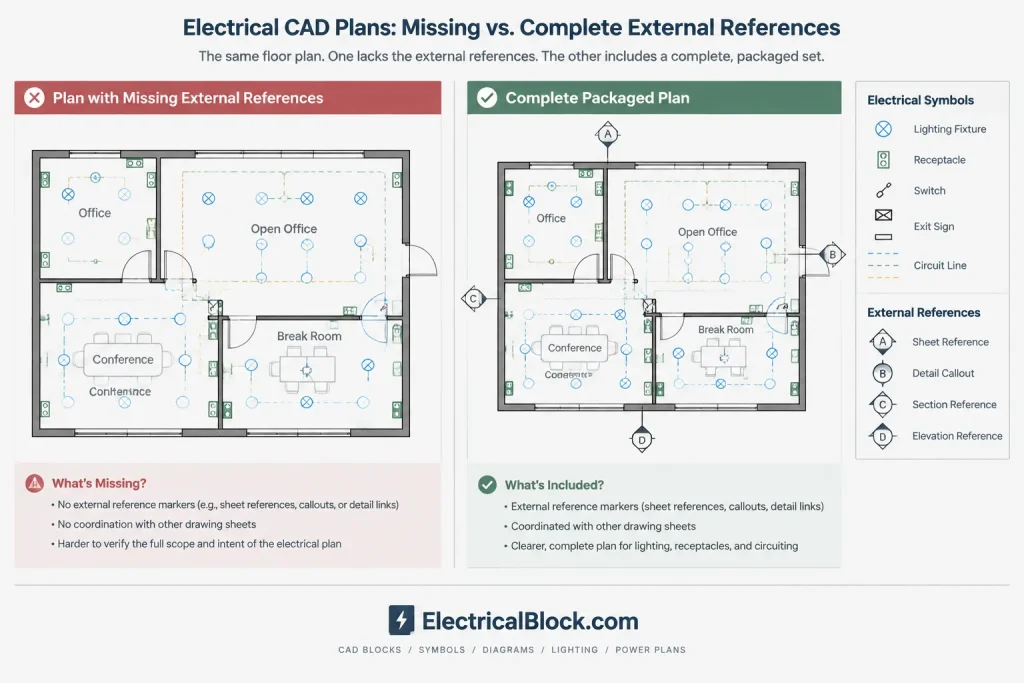
Review every attached reference and determine whether it is required, permitted, current, and available. Common dependencies include architectural backgrounds, reflected ceiling plans, structural files, equipment layouts, title blocks, and linked details.
Missing references can leave a drawing technically open but practically unusable. Conversely, including an entire consultant directory can distribute unnecessary or unauthorized information. Package only the references needed to understand or reproduce the intended drawings.
Reference paths
File paths should remain functional after transfer. References tied to an individual user’s local folders or a private network location may fail on the recipient’s system. A compact package structure with predictable folders is generally easier to relocate and archive.
If references will remain separate, preserve a logical relationship between host files and referenced files. If they will be combined into host drawings, verify the result carefully. Combining references can change layer names, object organization, and future update behavior, so it should be done only when required by the handoff standard.
Check Supporting CAD Resources
A drawing may depend on resources that are not visible in a basic file list. Missing resources can alter text, line appearance, plotted hierarchy, or symbol readability.
| Resource | Potential handoff problem | Review action |
|---|---|---|
| Fonts and text styles | Substituted text may wrap, overlap, or display incorrectly | Confirm permitted fonts and inspect key notes, schedules, and tags |
| Plot styles | Lineweights and screening may not match the issued sheets | Include required files when authorized and identify the intended plotting method |
| Linetype definitions | Circuits, demolition lines, or boundaries may appear continuous | Verify display and plotting in the packaged files |
| Raster images | Logos, maps, or scanned references may be missing | Include only necessary and distributable images |
| Linked data | Schedules or tables may lose their source connection | Decide whether the link, a static representation, or both are required |
| Custom symbol resources | Special objects may not display as expected | Convert or package them only according to the agreed workflow |
A PDF comparison is valuable during this review. The issued PDF provides a stable visual reference for detecting changed fonts, missing linework, altered hatch patterns, or displaced annotation.
Clean the Files Without Removing Design Meaning
CAD cleanup should improve reliability, not erase useful information. Remove obvious temporary content such as abandoned test geometry, detached scratch details, obsolete imports, and empty organizational data when it is safe to do so. Check for geometry located far from the project area, because it can make navigation and file extents confusing.
Be cautious with apparently unused layers, block definitions, and text styles. Some may support visibility states, future sheets, detail libraries, or objects that are currently hidden. Automated cleanup should be followed by a visual and structural review.
Also inspect blocks and symbols for unnecessary nesting. Deeply nested blocks can make editing difficult, while exploding all blocks can destroy attributes and symbol consistency. Retain useful block intelligence unless the recipient’s requirements call for a simplified file.
Protect Confidential and Unissued Information
Electrical CAD files can contain more than the plotted drawing. Frozen layers, off layers, unused layouts, hidden attributes, attached images, block definitions, and model-space notes may reveal internal comments or information outside the issue scope.
Review the controlled copy for:
- Internal redlines and reviewer comments
- Alternative layouts that were not issued
- Equipment information excluded from the formal documents
- Personal names, local file paths, or internal project codes
- Unrelated building areas or disciplines
- Background files that cannot be redistributed
- Superseded sheets and obsolete revision content
Do not remove legitimate project history merely to make a file look clean. Instead, distinguish between required record information and internal working content, following the project’s document-control rules.
Preserve Electrical Drawing Intelligence
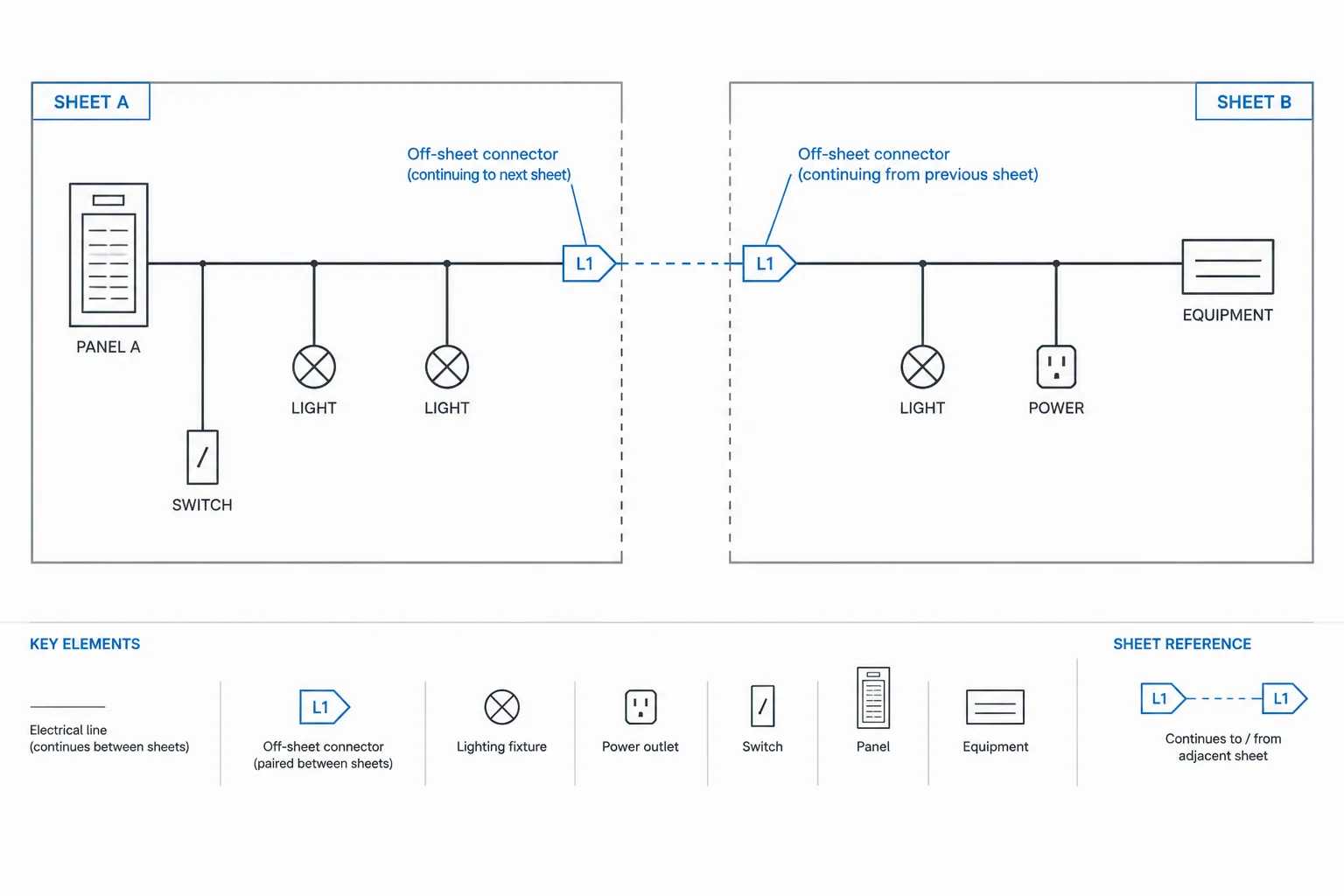
A useful electrical CAD handoff should maintain the relationships that help users interpret the drawings. Device tags should still correspond with legends and schedules. Panel names should remain consistent across plans, one-lines, and panel-related documentation. Circuit identifiers, feeder references, detail callouts, and continuation notes should remain legible and coordinated.

When simplifying files, verify that electrical symbols have not lost meaningful attributes. A receptacle symbol, lighting fixture tag, disconnect identifier, or equipment connection marker may look correct while its editable data has been removed. Whether that data must be preserved depends on the deliverable agreement, but the decision should be intentional.
Use a Clear Package Structure
A recipient should not have to guess which file to open. Organize the deliverable into a simple folder structure appropriate to the project. Separate current CAD files from supporting resources and avoid mixing superseded versions with the issued package.
A package may contain:
- A root folder identified by project and issue status
- Sheet files and electrical model files
- Approved external references
- Fonts, plot resources, and images that may be distributed
- A matching PDF issue set
- A file list, transmittal, or readme note
The readme note can identify the drawing purpose, expected starting files, reference arrangement, plotting assumptions, exclusions, and known limitations. It should not claim that files are complete or suitable for a use that has not been verified.
Perform a Recipient-Side Verification
The strongest test is to inspect the package outside the production environment. Open it from the prepared delivery folder or another isolated location rather than from the original project directory. This helps reveal references that still depend on network paths or local resources.
Check representative floor plans, diagrams, schedules, and detail sheets. Confirm that files open without unresolved dependency warnings, drawing extents are reasonable, layouts display correctly, and plotted output resembles the approved PDFs. Test more than the cover sheet; electrical dependencies often vary among plans and diagrams.
Final handoff checklist
- The package matches the intended issue and drawing status.
- Required sheet and model files are present.
- External references resolve from the delivery location.
- Fonts, linetypes, images, and plot resources have been reviewed.
- Electrical tags and cross-references remain coordinated.
- Internal comments and unauthorized files have been removed.
- The CAD files have been compared with the issued PDFs.
- The folder structure and file names are understandable.
- A transmittal or package note explains scope and limitations.
- A copy of the delivered package is retained under document control.
A Handoff Is a Documentation Deliverable
Clean geometry alone does not make a dependable electrical CAD package. The recipient also needs context, working references, supporting resources, and a clear statement of what the files represent. By defining the scope, packaging dependencies carefully, protecting unissued information, and testing from an isolated location, the project team can provide CAD files that are easier to coordinate, archive, and interpret.
Establish the Package Source of Truth
Before release, identify which document represents the approved issue. The issued PDF set often provides the most stable visual comparison, while the CAD files preserve editable geometry, attributes, layers, and references. These formats serve different purposes and should not be assumed to be interchangeable.
If the packaged DWG files produce output that differs from the approved issue, resolve the discrepancy rather than allowing the recipient to decide which version is authoritative. The package note should identify its status, intended use, exclusions, and relationship to the formal drawing issue.
Record Exceptions Instead of Hiding Them
Some dependencies may be unavailable for redistribution, intentionally omitted, converted to static content, or retained in a separate system. Document these conditions clearly. An exception note is more useful than an unexplained missing reference or an unauthorized substitute.
Known display limitations, object conversions, unavailable fonts, detached data links, and excluded backgrounds should be described in practical terms. This gives the recipient enough context to evaluate the files without suggesting that the package has been verified for uses outside the agreed scope.
Retain the Delivered Package as Issued
Keep a controlled copy of exactly what was transmitted, including the package note and accompanying issue documents. The retained copy supports later questions about file contents, reference arrangements, drawing status, and delivery scope. Avoid rebuilding the archive from a production folder after the transfer, because the working files may have changed.
When revisions are required after handoff, prepare a clearly identified replacement or supplemental package under the applicable document-control process. Quietly replacing files can break coordination and make it difficult to determine which drawings another party actually received.
Electrical CAD File Handoff FAQ
Should a DWG handoff also include PDFs?
Include PDFs when they are required by the deliverable agreement or useful as the formal visual reference. A PDF can help the recipient identify missing references, substituted fonts, plotting differences, and annotation changes, but it does not replace editable CAD files when those files are part of the required scope.
Should external references be bound into each drawing?
Only when the agreed handoff method requires it. Keeping references separate can preserve file organization and update relationships, while combining them may create a more self-contained deliverable. Either approach can affect layer names, object structure, and future editing, so the result must be reviewed.
Is removing hidden or frozen content always safe?
No. Hidden content may include legitimate alternate views, block components, reference information, or data used elsewhere in the drawing set. Review the purpose and authorization status of the content before removing it from the controlled handoff copy.
How can a team find broken file dependencies?
Open and plot the package from an isolated delivery location that cannot access the original production folders. Review representative plans, schedules, diagrams, and details while checking for unresolved references, missing images, changed text, altered linetypes, and unexpected plotting results.
What should a CAD package note explain?
It should identify the issue status, intended use, included file types, expected starting drawings, reference arrangement, relevant plotting assumptions, exclusions, and known limitations. It should also distinguish formal issue documents from editable coordination material.
Can internal consultant backgrounds be redistributed with the electrical files?
Not automatically. Confirm authorization, contractual requirements, and applicable licensing or confidentiality restrictions before including another party’s files. If a required background cannot be transferred, document the omission and its effect on the package.
Leave a Reply
You must be logged in to post a comment.