Connecting Schedule Rows to the Drawing Package
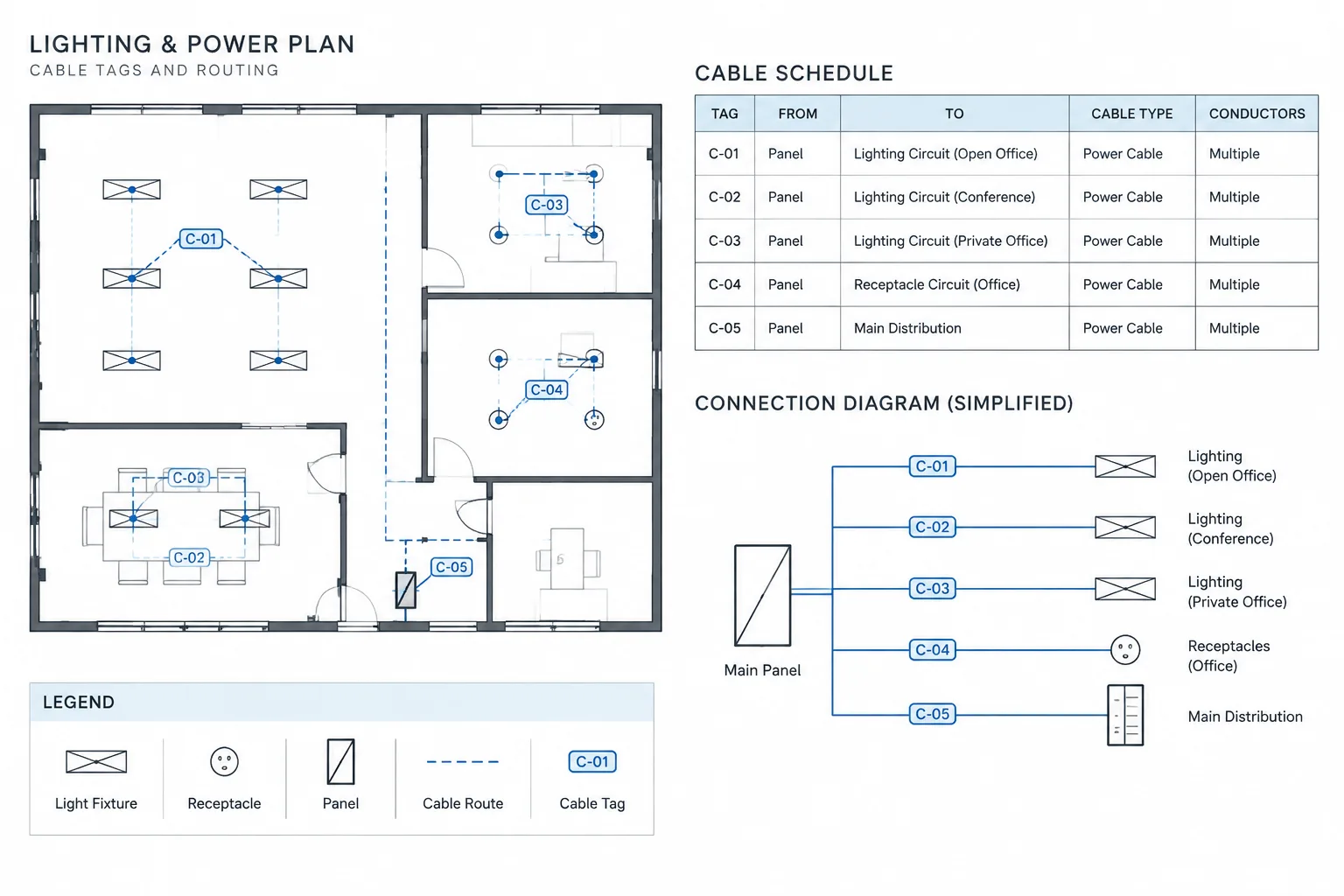
An electrical cable schedule in CAD is most useful when each entry can be traced beyond the table. The cable identifier should connect the scheduled record to equipment tags, diagram references, routing documents, and termination information without duplicating every detail from those sources.
This page explains how to structure those relationships, choose appropriate schedule fields, manage the underlying data, and review cable records against the drawings. The emphasis is on documentation control: keeping identifiers stable, references current, and unverified information clearly distinguished from confirmed project data.
An electrical cable schedule turns many separate drawing references into a structured record of cable connections. It can help a project team trace where a cable starts, where it ends, what systems it serves, and which drawings contain the related routing or termination information.
The schedule is not a substitute for plans, diagrams, specifications, or verified design calculations. Instead, it acts as a coordination index between them. A well-managed electrical cable schedule in CAD should make connections easier to follow without implying details that have not been confirmed.
What an Electrical Cable Schedule Documents
A cable schedule typically assigns one row to each cable or defined cable assembly. The row links a unique cable identifier to its origin, destination, service, and supporting documentation. Depending on project scope, it may also record cable construction, conductor information, routing references, termination points, status, and remarks.
The schedule should answer practical documentation questions:
- Which cable is being referenced?
- Where does it originate and terminate?
- What equipment, circuit, or system does it serve?
- Where is its route shown?
- Are termination details documented elsewhere?
- Has the entry been verified, revised, or reserved for future information?
The amount of information included should match the drawing package. Adding unsupported detail can be more harmful than leaving a clearly marked field pending verification.
Cable Schedule vs. Related Drawing Tables
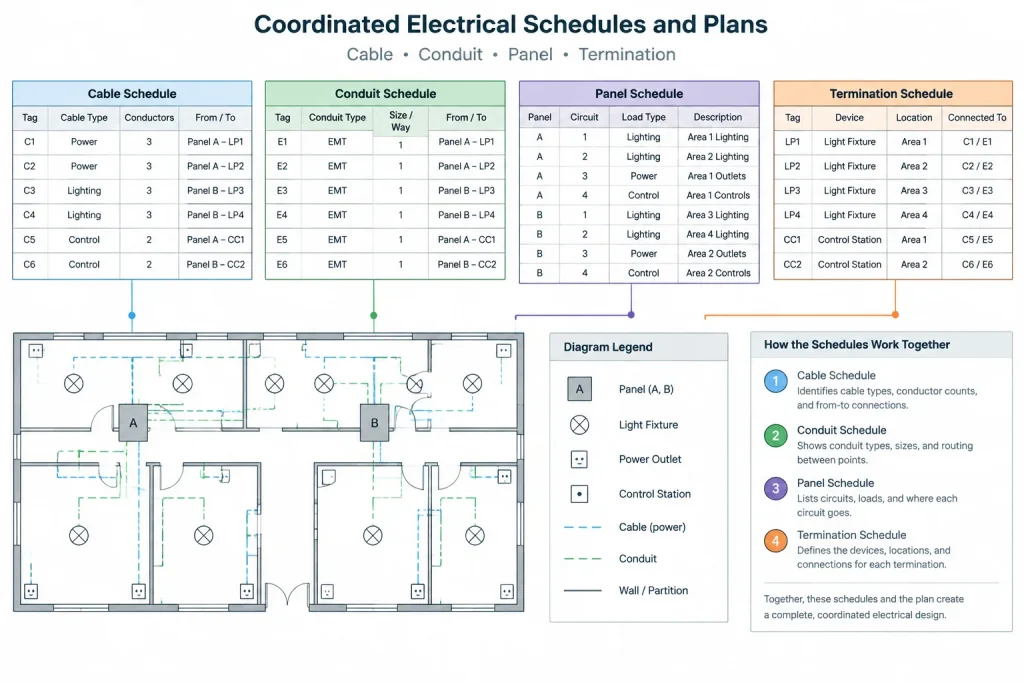
Several electrical schedules can contain similar information, but they serve different purposes. Keeping their roles distinct reduces duplicate data and conflicting edits.
| Document | Primary purpose | Typical relationship to a cable schedule |
|---|---|---|
| Cable schedule | Tracks individual cables or cable assemblies between identified endpoints | Provides the central cable ID and from-to record |
| Conduit schedule | Tracks raceways, pathways, endpoints, and routing notes | May identify the pathway assigned to a scheduled cable |
| Panel schedule | Organizes panel circuits, loads, and circuit descriptions | May provide the source circuit associated with a cable |
| Termination schedule | Documents terminal, connector, or conductor landing information | Expands the endpoint information referenced by the cable row |
| Equipment schedule | Lists equipment tags and selected design or coordination data | Establishes consistent names for cable origins and destinations |
| Wire list | Tracks individual conductors or control wires | May break a multiconductor cable into conductor-level connections |
A project does not necessarily need every type of schedule. The documentation structure should reflect the complexity of the system and the needs of the drawing users.
Recommended Cable Schedule Fields
Cable identifier
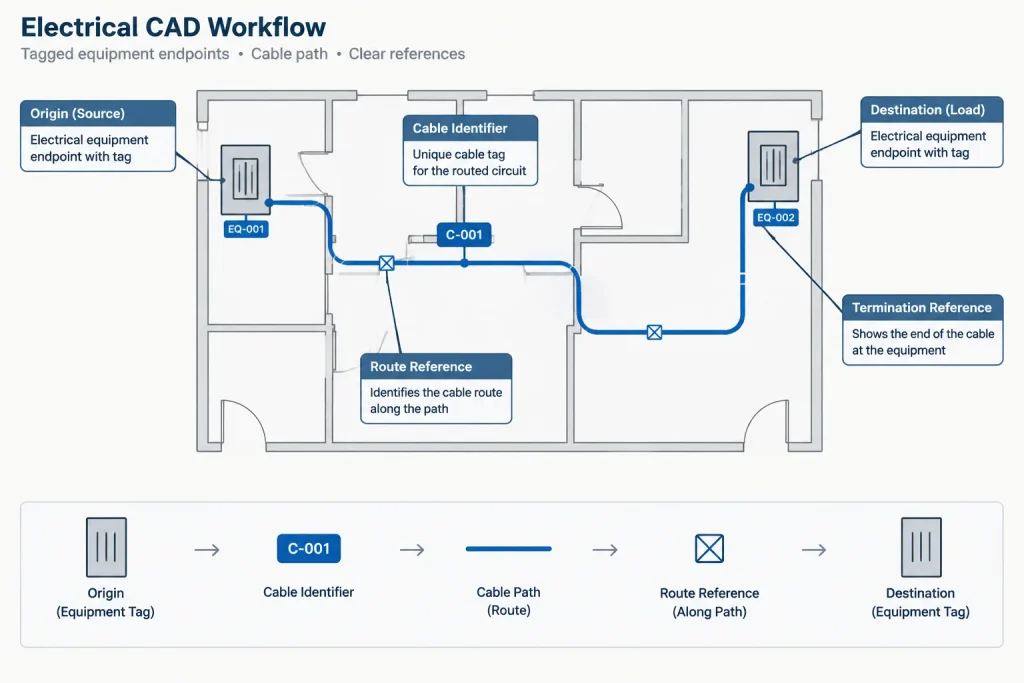
Give each scheduled cable a unique and stable identifier. The naming structure can communicate system, source, destination, service, or sequence, but it should not become so complicated that users must decode the entire design from the tag.
A cable ID should remain consistent across plans, single-line diagrams, wiring diagrams, termination details, and equipment connection drawings. If an ID changes, every reference should be reviewed rather than assuming that an automated update reached all locations.
From and to locations
Use equipment tags or other controlled endpoint names rather than casual descriptions. An origin such as “electrical room” is usually less useful than an identified panel, control enclosure, junction box, or field device.
Define the direction convention used by the schedule. “From” may represent the source, the upstream device, or simply the first documented endpoint. Bidirectional communication cables may not have a meaningful electrical source, so the project convention must be clear.
Service or description
A concise description helps readers understand why the cable exists. It can identify a feeder, branch circuit, control connection, communications link, monitoring circuit, or other documented service. Avoid copying long equipment descriptions into every row when a controlled tag already links to an equipment schedule.
Cable construction information
Where the design documents require it, the schedule can include conductor count, conductor size, cable type, shielding, insulation designation, or other construction information. These entries must come from verified project criteria, calculations, specifications, or manufacturer data. Do not infer cable construction from a generic CAD symbol.
Route or pathway reference
A route field can point to a conduit ID, cable tray segment, underground path, riser, plan area, or routing drawing. It should indicate where routing information is documented rather than attempting to place a complete route description inside one schedule cell.
Termination reference
For detailed control and instrumentation packages, the schedule may reference terminal strips, connector designations, splice records, or termination diagrams. Keep endpoint tags and terminal identifiers in separate fields when they are maintained by different drawing processes.
Status and remarks
Status fields can distinguish verified entries from preliminary, existing, future, spare, disconnected, or pending records. Use only project-defined terms, and explain abbreviations in the schedule notes or drawing legend. Remarks should capture genuine exceptions rather than becoming a storage area for unresolved design information.
A CAD Workflow for Building the Schedule
1. Establish the cable ID convention
Document the naming rules before populating the schedule. Decide which parts of the identifier are meaningful, who controls assignment, and how removed or abandoned IDs are handled. Avoid casually reusing deleted identifiers because archived drawings and field records may still refer to them.
2. Collect endpoints from source drawings
Start with equipment tags from single-line diagrams, plans, schematics, and equipment schedules. Standardize spelling, punctuation, and tag formatting before creating cable rows. Slight differences in an equipment name can hide duplicate or mismatched connections.
3. Create one controlled record per cable
Determine what qualifies as one scheduled item. A multiconductor cable may be one row, while its individual conductors appear in a separate wire or termination list. Parallel cable sets, composite cables, and cables that divide through splices need a documented project convention.
4. Add drawing cross-references
Reference the plan, diagram, detail, or schedule where each important relationship is shown. Cross-references are more maintainable than placing lengthy routing and connection narratives in the table. Confirm that referenced sheets and detail identifiers are current before issue.
5. Apply a consistent CAD table structure
Use consistent text styles, row spacing, column headings, alignment, and layer controls. Separate identifiers from descriptions visually, and allow enough room for anticipated content without forcing excessive abbreviations. If the table spans multiple sheets, repeat headings and provide a clear continuation method.
6. Review the schedule against the drawings
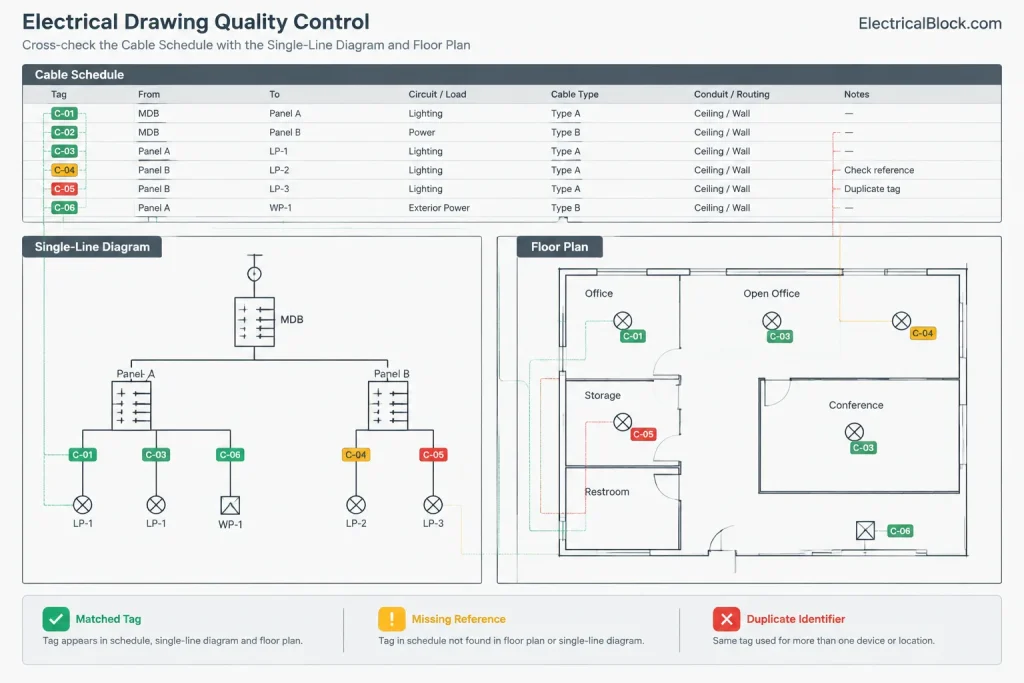
Trace each scheduled row from origin to destination. Confirm that both endpoint tags exist, the cable ID appears where expected, and associated route or termination references are valid. Then review the drawings in the opposite direction to find cables shown graphically but missing from the schedule.
Managing Schedule Data in CAD
A cable schedule may be drafted as a native CAD table, imported from a controlled spreadsheet, or generated from attributed objects and external project data. The best method depends on team workflow, but ownership must remain clear.
If CAD and an external data source both allow editing, define which one is authoritative. Otherwise, a correction made in the drawing may be overwritten during the next import. Record the data source and update date in the project workflow rather than relying on file names alone.
Block attributes can assist with cable-tag extraction, but automated output still needs review. Duplicate blocks, copied attributes, hidden objects, xrefs, and inconsistent tag formats can produce incomplete or misleading lists.
Common Coordination Problems
- Duplicate cable IDs: Often caused by copied drawing content or disconnected assignment lists.
- Unmatched endpoint tags: The schedule references equipment that was renamed or removed elsewhere.
- Conflicting cable data: Construction information differs between the schedule, diagram, and specification.
- Missing route references: The cable is scheduled, but users cannot locate its intended pathway.
- Overloaded remarks: Important routing or termination requirements are buried in long free-text notes.
- Stale entries: Revised equipment connections leave obsolete cable rows in the published schedule.
- Unclear cable grouping: The drawings do not explain whether one row represents a single cable, a set, or individual conductors.
Pre-Issue Review Checklist
- Confirm that every cable ID is unique and follows the project convention.
- Match origin and destination tags to current equipment identifiers.
- Check that scheduled cables appear on the appropriate diagrams or plans.
- Look for drawing cable tags that do not have corresponding schedule rows.
- Verify route, detail, and termination references.
- Resolve conflicting descriptions and abbreviations.
- Identify preliminary or unverified information explicitly.
- Check table continuation headings, sorting, and sheet references.
- Confirm which file or database is the authoritative schedule source.
- Review revisions for removed, added, rerouted, or reterminated cables.
Use the Schedule as a Coordination Tool
The greatest value of an electrical cable schedule is not the table itself. Its value comes from connecting plans, diagrams, pathways, equipment tags, and termination records through a controlled set of cable identifiers.
Keep the schedule concise, traceable, and based on verified project information. When the CAD table and its source drawings are reviewed together, the schedule becomes an effective way to find missing connections, inconsistent tags, and incomplete references before the drawing package is issued.
Maintaining the Schedule Through Drawing Revisions
Cable schedule coordination should continue whenever equipment, pathways, or connection points change. A revision to an endpoint tag can affect plans, diagrams, schedule rows, termination documents, and related annotations even when the cable itself remains in place.
Review the complete reference chain rather than treating the edited table cell as the full scope of the change. If a cable is removed, rerouted, reserved, or reterminated, apply the project status convention and check whether earlier references must remain understandable for revision history or record-document purposes.
Separate Confirmed Data From Coordination Notes
Schedule fields work best when each column has a defined purpose. Controlled identifiers, endpoint tags, route references, termination references, status terms, and remarks should not be used interchangeably. Keeping these data types separate improves sorting, comparison, extraction, and review.
When information is pending, identify its status rather than filling the field with an assumption. This allows the schedule to communicate an unresolved coordination item without presenting it as verified design information.
Check the Published CAD Output
Data accuracy alone does not guarantee a usable schedule. Review the plotted or published result for clipped text, ambiguous continuation rows, inconsistent abbreviations, hidden columns, and references that are difficult to locate. The final check should consider both the source data and the way drawing users will read the table.
Electrical Cable Schedule FAQ
What is the difference between a cable schedule and a wire list?
A cable schedule generally tracks a cable or defined cable assembly between identified endpoints. A wire list can document individual conductors or control wires at a more detailed connection level. The project documentation should state how multiconductor cables and their internal conductors are divided between these records.
Should the cable schedule contain the complete cable route?
Usually, the schedule is clearer when it points to the drawing, pathway identifier, or routing document where the route is shown. A long route narrative inside a schedule cell can become difficult to maintain and compare with plan revisions.
Can cable information be extracted automatically from CAD blocks?
Attributed blocks and external data can support schedule creation, but extracted information still requires review. Copied attributes, duplicate objects, external references, inconsistent tags, and hidden content can affect the resulting list.
Which file should control the cable schedule?
The project team should designate an authoritative data source. If both a CAD table and an external file can be edited independently, changes may conflict or be overwritten during an update.
What should happen when an equipment tag changes?
Review every cable row and drawing reference associated with that equipment. Plans, diagrams, connection details, termination records, and equipment schedules may all contain the former tag.
Can cable construction be determined from a CAD symbol?
No. A generic symbol does not establish cable construction or project requirements. Schedule entries should come from verified design documents, calculations, specifications, or manufacturer information applicable to the project.
Leave a Reply
You must be logged in to post a comment.