
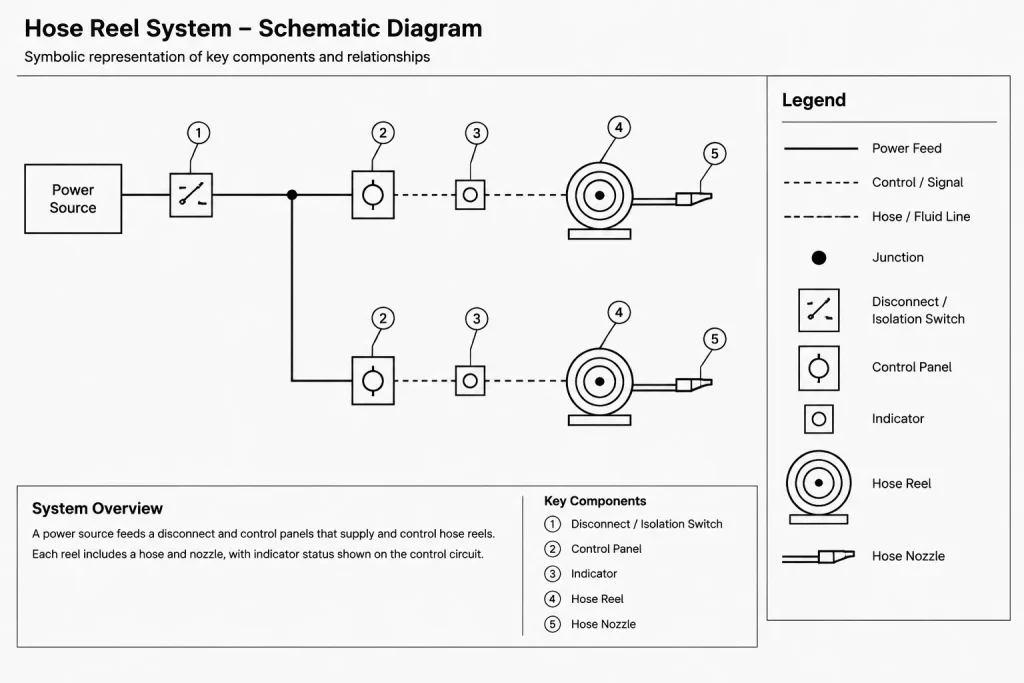
A hose reel system schematic diagram provides a simplified drawing reference for understanding how hose reel equipment is represented within fire protection documentation. Unlike a physical layout, a schematic generally emphasizes system relationships, connections, symbols, and identification rather than exact installation positions.
Before using the available DWG content, review its linework, labels, symbol conventions, and drawing organization. Confirm that each element is consistent with the project legend, equipment schedule, fire protection plans, and applicable design documentation.
Looking for a detailed schematic diagram for a hose reel system? Our downloadable DWG file offers a professionally designed CAD block that illustrates the complete layout and components of a hose reel system. This schematic is ideal for architects, engineers, and fire safety planners who require precise hose reel system designs for building projects. The DWG file is fully compatible with AutoCAD and other leading CAD software, ensuring seamless integration into your workflow. Use this drawing as a reference for fire protection system installations, maintenance planning, or regulatory compliance documentation. Enhance your project’s safety standards with this accurate and easy-to-edit schematic diagram for hose reel systems.
Please log in or register to download this file.
How to Read the Hose Reel System Drawing
Begin by identifying the drawing’s primary symbols and tracing the connection paths between them. Tags, notes, line types, and directional markers can help explain system relationships, but their meaning should always be checked against the drawing legend. Similar-looking lines may represent different services or documentation purposes.
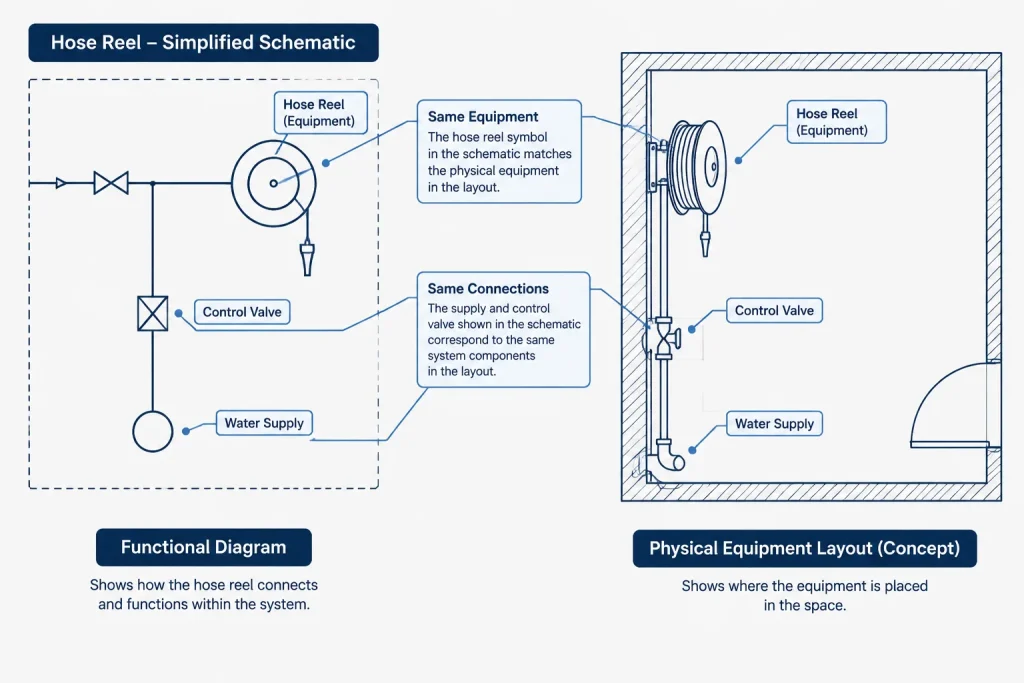
Schematic Drawing Versus Physical Layout
A schematic communicates functional relationships and is not necessarily a scaled representation of actual routing. Equipment locations, pipe paths, access requirements, and coordination clearances should be developed or confirmed on the relevant floor plan, reflected ceiling plan, equipment layout, or coordinated services drawing.
Recommended CAD Review Points
- Symbols: Compare all graphical symbols with the project’s fire protection legend.
- Annotations: Check tags, callouts, abbreviations, and notes for consistency across the drawing set.
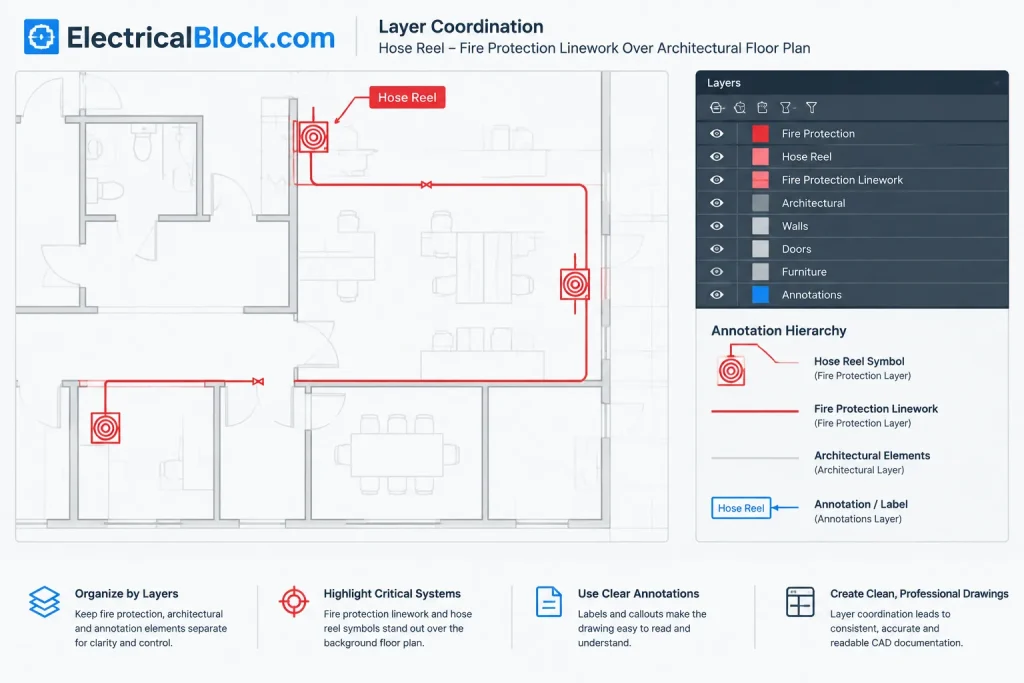
- Layers: Place fire protection linework, text, equipment, and reference geometry on clearly named layers that follow the project CAD standard.
- Line conventions: Confirm that line types and lineweights remain legible when plotted and do not conflict with architectural backgrounds.
- References: Coordinate schematic identifiers with schedules, details, equipment layouts, and related fire protection drawings.
- Revision control: Keep the downloaded reference separate from the approved project file until its contents have been reviewed.
Using the DWG in a Documentation Workflow
The drawing can be used as an editable reference when developing a project-specific schematic, legend, or coordination sheet. A practical workflow is to inspect the file in isolation, remove unrelated drafting data if appropriate, map the content to the office layer structure, and then place reviewed geometry into the working drawing.
Do not assume that a generic CAD reference establishes project compliance or installation requirements. Final documentation should be checked by the responsible design professional against the project criteria, adopted requirements, approved equipment information, and coordinated construction documents.
Related Drawing Topics
Useful companion references include fire protection symbols, equipment layout drawings, pipe and service-routing plans, CAD layer organization, drawing legends, and annotation workflows. Reviewing these topics together helps distinguish symbolic system information from physical placement and multidisciplinary coordination.
Frequently Asked Questions
Is a hose reel schematic the same as an installation plan?
No. A schematic typically shows system relationships and symbolic connections, while an installation plan communicates physical locations and routing. Project documents may require both forms of information.
Can the DWG be inserted directly into a project drawing?
It should be reviewed before use. Check units, layers, text styles, line types, symbols, references, and drawing standards before incorporating any content into a controlled project file.
What should be coordinated with the schematic?
Coordinate identifiers and system information with the fire protection plans, equipment schedules, architectural backgrounds, service-routing drawings, details, and project legend.
Does the drawing confirm regulatory compliance?
No generic CAD drawing can confirm compliance for a specific project. The responsible design team must verify the completed documentation against applicable project requirements and approved design information.
Why might the schematic differ from the floor plan?
The schematic may simplify geometry to make system relationships easier to read. The floor plan is generally used to communicate physical positioning and routing, so the two drawings can look different while describing related information.
Leave a Reply
You must be logged in to post a comment.