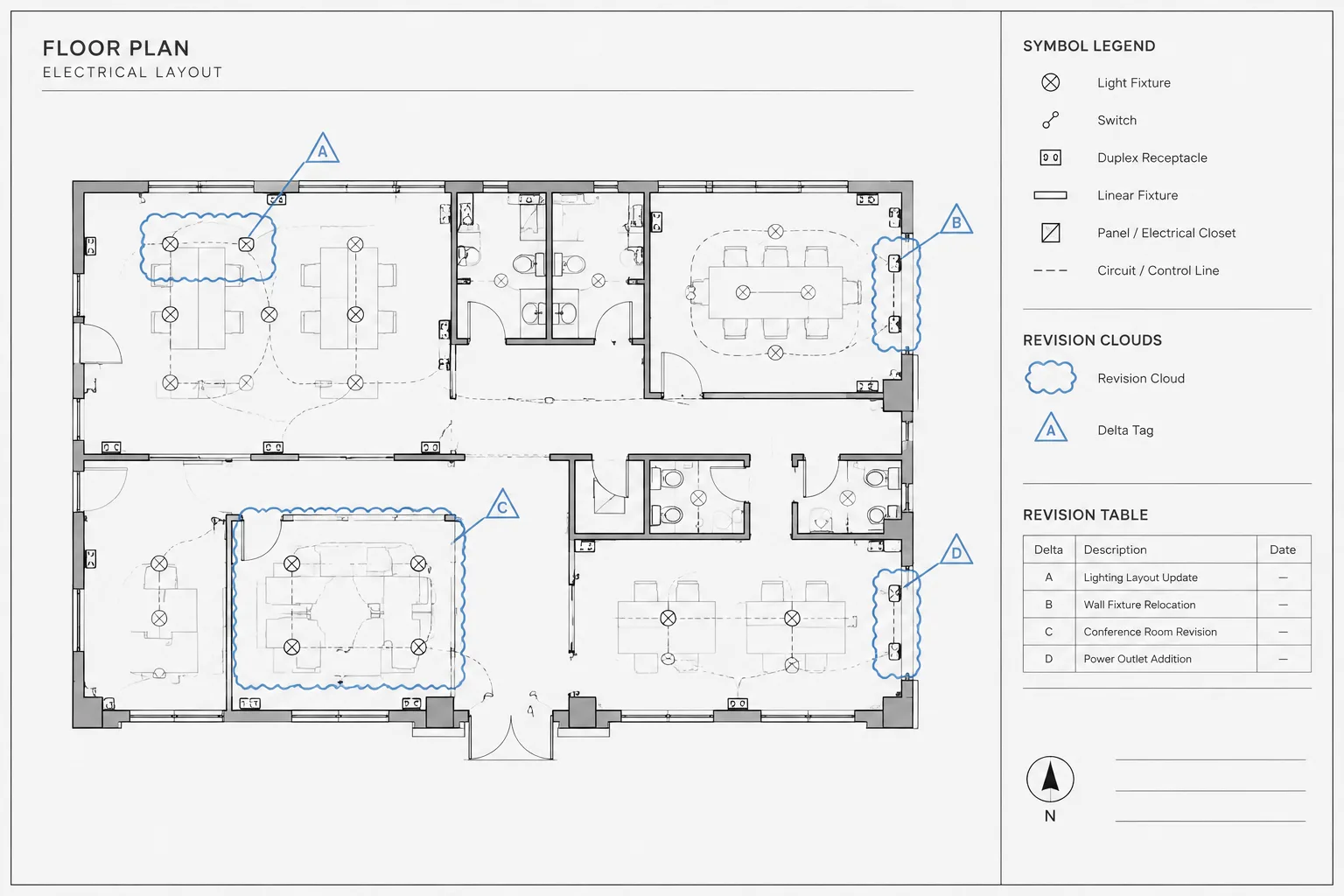
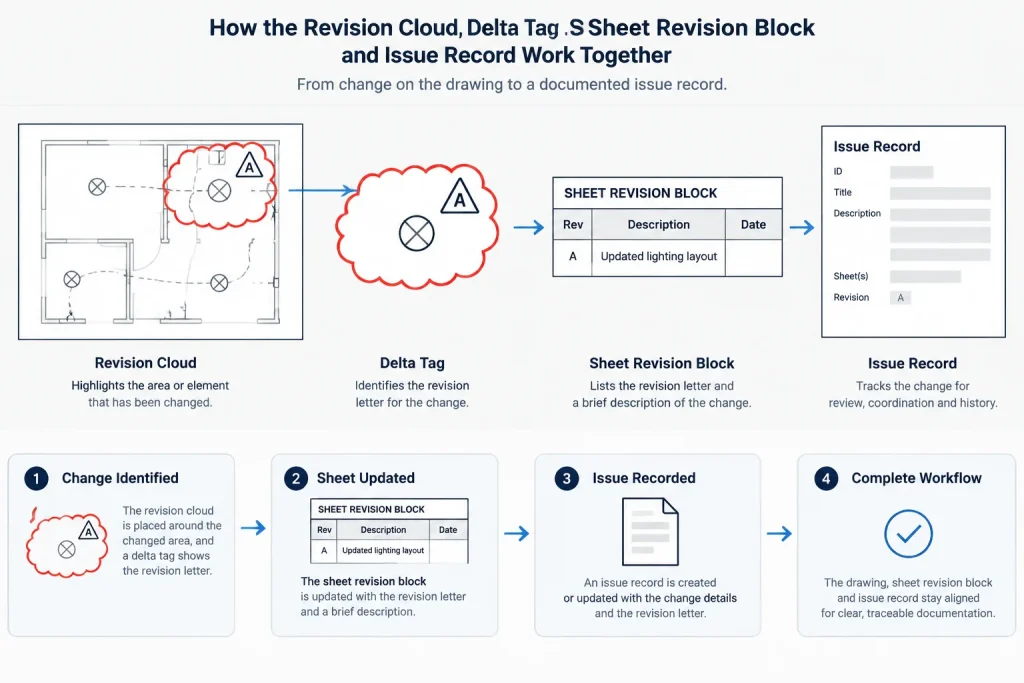
Electrical drawing revision clouds are most useful when they connect a visible drawing change to a controlled issue record. The cloud identifies where reviewers should look, while the delta tag, sheet history, and issue documentation establish which revision the mark represents.
This reference explains how to manage those relationships in CAD without treating revision graphics as isolated annotations. It is intended for electrical drafters, designers, engineers, students, and document-control teams reviewing plans, diagrams, schedules, and coordinated sheet sets.
Revision clouds help reviewers find changes, but they do not explain a change by themselves. On an electrical drawing, a cloud may surround relocated devices, revised circuiting, altered equipment, updated notes, or a coordinated background change. The cloud draws attention to an area; the revision tag and issue record provide the traceable documentation.
A useful CAD workflow treats clouds, delta tags, title block entries, and issue descriptions as parts of one revision system. When these elements are managed separately, drawings can contain untagged clouds, incorrect revision identifiers, or marks left over from an earlier issue. The following approach focuses on clear electrical documentation rather than any one software platform or project standard.
What a revision cloud communicates
A revision cloud indicates that information within a defined drawing area changed for a particular issue. It should help a reader quickly distinguish revised content from unchanged content. A cloud is most effective when its boundary is specific enough to identify the affected work without concealing symbols, circuit lines, dimensions, or notes.
The cloud does not replace a written revision description. A reader still needs to understand whether the change concerns design intent, coordination, scope, annotation, or background information. That context may appear in a revision block, issue narrative, change log, or other project-controlled record.
Common electrical changes that may need marking
- Added, removed, or relocated electrical devices
- Revised lighting fixture types, switching relationships, or control zones
- Changed circuit identifiers, home runs, panel references, or feeder information
- Modified equipment locations, connection points, or access zones
- Updated one-line diagram connections or distribution relationships
- Changed raceway, cable tray, underground route, or riser information
- Revised notes, schedules, details, or cross-references that affect the work
- Coordination changes resulting from architectural, structural, mechanical, or vendor information
Not every drafting cleanup requires a revision cloud. Text alignment, lineweight correction, or background cleanup may not represent a document change that needs highlighting. The project’s issue procedure should determine what is marked.
Clouds, delta tags, and revision records serve different purposes
| Element | Primary purpose | Typical coordination need |
|---|---|---|
| Revision cloud | Locates the changed area graphically | Must surround the correct content without obscuring it |
| Delta tag | Associates the marked area with a revision identifier | Must match the applicable issue or revision record |
| Revision block entry | Records the revision at sheet level | Must agree with the tags shown on that sheet |
| Issue description | Explains the reason or general nature of the change | Should use consistent wording across project records |
| Issue date or status | Places the revision in the document sequence | Must follow the project’s document-control process |
This separation is important. Several clouds may carry the same delta when they belong to the same issue. Conversely, adjacent clouds may require different tags if they represent changes issued at different times. A tag should not be assigned merely according to where a cloud appears on the sheet.
Build a controlled CAD layer strategy
Revision graphics should be isolated from permanent electrical design information. Dedicated layers make it easier to review, plot, hide, archive, or remove clouds without affecting devices and circuiting. A project may separate clouds from delta tags, or it may group them under a shared revision layer structure.
A practical layer plan should account for:
- Current revision clouds
- Current delta tags
- Prior revision graphics, when retained by the project procedure
- Revision text or temporary review notes
- Viewport-specific marks, if sheet presentation requires them
Layer names, colors, lineweights, and plotting behavior should follow the project CAD standard. Avoid assuming that a downloaded cloud block or inherited layer is ready for use. Check its units, scale behavior, attributes, plot properties, and naming before adding it to the drawing set.
Choose model space or paper space deliberately
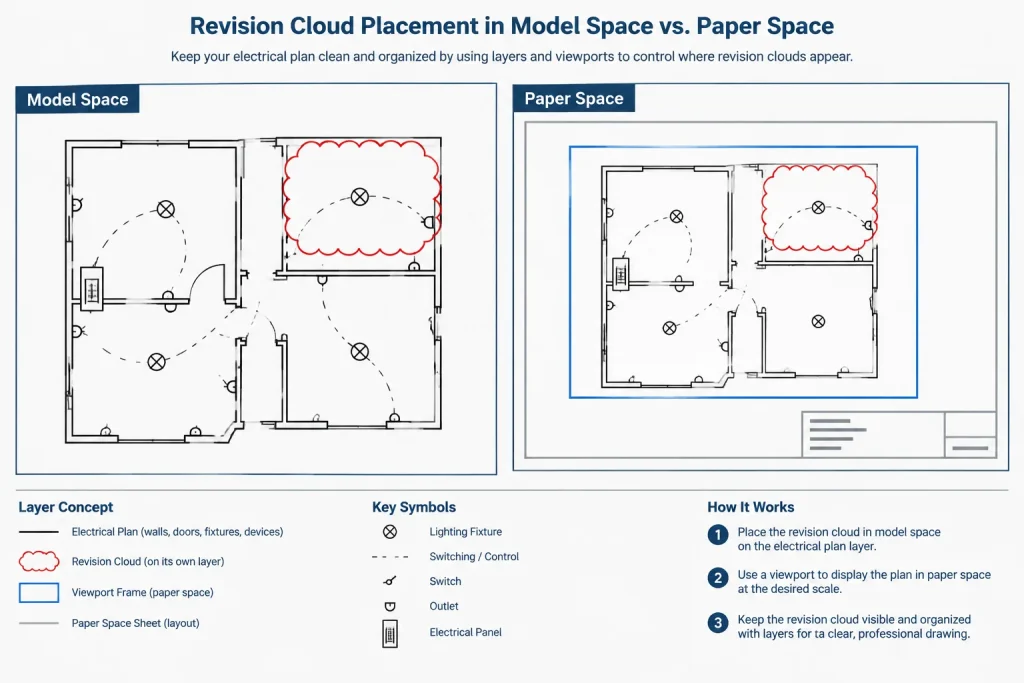
Revision clouds can be created around model geometry or placed over a sheet viewport. Either approach can work, but inconsistent placement makes later editing difficult.
Model-space clouds
A model-space cloud can remain associated with the changed plan area when the same model is displayed in more than one viewport. It must be managed carefully so it does not appear unintentionally on unrelated sheets, enlarged plans, or background exports. Layer and viewport visibility controls are therefore important.
Paper-space clouds
A paper-space cloud is directly tied to a particular sheet presentation. This is useful when the revision concerns a note, schedule, detail title, or a view shown only on that sheet. However, a paper-space cloud does not move automatically with revised model geometry or a repositioned viewport.
Before choosing a location, ask whether the mark belongs to the electrical information itself or to a specific sheet composition. Record the chosen method in the project drafting procedure so different team members do not mix approaches without a reason.
Shape clouds around the actual change
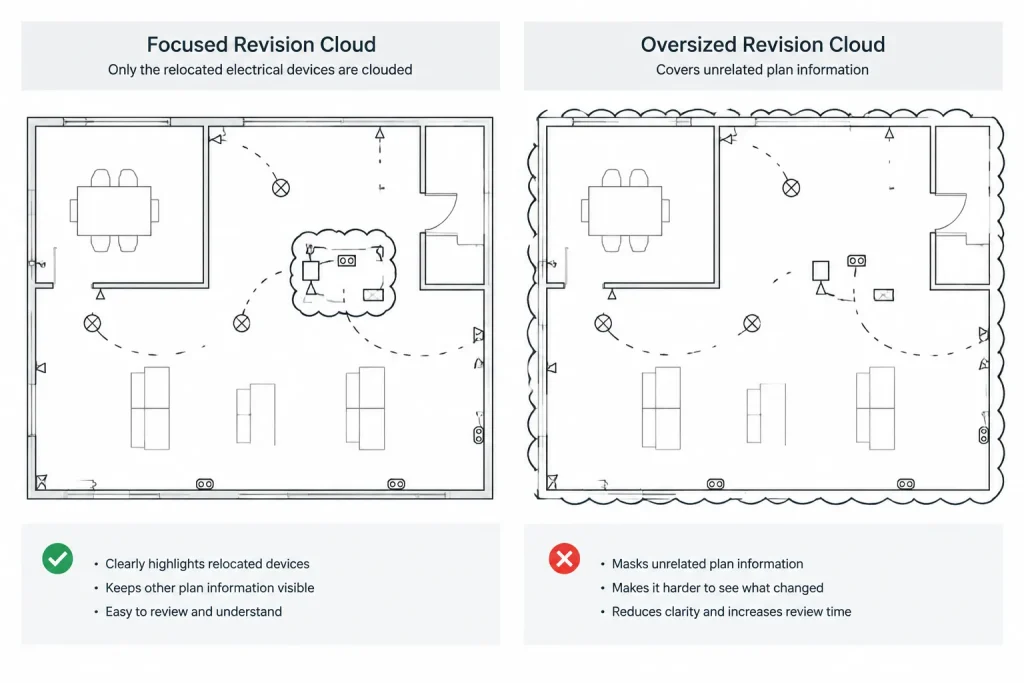
An oversized cloud can imply that more information changed than intended. A very tight cloud can overlap symbols and make the revised work difficult to read. The boundary should enclose the affected information while preserving enough white space to keep device tags, conductors, leaders, and dimensions legible.
Use separate clouds when changes are clearly disconnected. Combining distant modifications into one large boundary may save drafting time but forces reviewers to search for the actual differences. On dense plans, several focused clouds are usually easier to interpret than one irregular mark weaving through the entire viewport.
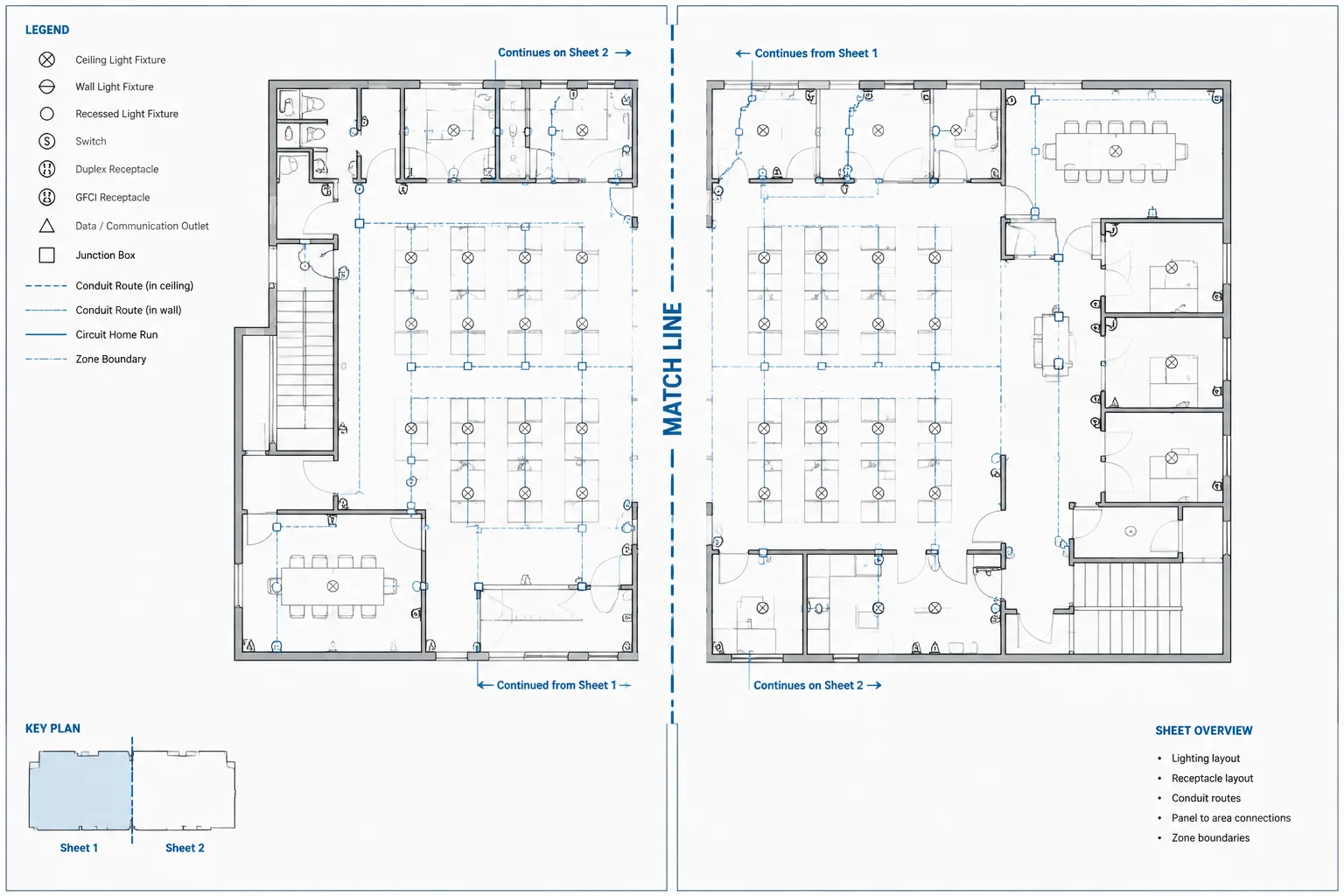
Clouds should also avoid crossing match lines, view titles, schedules, and title block information unless those elements are part of the change. If revised content continues onto another sheet, mark and tag the relevant area on each affected sheet rather than implying that one cloud covers both.
Place delta tags for quick recognition
A delta tag should be visually associated with its cloud while remaining clear of electrical symbols and annotation. Place it near the cloud boundary, using a consistent relationship throughout the set. If a crowded area requires an offset tag, use a clear leader or another project-approved association method.
Tags should remain readable at the plotted sheet scale. Check that their text, boundary, and lineweight match the drawing’s annotation hierarchy. Do not scale a tag informally just to fit a congested space if doing so makes revision symbols inconsistent across the set.
If a delta symbol contains an attribute, confirm that the displayed value and stored attribute agree. Copied tags are a common source of errors because their geometry may be correct while the identifier still references an older issue.
A practical revision-marking workflow
- Confirm the issue basis. Identify the document issue, revision identifier, affected sheets, and required description before drafting clouds.
- Compare the drawing states. Review the prior issued sheet against the proposed sheet so the marked area reflects the actual documented change.
- Complete the design edit first. Avoid shaping a cloud around work that is still moving. Finalize the revised geometry and annotation before marking it.
- Draw focused cloud boundaries. Enclose only the information relevant to the issue and maintain plan readability.
- Add coordinated delta tags. Verify that each tag matches the revision entry applicable to that sheet.
- Update the sheet record. Coordinate the title block or revision block with the issue documentation.
- Review affected references. Check related plans, one-lines, schedules, details, and cross-references for changes that may also require marking.
- Plot and inspect. Review the output at its intended presentation size rather than relying only on the CAD display.
- Archive or remove marks according to procedure. Do not leave obsolete clouds visible simply because their layers already exist.
Coordinate changes across electrical drawing types
An electrical revision often extends beyond the first drawing where it was discovered. Relocating equipment on a power plan may affect a feeder route, equipment schedule, one-line diagram, connection detail, or room elevation. Changing a lighting fixture type may affect the plan symbol, fixture schedule, controls information, and detail references.
Revision review should therefore follow the information relationship, not just the sheet boundary. A cloud on one plan does not alert readers to an unmarked inconsistency elsewhere. Use equipment tags, circuit identifiers, detail references, and schedule keys to trace the affected information through the set.
Quality-control checks before issue
- Every visible cloud has the intended revision association.
- Every delta tag matches the sheet’s revision record.
- No current cloud surrounds information that did not change.
- Related schedules, diagrams, and details have been reviewed.
- Clouds and tags plot clearly without covering electrical content.
- Revision layers follow the project naming and plotting rules.
- Old review marks and obsolete revision graphics are not visible.
- Viewport clipping, layer visibility, and sheet composition do not cut off clouds.
- The final PDF or plotted output matches the CAD revision presentation.
Revision clouds are most valuable when they form part of a disciplined issue-control workflow. Focused boundaries help readers find changes, coordinated delta tags connect those changes to an issue, and accurate sheet records provide traceability. Treating these elements as managed drawing data—not temporary decoration—produces electrical documents that are easier to review and less likely to carry conflicting revision information.
Think of revision control as an information chain
A reliable revision process preserves a clear path from the edited electrical content to the graphical mark, revision identifier, sheet record, and issued deliverable. A mismatch anywhere in that chain can make an otherwise accurate design change difficult to verify.
This distinction is especially important when several team members contribute to a drawing set. The person editing a plan may not be responsible for the title block, issue register, or final publication package. Defined ownership helps prevent a completed design edit from reaching issue without its related documentation.
Separate drawing status from revision identity
A drawing may pass through internal review, coordination, and approval stages before it becomes an issued revision. Temporary review clouds should not be mistaken for formal issue marks. Distinct layers, naming practices, or review files can help keep internal comments separate from revision graphics intended for the published sheet.
The meaning of a delta identifier should also follow the project convention. It may refer to a revision sequence, issue event, or another controlled designation. Drafters should not infer its meaning from an older drawing or a copied symbol when the current issue record is available.
Use drawing comparison as a review aid
CAD and document-comparison tools can help locate differences between drawing states, but detected differences are not automatically revision-worthy changes. Updated backgrounds, shifted viewports, regenerated text, or altered references may create visual differences that require interpretation.
The reviewer should determine whether each difference affects the electrical document and whether related information appears elsewhere in the set. Comparison results support professional review; they do not replace the project’s decision about what must be clouded and recorded.
Check externally referenced information
Changes introduced through architectural, mechanical, structural, civil, or vendor references can affect an electrical sheet even when no electrical object was directly edited. Before issue, review whether background changes alter device locations, equipment clearances, routing, room identification, mounting context, or referenced details.
If an external reference changes after clouds have been placed, confirm that the cloud still encloses the intended information. A moved viewport, clipped reference, or updated background can separate a revision mark from the content it was meant to identify.
Revision handoff checklist
- Confirm which drawing state is the approved comparison baseline.
- Identify whether each mark is an internal review comment or an issued revision graphic.
- Verify that copied delta symbols do not retain outdated attributes or identifiers.
- Check that sheet records and project-level issue records describe the same event consistently.
- Review referenced files and dependent electrical views for related changes.
- Confirm that cloud and tag layers have the intended visibility in every affected viewport.
- Inspect the published deliverable rather than assuming the CAD file and final output match.
- Retain or remove superseded marks according to the established document-control procedure.
The objective is not to place as many clouds as possible. It is to produce a revision package in which every visible mark has a documented purpose and every documented electrical change can be found efficiently.
Frequently asked questions
Does a revision cloud explain what changed?
No. It identifies the affected drawing area. The delta tag, revision entry, and issue description provide the corresponding identity and context.
Should every CAD edit receive a revision cloud?
Not necessarily. The project issue procedure should distinguish document changes from drafting cleanup, internal review comments, and background adjustments that do not require formal marking.
Can several clouds use the same delta tag?
Yes, when the marked areas belong to the same controlled revision and the project convention permits it. Each cloud still needs an unambiguous visual association with that revision.
Why should review clouds and issued clouds be separated?
Review clouds may identify unresolved comments or work in progress, while issued clouds document approved changes in a deliverable. Separating them reduces the risk of publishing temporary markup.
Can automated drawing comparison replace manual revision review?
No. Comparison tools can reveal visual or database differences, but a qualified reviewer must determine their electrical significance and whether related sheets, schedules, diagrams, or details are affected.
What should be checked when a viewport moves?
Confirm that paper-space clouds and tags still align with the revised content, that no boundary is clipped, and that model-space revision layers remain correctly controlled in the viewport.
Should old revision clouds remain visible?
That depends on the project’s document-control procedure. Superseded marks should never remain visible merely because their layers were copied forward or left enabled.

Leave a Reply
You must be logged in to post a comment.