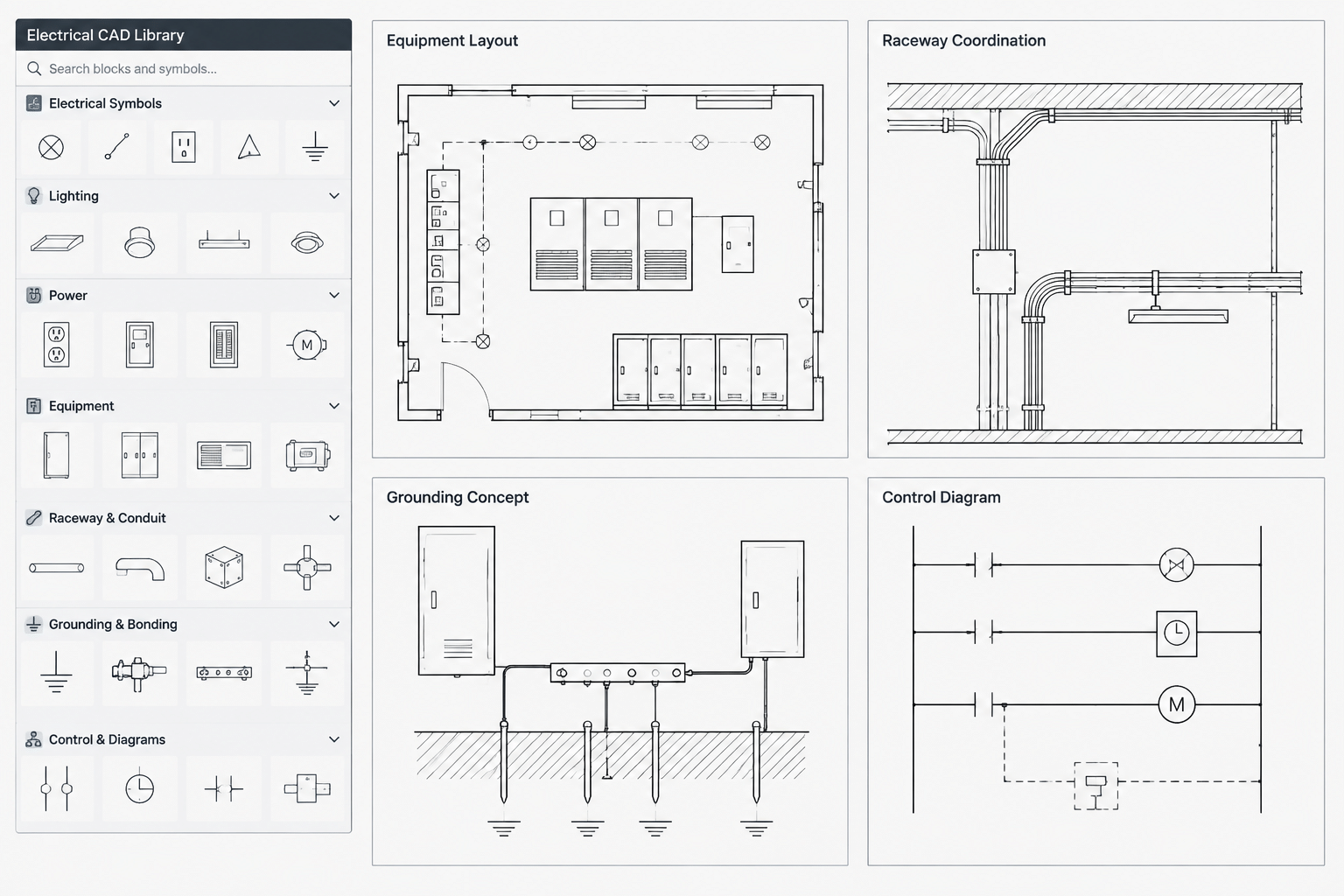
A dependable electrical CAD detail library supports more than drafting speed. It gives project teams a controlled starting point for recurring documentation while making required reviews, project inputs, and content limitations visible.
This guide explains how to organize reusable electrical details, standardize their internal CAD structure, manage revisions, and prevent library content from being mistaken for completed project design. The emphasis is on drawing governance, coordination, and quality control.
An electrical CAD detail library is more than a folder of reusable drawings. It is a controlled documentation resource that helps drafters produce consistent details without carrying outdated notes, unresolved dimensions, or project-specific assumptions into new work.
A useful library may contain equipment mounting diagrams, conduit arrangement details, grounding concepts, penetration coordination diagrams, control schematics, identification layouts, and other drawing content used repeatedly across projects. Unlike a symbol library, which primarily supplies individual graphical objects, a detail library often combines geometry, annotations, leaders, notes, references, and title information into a coordinated drawing unit.
The challenge is deciding what should be reusable, what must remain project-specific, and how revisions should be managed. The following workflow focuses on CAD organization and documentation control rather than installation methods.
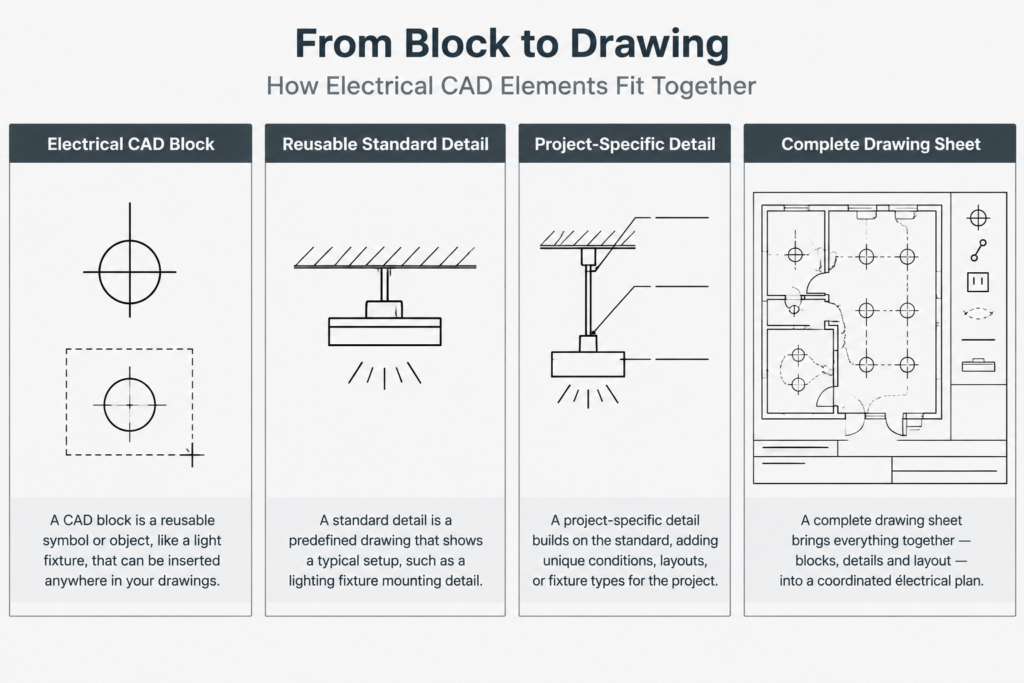
Understand the Difference Between Blocks, Details, and Project Drawings
These resources may all use DWG or similar CAD formats, but they serve different purposes.
| Resource | Typical content | Primary purpose | Main risk |
|---|---|---|---|
| CAD block | A symbol, device outline, tag, or equipment representation | Repeated placement within drawings | Incorrect scale, layer, insertion point, or attribute data |
| Standard detail | Geometry, notes, labels, and explanatory relationships | Documenting a recurring design concept | Reusing assumptions that do not apply to the current project |
| Project detail | A standard detail modified for a specific condition | Communicating project design intent | Losing traceability to the source or overlooking later coordination changes |
| Project drawing | Sheets, views, references, schedules, and coordinated design information | Issuing the complete project documentation | Conflicts between plans, details, diagrams, and schedules |
A block can be part of a detail, but an entire detail should not automatically be treated as a universally reusable block. Notes and depicted relationships may carry more design meaning than the linework itself.
Classify Details Before Building the Library
Begin by grouping details according to function. A classification system makes content easier to find and helps reviewers identify the type of technical review each file needs.
Practical categories may include:
- Service and distribution concepts
- Equipment layout and mounting coordination
- Raceway, cable tray, and pathway arrangements
- Grounding and bonding documentation concepts
- Lighting and lighting-control details
- Power connection and control-interface diagrams
- Fire alarm and low-voltage coordination details
- Penetration, sleeve, and opening coordination
- Identification, labeling, and nameplate layouts
- Site electrical and utility coordination
Categories should describe drawing purpose rather than a particular manufacturer or past project. If content only works with one selected product, assembly, or construction condition, identify it as project-specific or product-dependent instead of filing it as a general standard.
Separate Reusable Content from Project Decisions
A reusable detail should communicate a stable concept while leaving variable design decisions visible for project completion. A detail becomes risky when editable placeholders look like final information or when old project values remain hidden among generic notes.
Content that may be suitable for reuse
- Consistent graphical hierarchy and view arrangement
- Generic component relationships
- Standard office abbreviations and annotation styles
- Clearly marked fields that require project input
- References to related drawings that can be updated systematically
- General coordination prompts written without unsupported project assumptions
Content that normally requires verification
- Dimensions and clearances
- Equipment ratings or capacities
- Conductor, cable, raceway, or overcurrent information
- Mounting heights and elevations
- Structural attachment information
- Fire-resistance and penetration requirements
- Manufacturer-specific geometry or connection locations
- References to governing criteria, specifications, or other disciplines
Do not rely on color alone to distinguish placeholders. Use an explicit marker, note style, attribute, or review status that remains understandable when the drawing is plotted in monochrome.
Choose a Consistent File Strategy
Two common approaches are maintaining one file per detail or placing multiple details in categorized source drawings. Either can work if the method supports reliable revision control.
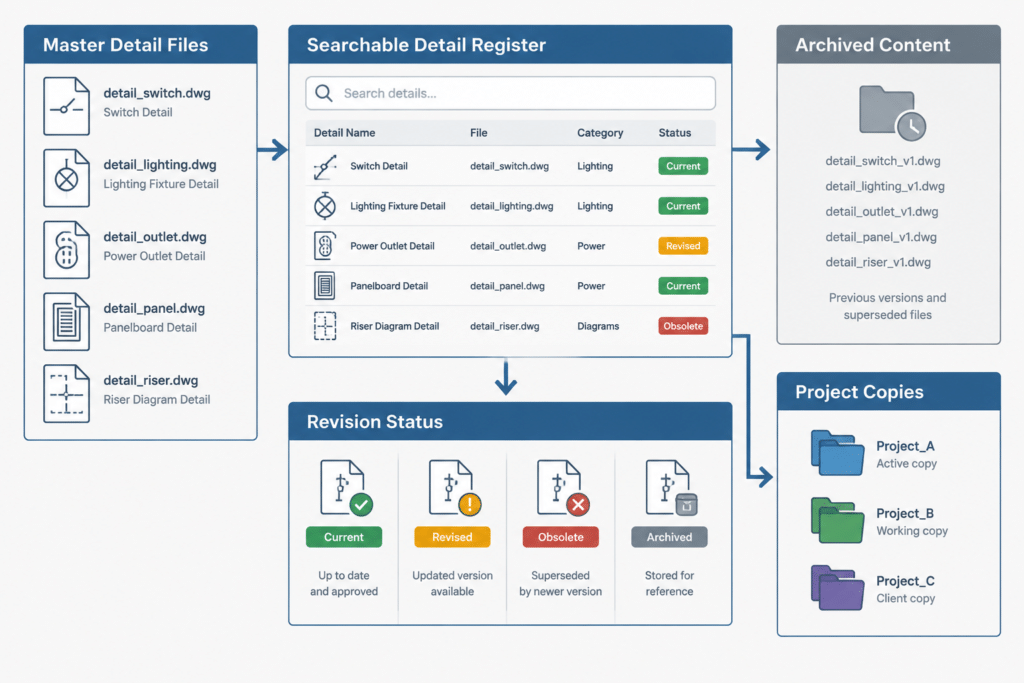
Individual files make it easier to assign ownership, track revisions, and insert only the required content. Categorized source drawings make browsing convenient and allow related details to be compared on one canvas. A hybrid system can use controlled master files for editing and separate published files for project use.
Whatever strategy is selected, avoid treating personal desktop folders, email attachments, or copied project sheets as authoritative sources. Establish a clearly identified location for current approved library content and restrict editing rights as appropriate to the organization.
Use Searchable File Names and Metadata
A detail number alone may be difficult to search unless users already know the catalog. Combine a stable identifier with a short functional description. Keep names concise, avoid ambiguous abbreviations, and do not encode information that changes frequently.
Useful metadata can include:
- Detail title and category
- Library identifier
- Review status
- Content owner or responsible discipline
- Revision date or revision sequence
- Related detail identifiers
- Keywords and common alternate terms
- Known limitations or required project inputs
Metadata may be stored in a register, drawing properties, title blocks, or a document-management system. The important point is that the catalog and the CAD file remain synchronized.
Standardize the Internal CAD Structure
Library files should follow the same CAD rules expected in project production. Standardization reduces cleanup after insertion and makes details easier to audit.
Check each source detail for:
- A deliberate base point or insertion point
- Approved units and drawing scale conventions
- Consistent text, dimension, leader, and table styles
- Layers that map cleanly into project standards
- Logical lineweight and plotting behavior
- No unexplained external references, images, or font dependencies
- No duplicate or unused definitions that unnecessarily enlarge files
- Editable text where project-specific information must change
- A clear boundary around the detail content
Avoid exploding all content merely to make it appear simple. Structured blocks, attributes, and grouped components can preserve relationships and reduce accidental edits. However, excessive nesting can make a detail difficult to revise. Use enough structure to protect intent without hiding important content several levels deep.
Create a Controlled Project-Adoption Workflow
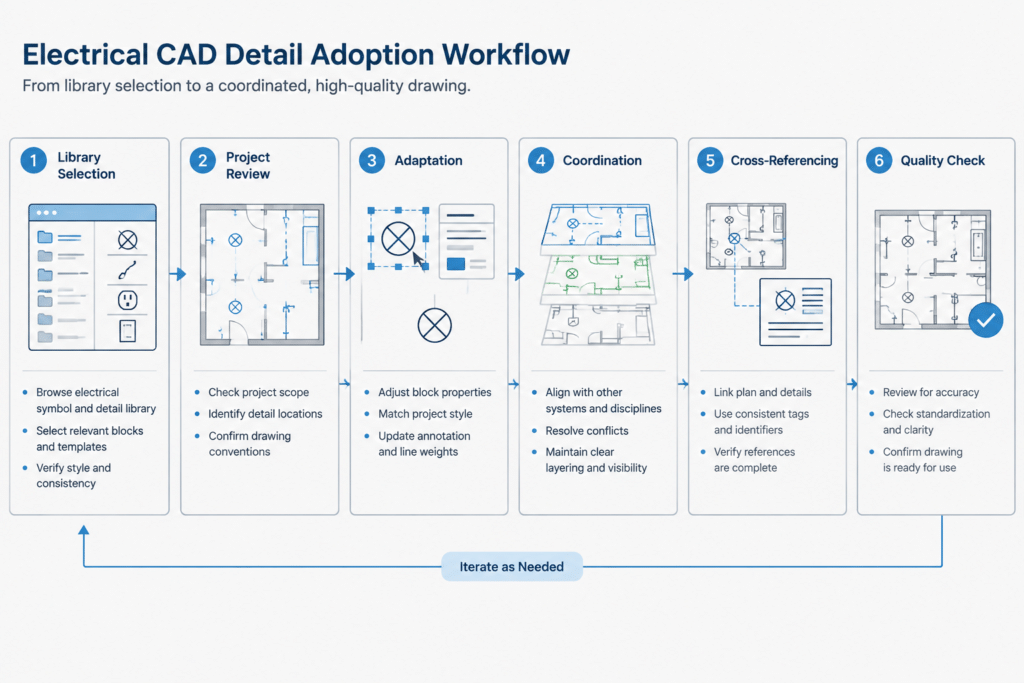
Inserting a detail is the beginning of project coordination, not the end. A controlled adoption process can follow these steps:
- Select: Choose the closest applicable library detail by function, not merely by visual similarity.
- Copy or reference: Bring the detail into a project-controlled location so its project status is clear.
- Review assumptions: Identify every note, dimension, component, and reference requiring confirmation.
- Adapt: Modify the content to match the actual design and drawing conventions.
- Coordinate: Compare it with plans, schedules, single-line diagrams, equipment information, specifications, and relevant consultant drawings.
- Identify: Assign the project detail number, title, sheet location, and callout references.
- Check: Perform drafting and technical reviews before issue.
This workflow prevents a typical detail from being mistaken for completed design documentation.
Manage Callouts and Cross-References Carefully
A detail can be graphically correct and still fail if its references point to the wrong sheet or view. Detail bubbles, section marks, equipment tags, keynotes, and continuation references should be checked whenever sheets are added, removed, or renumbered.
Where the CAD workflow supports linked or attributed references, use them consistently. Where references are entered manually, include them in the project quality-control checklist. Also check references in both directions: the plan should point to the detail, and the detail should clearly identify what condition it explains.
Avoid vague titles such as “Typical Detail” when multiple conditions exist. Titles should distinguish the application, location, orientation, or equipment relationship without becoming unnecessarily long.
Control Revisions Without Overwriting Project History
When a library detail changes, active projects should not be updated automatically without review. A new standard note or revised arrangement may not apply to a project that has already been coordinated or issued.
Maintain a revision record describing what changed and why it matters. Project teams can then compare their adopted copy with the current library version. This is safer than silently replacing geometry, because it preserves project history and makes technical differences visible.
Feedback from projects can improve the library, but project edits should not flow directly into the master. Submit proposed changes for review, remove project-only information, and confirm that the revision is broadly reusable before publishing it as a new library version.
Audit the Library Regularly
A library loses value when users cannot tell which details are current. Periodic audits should look for duplicate content, obsolete references, inconsistent titles, unresolved placeholders, missing dependencies, and details that are rarely used because they are difficult to find.
Possible status labels include current, under review, restricted use, superseded, and archived. Archived details can remain available for record projects while being separated from content intended for new work.
The strongest electrical CAD detail library is not necessarily the largest. It is the one users can search, understand, adapt, and verify. Clear ownership, controlled revisions, visible project inputs, and disciplined cross-referencing turn a collection of drawings into a dependable documentation resource.
Practical Library Governance Checklist
The library should have a documented operating method as well as organized CAD files. Without ownership and review controls, even well-drafted details can become unreliable over time.
- Assign ownership: Identify who can approve, revise, publish, restrict, or archive library content.
- Define source authority: Make the approved library location distinguishable from working folders, project copies, and exported files.
- Show content status: Use visible status information so users can recognize approved, pending, restricted, superseded, and archived material.
- Record limitations: State which information requires project confirmation and whether the detail depends on equipment, construction, or consultant coordination.
- Test adoption: Insert or reference the detail in a controlled test drawing to check layers, styles, base points, plotting behavior, and dependencies.
- Preserve project history: Review library revisions before applying them to an active project rather than replacing adopted details automatically.
- Collect feedback: Route proposed improvements through technical review instead of copying project edits directly into the master library.
How to Evaluate a Detail Before Project Use
A library status indicates that content has passed the organization’s publishing process; it does not prove that the detail fits every project condition. The project team should compare the selected detail with the applicable plans, diagrams, schedules, specifications, equipment information, and related discipline documents.
Review the drawing as a communication package rather than linework alone. Confirm that its title matches the intended condition, its notes do not preserve unrelated assumptions, its references point to the correct project locations, and its graphical relationships agree with the rest of the documentation.
Signs That a Detail Should Be Revised or Retired
- Users repeatedly recreate the same corrections after inserting it.
- Its title or keywords no longer describe the content clearly.
- Required fonts, references, images, or other dependencies are unavailable.
- Placeholders can be overlooked or mistaken for confirmed project information.
- Its notes conflict with current office documentation practices.
- Several nearly identical versions make selection difficult.
- The detail represents a narrow project condition but is presented as a general standard.
Retirement does not always require deletion. Moving superseded content into a clearly separated archive can preserve record-project traceability while preventing accidental use in new documentation.
Frequently Asked Questions
What is the difference between an electrical CAD detail library and a symbol library?
A symbol library generally contains individual graphical objects such as device symbols, tags, and equipment outlines. A detail library usually combines geometry, notes, leaders, labels, and references to explain a recurring design or coordination concept.
Should library details be inserted as blocks or external references?
The appropriate method depends on the organization’s CAD workflow and revision policy. Blocks can provide a controlled package within a project drawing, while external references can support centrally managed source content. In either case, project-specific changes and revision responsibilities must remain clear.
Can an approved library detail be placed on a project sheet without modification?
Not automatically. Approval for library publication means the source has passed an internal process, not that every note, dimension, reference, or depicted condition applies to a particular project. The adopted detail still requires project review and coordination.
How should placeholders be shown?
Use an explicit marker, attribute, note style, or review status that remains recognizable in normal plotting conditions. Avoid relying only on color because color distinctions may disappear in monochrome output.
Should project changes be added directly to the master library?
No. Project edits may contain condition-specific information. Proposed improvements should be separated from project assumptions, technically reviewed, and deliberately published through the library revision process.
How can duplicate details be reduced?
Use consistent categories, descriptive file names, alternate search terms, related-detail references, and visible status information. Before creating new content, search by purpose and condition rather than relying only on a known detail identifier.
What should happen when a library detail is updated?
Record the change and make the revised source available through the controlled library. Active project teams should compare the revision with their adopted copies and decide whether it applies; existing project content should not be replaced silently.






Leave a Reply
You must be logged in to post a comment.