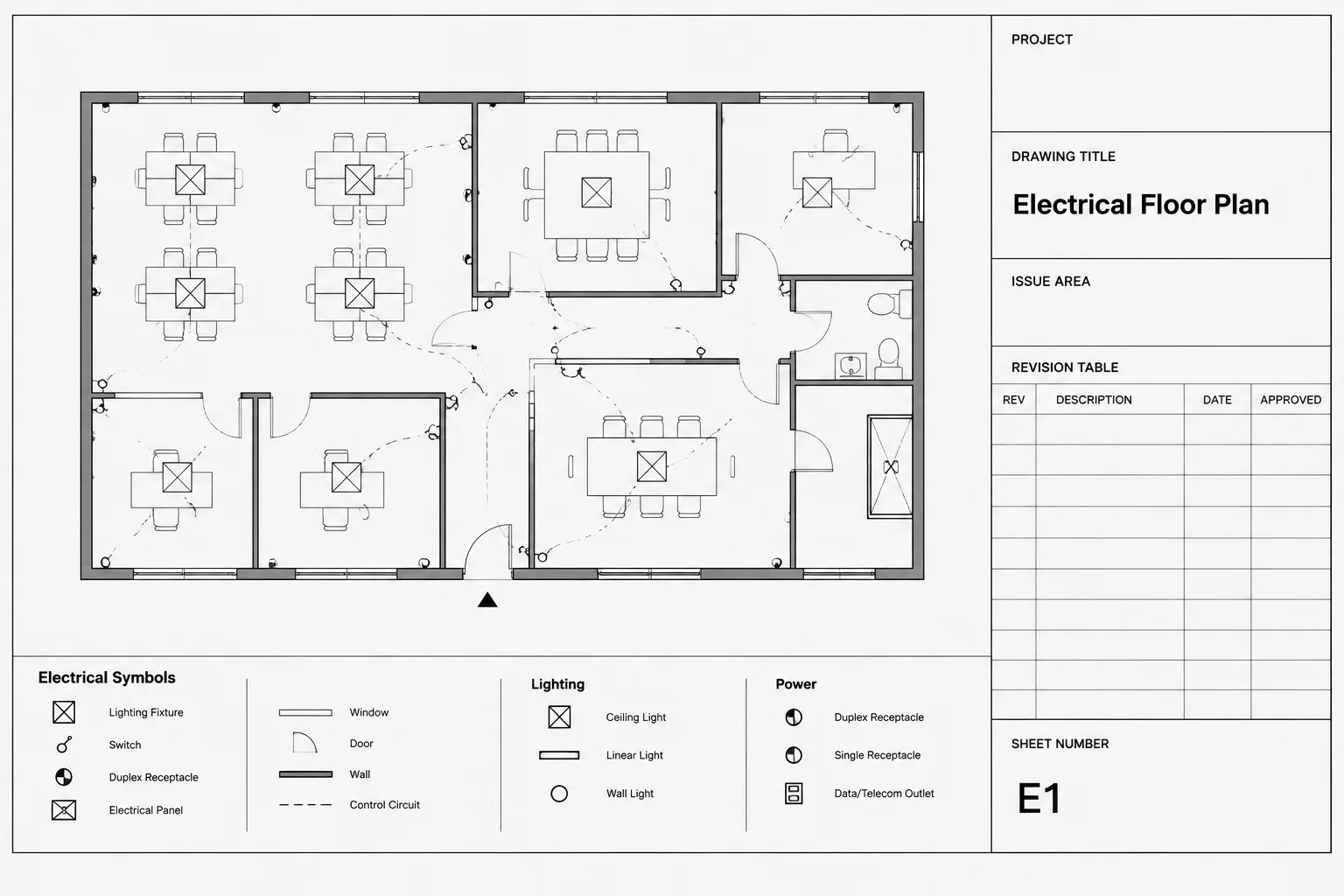
Electrical drawing title blocks in CAD provide the visible identity and publication status of each sheet. Their effectiveness depends on more than graphic appearance: editable fields, shared project information, sheet-specific data, revision records, and plotted output must remain coordinated throughout the drawing workflow.
This reference explains how to structure title block information, manage CAD attributes, distinguish issue data from revision history, and review electrical sheets as a controlled set. Project teams should adapt these principles to their approved templates, contractual requirements, and document-control procedures.
An electrical drawing title block is more than a border around a sheet. It identifies the drawing, connects it to the rest of the project set, records issue information, and helps reviewers determine whether they are looking at the correct document. When title block data is inconsistent, even technically accurate plans can become difficult to navigate and control.
A reliable CAD workflow treats the title block as structured project data rather than decorative linework. Sheet titles, drawing numbers, project identifiers, revision entries, and professional information should be organized so they can be checked and updated without editing unrelated graphics. The exact fields and appearance will vary by organization, client, jurisdiction, and project delivery method, so every template must be verified against current project requirements.
What an Electrical Title Block Needs to Accomplish
The title block should answer several basic questions without requiring the reader to search elsewhere:
- What project does this sheet belong to?
- What electrical content is shown?
- Where does the sheet fit within the drawing set?
- What issue or revision does the sheet represent?
- Who prepared, checked, or authorized the document, where applicable?
- Are there limitations or status notes that affect how the drawing may be used?
Not every field belongs inside the title block itself. General notes, electrical design criteria, symbol legends, and detailed revision narratives may be located elsewhere on the sheet or in the set. The goal is to keep the title block concise while making sheet identity unmistakable.
Typical Title Block Information Groups
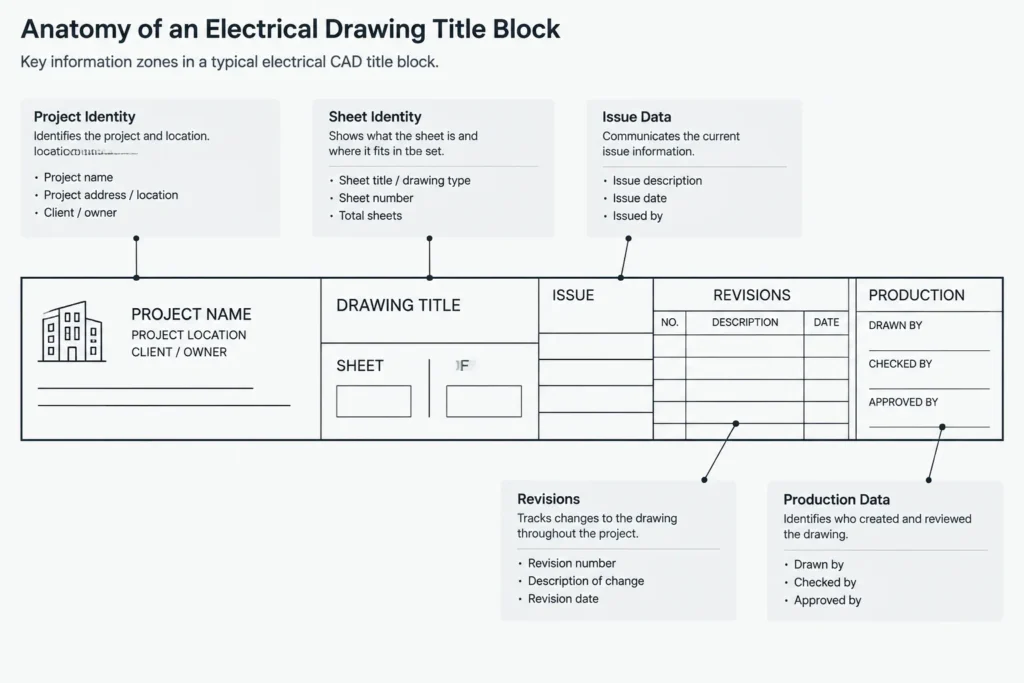
Grouping related fields makes the block easier to read and maintain. A practical title block may include the following categories, although the required content should always come from the project documentation plan.
| Information group | Typical content | Coordination concern |
|---|---|---|
| Project identity | Project name, location, client, and internal project reference | Wording should match the cover sheet and contractual records |
| Sheet identity | Drawing number, sheet title, discipline, and sequence information | Must agree with the sheet index and file naming system |
| Issue information | Issue purpose, date, package designation, or document status | Should identify the current published state without retaining misleading data |
| Revision information | Revision identifier, description, date, and responsibility fields | Must coordinate with revision clouds, delta symbols, and issue records |
| Production information | Drawn by, checked by, approved by, CAD file reference, or plot date | Automated and manually entered values must be clearly distinguished |
| Professional information | Organization details and any required authorization area | Content and placement require project-specific verification |
Separate Sheet-Level Data from Project-Level Data
One of the most useful title block decisions is separating information that changes by sheet from information shared by the entire project.
Project-level data
Project name, client name, site identification, and project reference are usually common across many sheets. Re-entering this information independently on every drawing creates opportunities for spelling differences and outdated values. Where the CAD environment and office workflow permit, shared data should come from a controlled source or a consistently maintained title block definition.
Sheet-level data
The drawing number, sheet title, drafter initials, checker initials, and certain issue fields may vary by sheet. These values should remain easy to edit without exploding the title block or overriding fixed graphics.
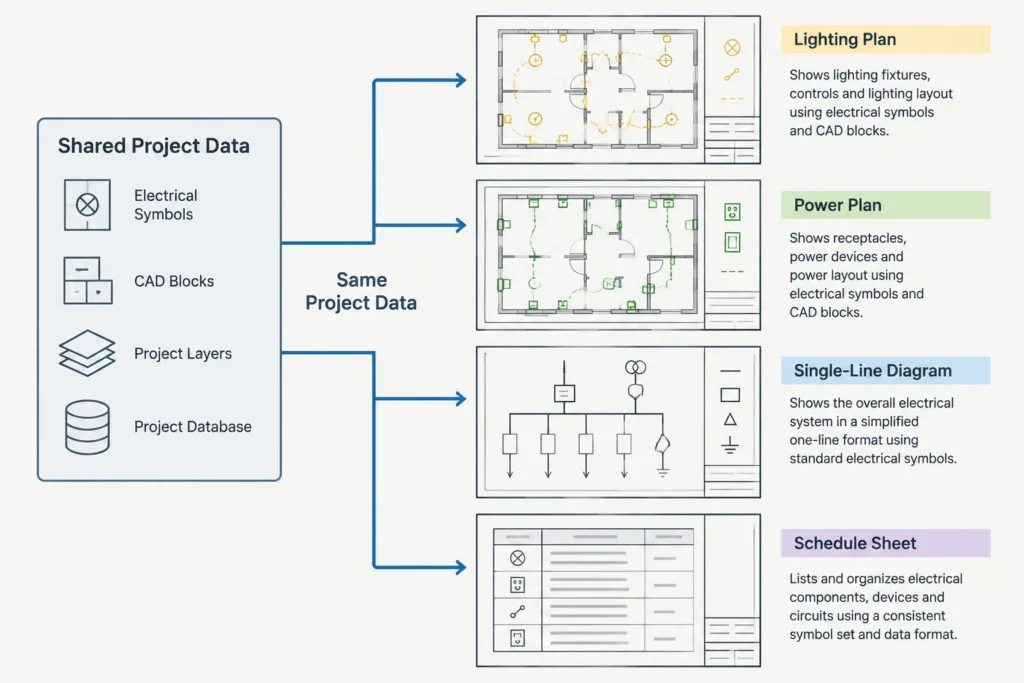
The distinction is especially important when a set includes lighting plans, power plans, one-line diagrams, panel schedules, enlarged plans, and electrical details. A project-wide change should not require unrelated manual edits on every individual sheet.
Use CAD Attributes Deliberately
Block attributes can turn a title block into a repeatable data-entry tool. Each editable field should have a clear tag, prompt, default behavior, and expected format. Attribute tags intended for internal CAD use can be concise, but their prompts should be understandable to the person editing the sheet.
Useful attribute practices include:
- Assign one purpose to each attribute instead of combining unrelated information in a single multiline field.
- Use consistent attribute tags across all electrical sheet templates.
- Keep fixed labels, such as field headings, separate from editable values.
- Avoid duplicate attributes that display the same information in different locations unless the duplication is intentionally managed.
- Define text alignment and available field width so longer project names do not collide with borders.
- Test empty values to ensure unused fields do not leave confusing punctuation or labels.
- Do not explode title blocks simply to make a routine text correction.
Attributes can improve consistency, but they do not validate the meaning of the entered data. A correctly functioning field can still contain the wrong sheet number or issue date. Human review remains necessary.
Coordinate Drawing Numbers and Sheet Titles
The drawing number is a navigation key. It should match the sheet index, plotted filename convention, issue register, and references from other drawings. If an enlarged electrical plan points to another sheet, that destination must remain valid after sheets are inserted, removed, or renumbered.
Sheet titles should describe the content at a useful level. Titles that are too broad make similar sheets difficult to distinguish, while titles filled with internal shorthand may confuse outside reviewers. A multi-area project may need the title to identify the building, level, area, and drawing function. The title should describe what is actually shown rather than what an earlier template expected to show.
Before issue, compare title block data with viewport content. A duplicated layout can retain the source sheet title, drawing number, match-line references, or detail callouts even after the visible plan has changed.
Manage Issue and Revision Information Carefully
Issue data and revision data serve related but different purposes. An issue field describes the document package or current publication state. A revision record identifies a documented change after an established issue point, according to the project workflow.
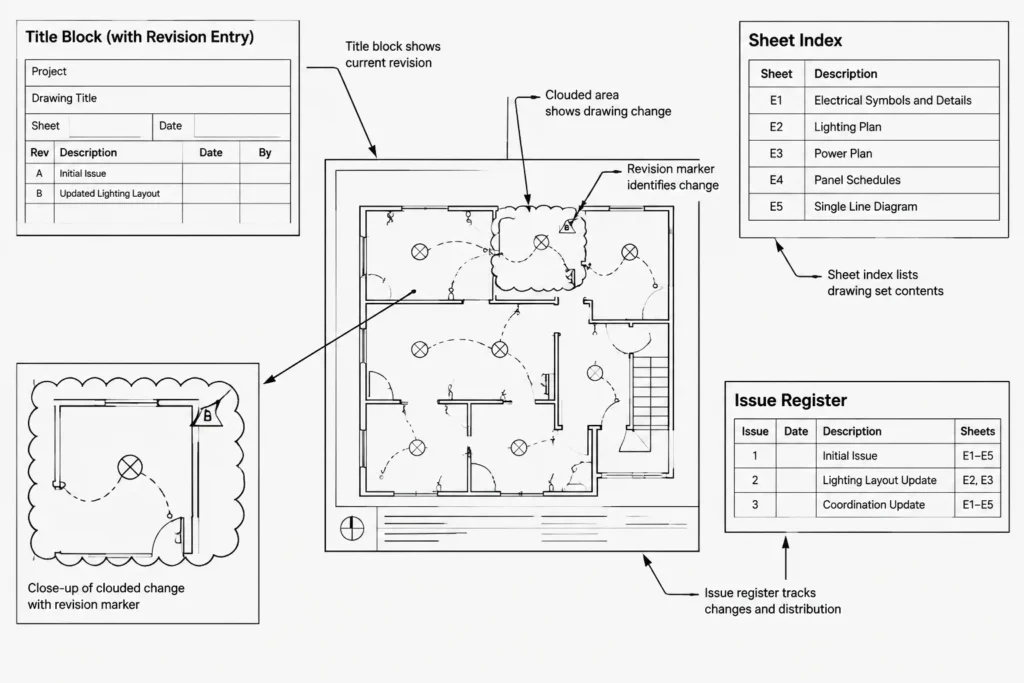
A practical revision process should coordinate four items:
- The revision entry in or near the title block
- Revision markers used on the drawing
- Clouds or other graphical change indicators, when required
- The external issue record or transmittal process
These items should not contradict one another. For example, removing a revision cloud while leaving an unexplained marker can make the history difficult to interpret. Likewise, copying a previously issued sheet can carry revision entries into a new sheet where those changes never occurred.
Do not use automatic dates without understanding when they update. A plot date may be useful as production metadata, but it should not silently replace an intentional issue date. The label should make the distinction clear.
Place the Title Block in a Stable Sheet Environment
Title blocks are generally managed in the sheet layout environment so their plotted size and position remain stable while model geometry is viewed through viewports. Electrical plans, diagrams, and schedules may use different viewport arrangements, but the title block should maintain a consistent relationship to the plotted sheet boundary.
Keep viewport frames, nonplotting guides, sheet notes, and title block graphics on appropriately controlled layers. Avoid placing model elements inside the title block block definition. This separation reduces the chance that editing a border affects electrical plan content.
If multiple sheet sizes or client templates are used, maintain clearly identified source files. Scaling one border to imitate another can distort text, logos, lineweights, and reserved approval areas. Use the verified project template rather than assuming that a visually similar border is interchangeable.
Title Block Quality-Control Checklist
Before publishing an electrical drawing set, review title blocks as a coordinated group rather than checking each sheet only in isolation.
- Confirm that every sheet belongs to the correct project and package.
- Compare every drawing number and title with the current sheet index.
- Check for duplicated numbers, missing sheets, and obsolete placeholder layouts.
- Verify that issue dates and status descriptions are consistent across the package.
- Confirm that revision entries correspond to the graphics and issue record.
- Look for truncated attributes, overlapping text, and blank required fields.
- Check that referenced sheet numbers and detail destinations still exist.
- Confirm that title block text remains legible in the final plotted output.
- Remove unintended file paths, user names, test notes, and template instructions.
- Review the exported document properties and filenames separately from visible title block data.
Build a Maintainable Template, Not a Frozen Graphic
A good electrical drawing title block supports the life of the project. It should be controlled enough to preserve graphic consistency but flexible enough to accommodate legitimate project data. Fixed geometry, editable attributes, shared project fields, and revision areas should each have a defined role.
Template improvements should be tested on several representative electrical sheets, including a floor plan, diagram, schedule-heavy sheet, and detail sheet. This exposes problems such as long titles, crowded revision records, conflicting viewport space, and fields that appear correctly in CAD but fail in the published output.
The final objective is dependable document identification. When title block data agrees with the sheet index, references, revisions, filenames, and visible drawing content, the entire electrical set becomes easier to review, issue, archive, and reuse.
Assign Ownership to Title Block Fields
A maintainable title block workflow identifies who controls each category of information. Project identity may come from a shared project record, while sheet titles and drawing numbers may be maintained by the electrical drafting team. Issue status may require confirmation from a project manager or document controller. Professional information should be handled only through the organization’s approved process.
Clear ownership helps prevent competing edits. It also makes discrepancies easier to resolve because reviewers can distinguish a drafting correction from a project-wide information change.
Classify Fields by Update Method
- Fixed graphic content: Borders, labels, dividers, and approved organizational graphics that should not be edited during routine sheet production.
- Shared project data: Information intended to remain consistent across the drawing set.
- Sheet-specific data: Values that identify the content and production details of an individual sheet.
- Controlled issue data: Status, issue, and revision information governed by the project publication process.
- Generated metadata: Values supplied by CAD, sheet-management, plotting, or publishing tools and checked before release.
Review Data at Three Different Levels
Title block quality control is more effective when the review separates field accuracy, sheet coordination, and published-output checks.
Field Review
Inspect attribute values, spelling, capitalization, alignment, blank fields, and text fit. Confirm that automated values are labeled according to what they actually represent.
Set Review
Compare drawing numbers, sheet titles, project identifiers, issue descriptions, and revision information across the package. This review can reveal duplicates and inconsistencies that are difficult to recognize while examining sheets individually.
Published-Output Review
Open the issued output rather than relying only on the CAD layout. Check that title block text is visible, searchable where expected, properly clipped, and consistent with the filename and document properties. Confirm that nonplotting guides, hidden template notes, and working annotations were not included.
Treat Copies as Unverified Until Reviewed
Duplicating a layout can save drafting time, but it also copies embedded assumptions. The new sheet may inherit obsolete titles, issue entries, references, viewport labels, or generated fields. A copied title block should therefore be treated as unverified until its visible data and related drawing references have been checked against the current sheet purpose.
This approach supports dependable electrical documentation without assuming that a technically functional CAD block contains correct project information.
Frequently Asked Questions
What is the difference between a title block and a drawing border?
The border establishes the sheet boundary and graphic framework. The title block carries identifying and control information such as the project, drawing number, sheet title, issue status, and revision data. They may be combined in one CAD block, but they perform different documentation functions.
Should every title block field be a CAD attribute?
No. Fixed labels and stable graphics generally do not need to be editable attributes. Attributes are most useful for values that must be entered, updated, extracted, or coordinated. Excessive editable fields can make the block harder to maintain.
Should a title block be placed in model space or a sheet layout?
A sheet layout generally provides a stable environment for plotted title block graphics, while electrical design content is displayed through viewports. The selected method should follow the verified CAD template and project documentation workflow.
Why should issue dates and plot dates be kept separate?
An issue date identifies an intentional publication event, while a plot date may update whenever output is generated. Confusing them can misrepresent the document’s status. Each field should be clearly labeled and controlled according to its purpose.
Can title block attributes replace document-control review?
No. Attributes standardize data entry and presentation, but they cannot determine whether a drawing number, title, status, or revision entry is correct. The published set still requires coordinated human review.
What should be checked after copying an electrical sheet layout?
Review the drawing number, sheet title, issue data, revision history, viewport content, match lines, detail references, and generated metadata. Copied layouts often retain information from the source sheet even when the displayed electrical content has changed.


Leave a Reply
You must be logged in to post a comment.