
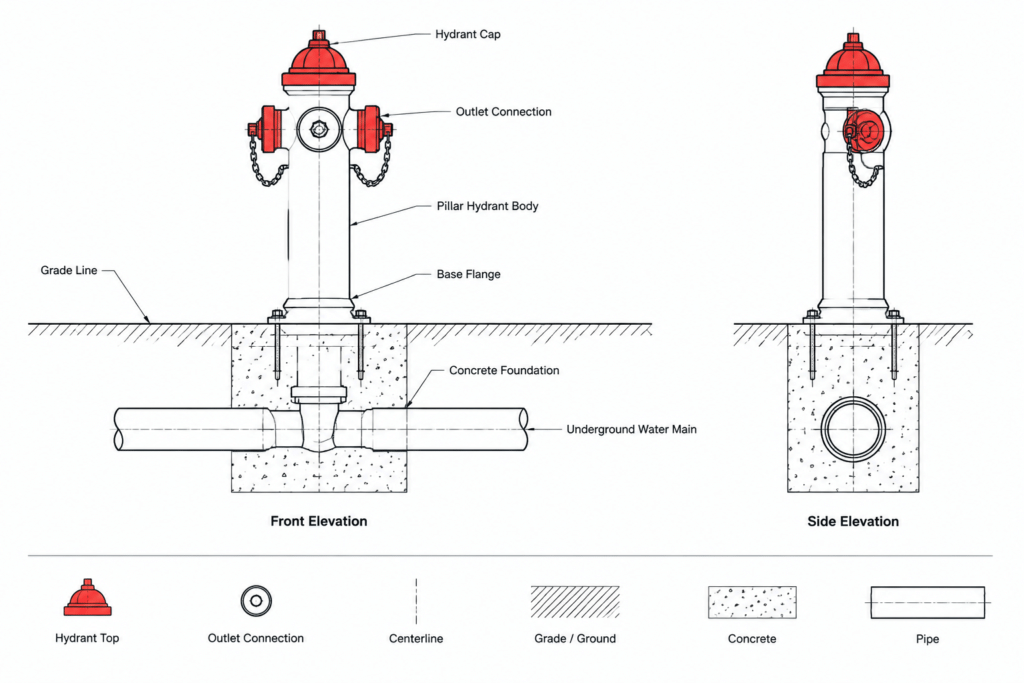
A fire hydrant pillar installation detail helps design teams represent the hydrant and its surrounding construction context consistently across site, utility, and fire protection drawings. The DWG resource on this page can be used as a drafting reference when developing coordinated plan sets or assembling a project detail library.
Before incorporating the block into construction documents, review its geometry, notes, units, layers, and displayed specifications against the project criteria. A typical detail communicates a drafting arrangement; it does not by itself confirm approval, accessibility, system performance, or compliance with governing requirements.
Looking for typical installation details for Fire Hydrant Pillar Type? Download our high-quality DWG file, featuring a comprehensive CAD Block designed for fire hydrant pillar installations. This detailed drawing includes all essential measurements and specifications needed for architects, engineers, and construction professionals. Perfect for use in designing fire protection systems for commercial, industrial, or residential projects, this DWG file ensures compliance with safety standards. The CAD Block is fully compatible with AutoCAD and other leading CAD software, making it easy to integrate into your plans and streamline your workflow for efficient project execution.
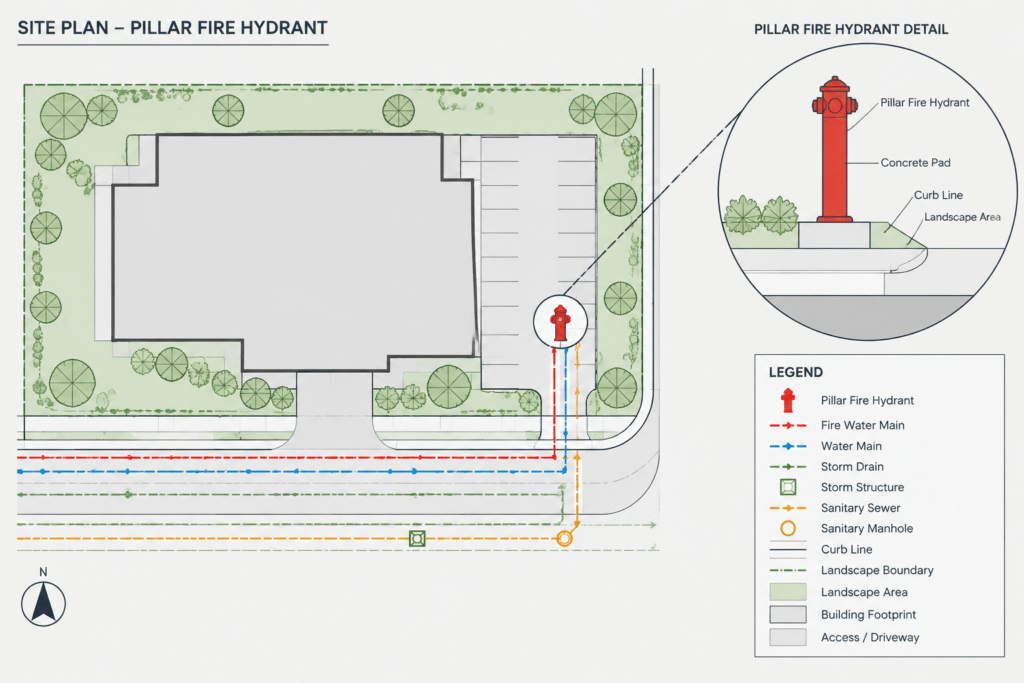
Please log in or register to download this file.
How to Use the Fire Hydrant Detail in a CAD Workflow
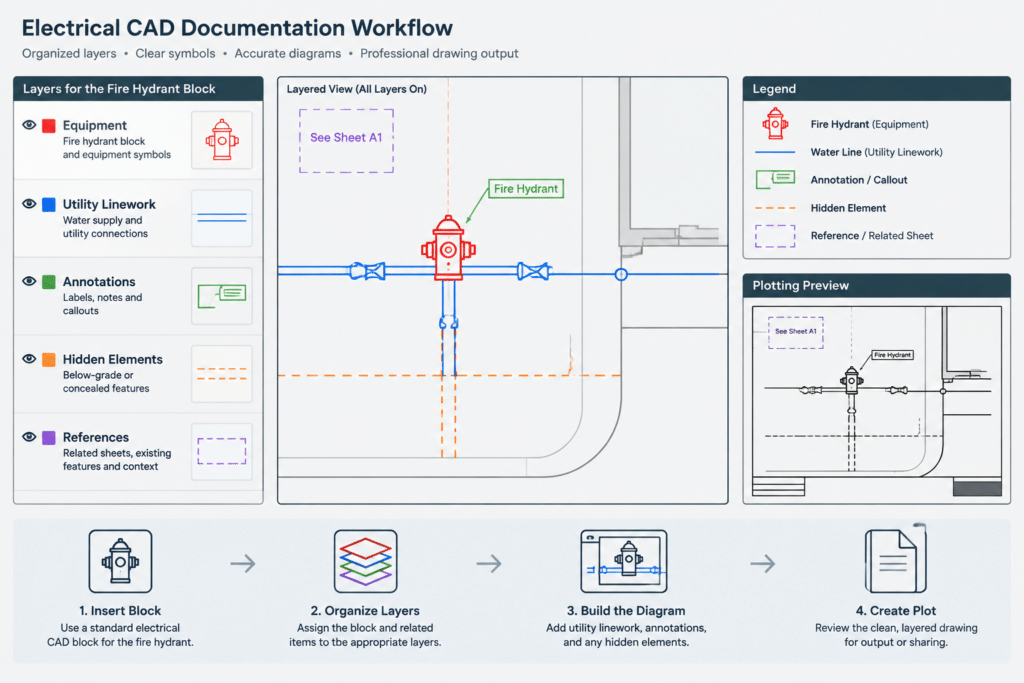
Start by opening the supplied DWG in a controlled review file rather than inserting it directly into a live project. Confirm the drawing units, insertion point, linework organization, text behavior, and plotted appearance. If the file uses layers that do not match the office standard, map them carefully while preserving the original source for reference.
When placing the detail in a drawing set, distinguish between typical information and project-specific information. Labels, surrounding grades, piping connections, clearances, materials, and installation notes may require revision by the responsible design disciplines. Avoid treating graphic scale or visual proportions as verified dimensions unless the drawing expressly provides and confirms them.
Drawing Coordination Considerations
- Site utility plans: Coordinate the hydrant symbol or detail reference with the documented water or fire-service routing.
- Equipment layouts: Check the represented location against nearby structures, landscape elements, curbs, access areas, and other site features.
- Plans and details: Use consistent identifiers so readers can move clearly between the plan symbol, detail callout, and installation view.
- Layers and lineweights: Separate existing, proposed, hidden, centerline, annotation, and reference information according to the project CAD standard.
- Legends and annotations: Keep terminology consistent with the drawing legend, abbreviations, specifications, and equipment schedules.
- Discipline coordination: Compare the CAD detail with current civil, fire protection, architectural, and landscape documentation before issue.
Quality-Control Review Before Publication
Inspect the block for duplicate geometry, stray objects, unresolved references, inconsistent text styles, and elements located far from the intended insertion point. Confirm that notes remain readable at the planned sheet scale and that screening or lineweight choices make the hydrant distinguishable from background information.
The final drawing should also identify where project-specific requirements are documented. Local authority criteria, utility requirements, approved product information, and professional design decisions should take precedence over a generic CAD detail. Related drafting references include fire protection symbols, site utility plans, CAD layer standards, drawing legends, equipment layouts, and detail-callout conventions.
Frequently Asked Questions
What is a fire hydrant pillar installation detail?
It is a CAD representation used to communicate the hydrant arrangement and relevant installation context. Depending on the source drawing, it may include linework, annotations, dimensions, or specification references that must be reviewed before project use.
Can this DWG be inserted directly into a project?
It can be used as a drafting starting point, but it should first be checked for units, layers, text styles, scale behavior, insertion location, and compatibility with the project template. Project-specific engineering and approval requirements still apply.
Is the detail the same as a hydrant symbol on a site plan?
No. A plan symbol identifies location and may connect to a legend or callout, while an installation detail provides a more developed graphic representation. The symbol, callout, and detail title should use consistent identification.
Does a typical CAD detail establish code compliance?
No. Compliance depends on the adopted requirements, authority review, approved system design, site conditions, and project documentation. A generic drawing should not replace verification by the responsible professionals.
What should be checked after importing the block?
Review units, geometry, layers, lineweights, text, external references, plotting behavior, and coordination with current site and utility drawings. Preserve an unchanged copy of the source file for comparison.



Leave a Reply
You must be logged in to post a comment.