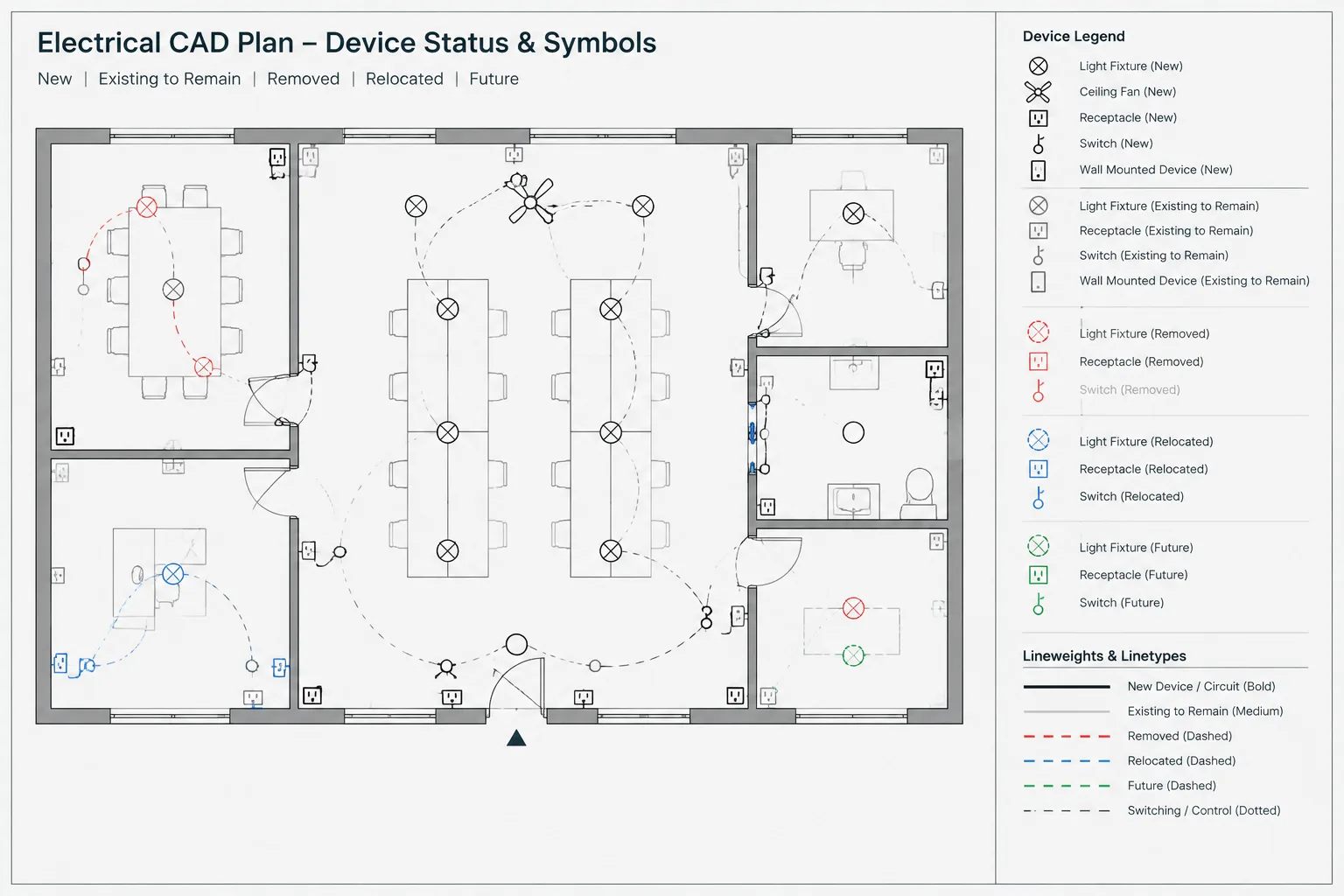
Electrical work status is a distinct layer of information within a CAD drawing. Symbols identify devices and equipment, while status graphics explain whether those objects are new, existing, removed, relocated, reserved for future use, or shown only for coordination. This guide outlines how to build that distinction into plans, diagrams, schedules, blocks, and drawing reviews without depending on color or layer names alone.
Electrical drawings often need to communicate more than device type and location. They must also show what happens to each device, circuit, raceway, or piece of equipment during the project. A receptacle symbol may represent new work, an existing device that remains, a device to be removed, or an item that will be relocated. If that status is unclear, a technically accurate symbol can still produce an ambiguous construction document.
A reliable approach to electrical work status in CAD combines graphic treatment, layer organization, notes, tags, and coordinated schedules. No single method should carry the entire meaning. Color may disappear in a monochrome plot, screened lines may be difficult to distinguish at a reduced scale, and a layer name is not visible to someone reading a PDF. The drawing should remain understandable in its issued form.
Separate device identity from work status
Device identity answers the question, “What is this?” Work status answers, “What is happening to it?” These are different data categories and should be managed separately.
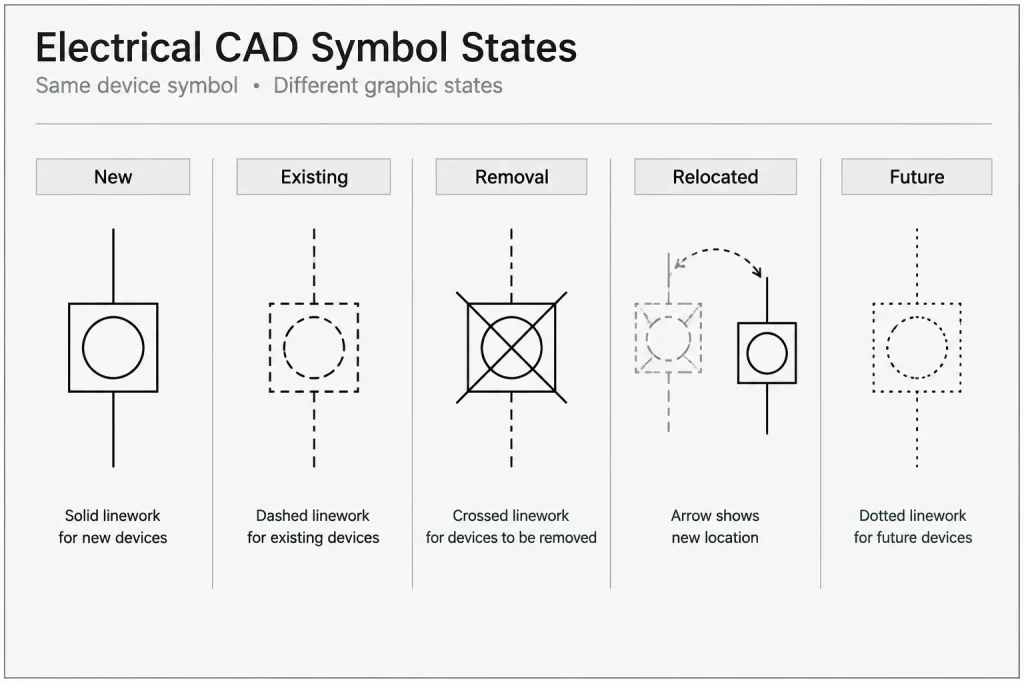
For example, the same basic luminaire symbol might appear as new, existing to remain, relocated, or removed. Creating an unrelated symbol for every combination can make a block library difficult to maintain. A more controlled system keeps the recognizable device geometry consistent while using layers, linework, tags, or supplemental notation to communicate status.
Common status categories include:
- New: Work included as a new project installation.
- Existing to remain: Existing work that stays in place and is not intentionally modified, except where another note indicates otherwise.
- Remove: Existing work intended for removal from its current location.
- Relocate: Existing work moved from one location to another. The documents should clarify both the original and destination conditions.
- Future: Work shown for planning or coordination but not necessarily included in the current scope.
- By others: Work displayed for coordination while responsibility is assigned elsewhere.
Project terminology may vary. Define the actual categories in the drawing legend and avoid assuming that every reader interprets terms such as future, spare, relocated, or existing in the same way.
Build a project status matrix before drafting
A small status matrix gives the CAD team a consistent graphic rule set. It should describe how each condition appears on plans and how it is represented in schedules or diagrams.
| Status | Possible plan treatment | Additional documentation |
|---|---|---|
| New | Primary lineweight and normal project symbol | New tag, circuit reference, or equipment entry as applicable |
| Existing to remain | Screened or secondary lineweight | Existing designation where needed to avoid confusion |
| Remove | Distinct demolition linetype, symbol modification, or removal tag | Demolition note and source-condition reference where applicable |
| Relocated | Removal treatment at the original point and new-work treatment at the destination | Shared identifier or explicit relocation note connecting both locations |
| Future | Distinct linetype or screened graphic treatment | Clear note defining whether equipment, pathway, space, or connection is included |
| By others | Coordination graphic separated from project work | Responsibility note or scope designation |
This table is a drafting framework rather than a universal convention. The selected graphics must match the project’s plotting method, client requirements, and documentation strategy.
Use layers without making layers the only explanation
Status-based CAD layers are useful because they support visibility control, plotting, quantity review, and selective display. A project might separate new devices, existing devices, removal work, and future work while retaining additional classification for lighting, power, communications, or equipment.
There are two common organizational approaches:
- Status-first layers: The layer name begins with the work condition and then identifies the system or object type.
- System-first layers: The electrical system or object type comes first, followed by the status designation.
Either can work if it is consistent. The layer structure should be understandable to the production team, compatible with layer filters or states, and documented in the project CAD rules.
Do not rely on layer color alone. A recipient may print in grayscale, apply a different plot style, export to another format, or view the drawing with altered display settings. Reinforce status through lineweight, linetype, annotation, or a plan-specific legend.
Handle relocated work as two coordinated conditions
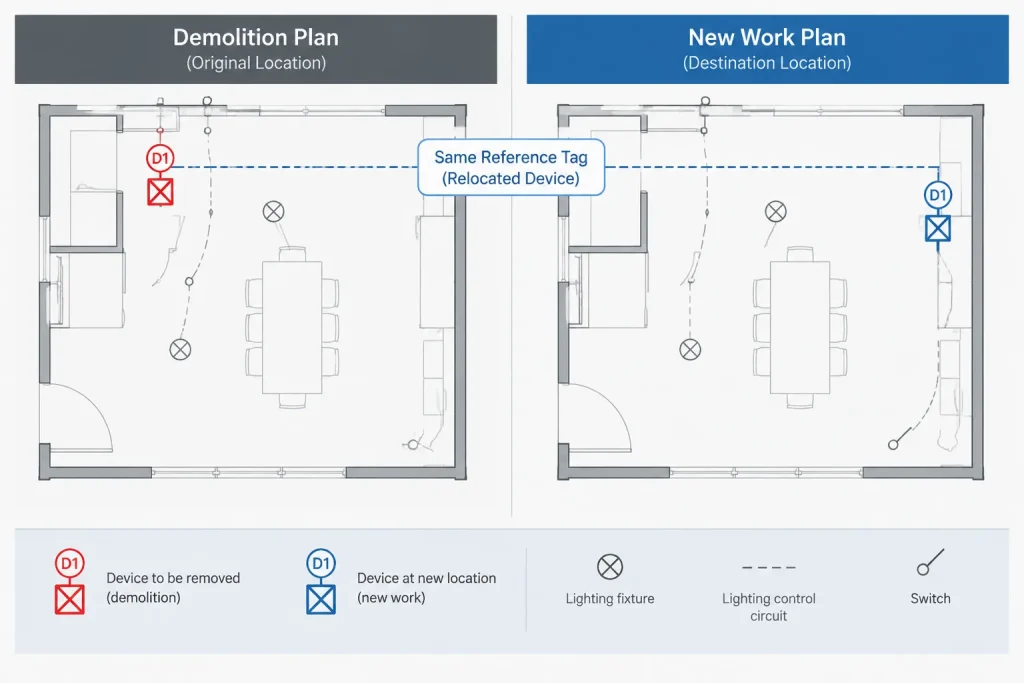
Relocated devices are a frequent source of drawing conflicts because one physical item creates documentation in two places. The original location represents removal work, while the destination represents installation or reconnection work. Showing only the destination can conceal the removal scope. Showing only the original location does not define the final arrangement.
A strong relocation workflow includes:
- A removal symbol or callout at the original location.
- A destination symbol on the new-work plan.
- A matching device identifier, keynote, or relocation reference.
- Updated circuit, control, equipment, and schedule information where applicable.
- A check that the item is not accidentally counted as both a new device and an unrelated existing device.
If the project uses separate demolition and new-work sheets, coordinate the two views with stable identifiers. Avoid vague notes such as “relocate as required” when the destination or design intent can be documented more clearly.
Distinguish future work from current provisions
The word future can describe several different conditions. It may indicate equipment shown only for spatial coordination, an empty pathway reserved for later use, a designated equipment area, or a future connection point served by current work. These conditions are not interchangeable.
When future elements appear in CAD, identify what is actually part of the present project. For example, the drawing may need to distinguish between a future device, a current pathway intended to support that device, and a current connection point reserved for later extension. The graphic appearance should not imply that all shown components are included now.
Future work should also be separated from spare capacity. A spare schedule position, an unused raceway, and a future piece of equipment describe different documentation concepts. Use precise notes and schedule terminology rather than a single broad future label.
Coordinate status across drawing types
Status information should not stop at the floor plan. An equipment item shown as existing to remain on a plan should not appear as plainly new on a single-line diagram unless the difference is intentional and explained.
Plans
Plans establish physical location and often carry the clearest new-versus-existing graphics. Check device symbols, circuiting, raceway paths, equipment tags, and local notes.
Single-line and riser diagrams
Diagrams should distinguish existing sources, retained distribution equipment, new feeders, replaced components, and future connections. Use local legends when the diagram employs status graphics not used elsewhere.
Schedules
Equipment, fixture, cable, or panel-related schedules may need a status field or carefully worded remarks. A schedule should not silently convert a relocated item into a new item or list removed equipment as active project equipment.
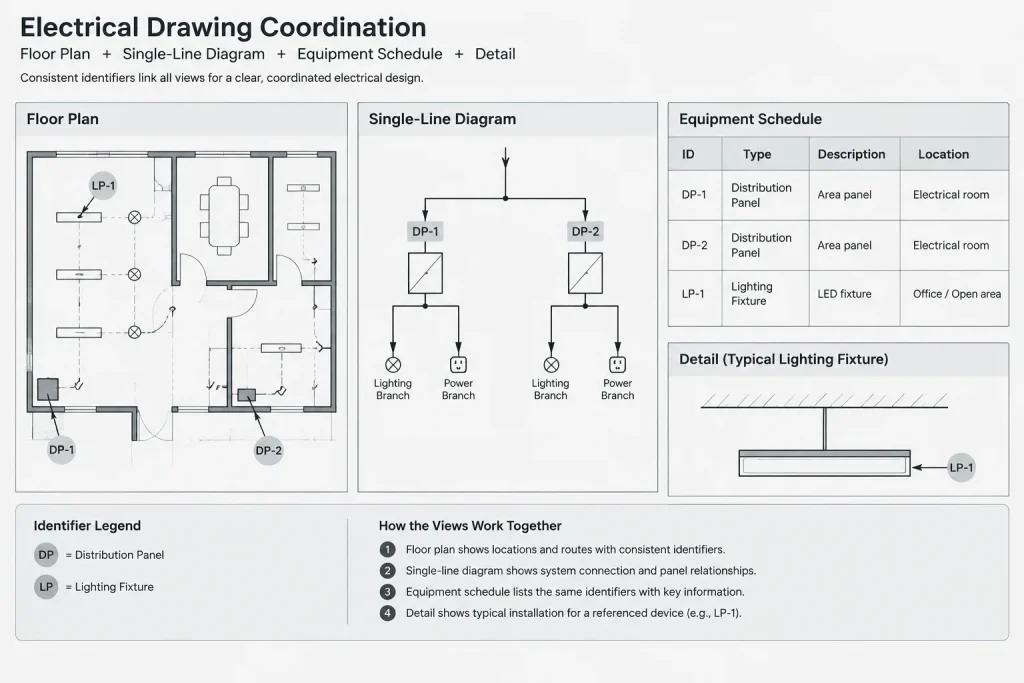
Details and elevations
Details may show a combination of existing construction and new connections. Identify the interface rather than letting all linework appear equally new. Elevations should match the final location and orientation documented on the plan.
Keep blocks flexible but controlled
Electrical blocks can support status workflows without storing every possible project condition inside the block. A practical block may contain stable device geometry and editable attributes for the device tag, circuit reference, or status code. The block can then be placed on the appropriate status layer.
Dynamic visibility or nested status graphics may be useful in some office workflows, but complexity should have a clear benefit. Overloaded blocks can become difficult to audit, exchange, or plot. If status is controlled by both a visibility setting and a layer, mismatched combinations may occur. Establish which property is authoritative and include it in quality-control checks.
Perform a status-focused drawing review
A dedicated review is more effective than looking for status errors during a general redline session. Use a repeatable sequence:
- Isolate each status category and look for objects on the wrong layer.
- Review new-work and demolition views together.
- Trace relocated items from original location to destination.
- Compare plans with diagrams, schedules, details, and equipment lists.
- Check that future and by-others items are not included in current-work counts without explanation.
- Plot in the intended issue style and confirm that every status remains distinguishable.
- Review reduced-size output, where subtle screening and linetype differences may disappear.
- Confirm that legends and notes use the same terminology as tags and schedules.
The final test is whether a reader can determine both the identity and project status of an object without opening the CAD layer manager. Layers help the drafting team manage information, but the published drawing must communicate independently.
A clear status system reduces scope ambiguity
New, existing, removed, relocated, future, and by-others graphics form a scope language across the electrical set. When that language is planned early, CAD layers remain cleaner, blocks are easier to reuse, and coordination between plans and diagrams becomes more dependable. The goal is not to maximize the number of graphic styles. It is to use a small, defined set of conditions that remains clear in CAD, PDF, print, schedules, and multidisciplinary review.
Establish an authority for conflicting status information
A coordinated drawing set should not contain competing answers about an object’s status. Before issue, the project team should decide which project record governs when a plan symbol, block attribute, schedule remark, keynote, and diagram do not agree. That decision may depend on the office workflow, but it should be documented and consistently applied.
Resolving a conflict involves more than correcting the visible symbol. The drafter should trace the object through every place where its identity or scope is represented. This may include demolition plans, new-work plans, single-line diagrams, risers, schedules, details, equipment lists, and referenced backgrounds.
Account for referenced files and drawing revisions
Status errors can appear when external references contain electrical objects that are also represented in the active drawing. Existing background information should be visually separated from project-controlled electrical work so that referenced symbols are not mistaken for current scope.
Revisions can also change an object from one status category to another. A future item may become current work, an existing device may become relocated, or previously retained equipment may enter the removal scope. When that happens, update the complete documentation chain rather than changing only the plan graphic. Related notes, identifiers, schedules, diagrams, and quantity reviews should be checked at the same time.
Use issue output as the communication test
The working CAD file may contain filters, colors, properties, and saved views that help the production team understand status. The issued PDF or print does not necessarily preserve those aids. Review the final plotted output as a reader would receive it, with particular attention to overlapping symbols, screened backgrounds, dense equipment areas, demolition linework, and relocation references.
A successful status system remains legible when viewed outside the authoring environment. Readers should be able to identify the object, understand its project condition, and find any related scope note without inspecting CAD properties.
Frequently Asked Questions
Should new and existing electrical work use different CAD blocks?
Not necessarily. A maintainable library can use consistent device geometry while layers, linework, tags, attributes, or notes communicate work status. Separate blocks may be appropriate when the plotted geometry genuinely differs, but creating unrelated blocks for every status combination can make coordination harder.
Can color alone identify electrical work status?
No. Color may change during plotting, export, printing, or file exchange. Reinforce color with a plotted distinction such as lineweight, linetype, screening, annotation, or a clearly defined legend.
How should a relocated electrical device be shown?
Document the original location as removal work and the destination as installation or reconnection work. A shared identifier, keynote, or relocation note should connect the two representations. Associated circuit, control, equipment, and schedule information should also be reviewed.
Is future equipment the same as spare capacity?
No. Future equipment, reserved space, unused pathways, connection provisions, and spare schedule positions describe different conditions. Notes and schedules should state what is included in the current scope and what is shown only for later planning.
Why are status layers not sufficient by themselves?
Layer names and properties are useful to CAD users but may not be visible in an issued document. The plotted drawing must communicate status independently through graphics, labels, notes, legends, and coordinated schedule information.
What should be checked when an object’s status changes during a revision?
Review every representation of the object, including plans, demolition views, diagrams, schedules, details, tags, notes, and referenced backgrounds. This prevents a revised plan symbol from conflicting with unchanged information elsewhere in the drawing set.
Leave a Reply
You must be logged in to post a comment.