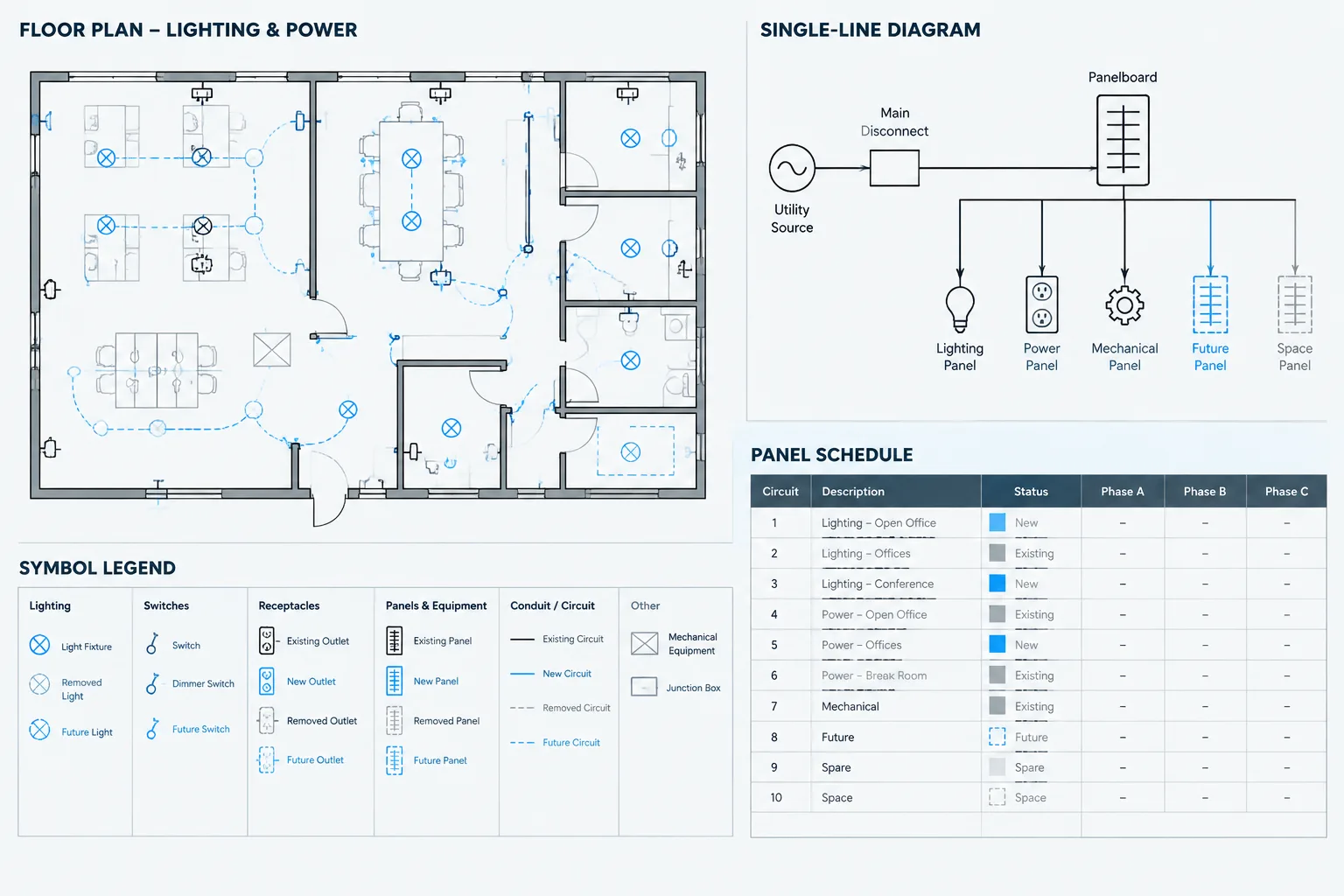
Electrical drawing status notation should communicate both the condition of an item and its relationship to the current project scope. Terms such as existing, new, spare, space, and future may appear simple, but inconsistent use can create conflicts between CAD plans, single-line diagrams, schedules, legends, and details.
This reference explains how to organize status information as a coordinated documentation system rather than as isolated labels. It focuses on drafting clarity, controlled terminology, plotted appearance, and quality control while recognizing that the project legend and documented requirements govern the final convention.
Electrical drawings often show more than the equipment included in the current construction scope. A plan may contain existing devices, new feeders, equipment to be relocated, future provisions, and items scheduled for removal. Panel schedules and single-line diagrams may also use terms such as spare and space, which are easy to confuse.
Clear electrical drawing status notation helps reviewers understand what exists, what changes, and what remains only a future possibility. The exact terminology and graphic conventions can vary by organization and project, so the drawing legend and project requirements should govern. The goal is not to force every status into a universal symbol. It is to create a consistent documentation system that remains understandable across plans, diagrams, schedules, and details.
Separate Physical Status from Project Responsibility
A common drafting problem is using one note to describe several different ideas. An item can have a physical status, a scope status, and a responsible party. These are related, but they are not interchangeable.
- Physical status: Existing, new, relocated, removed, or abandoned.
- Planning status: Future, spare, reserved, or conceptual.
- Scope status: Included in the current work, excluded from the contract, or shown for coordination only.
- Responsibility: Furnished, installed, or connected by a particular discipline, contractor, owner, utility, or vendor.
For example, labeling equipment only as “by others” does not explain whether it is existing, future, or newly installed under a separate contract. Similarly, “future” does not identify who will provide the future item or whether any current infrastructure is being installed for it.
Common Status Terms and Their Drawing Meaning
The following interpretations are common starting points, but project-specific definitions should be confirmed before they are placed in a legend.
| Status | Typical drawing meaning | Coordination concern |
|---|---|---|
| Existing to remain | An installed item intended to stay in place | Verify that connected circuits, tags, and downstream equipment are represented consistently |
| New | An item included as part of the current work | Coordinate its plan location, source, identifier, and schedule entry |
| Relocated | An existing item moved to a new location | Show both the original disposition and the new location without making the item appear duplicated |
| Remove | An item designated for removal | Clarify related circuit, feeder, and source impacts on demolition documents |
| Abandoned | An item or pathway no longer serving its previous function but not necessarily removed | State the intended drawing treatment rather than assuming the word alone explains field disposition |
| Future | An item anticipated after the current project scope | Distinguish the uninstalled future item from infrastructure actually included now |
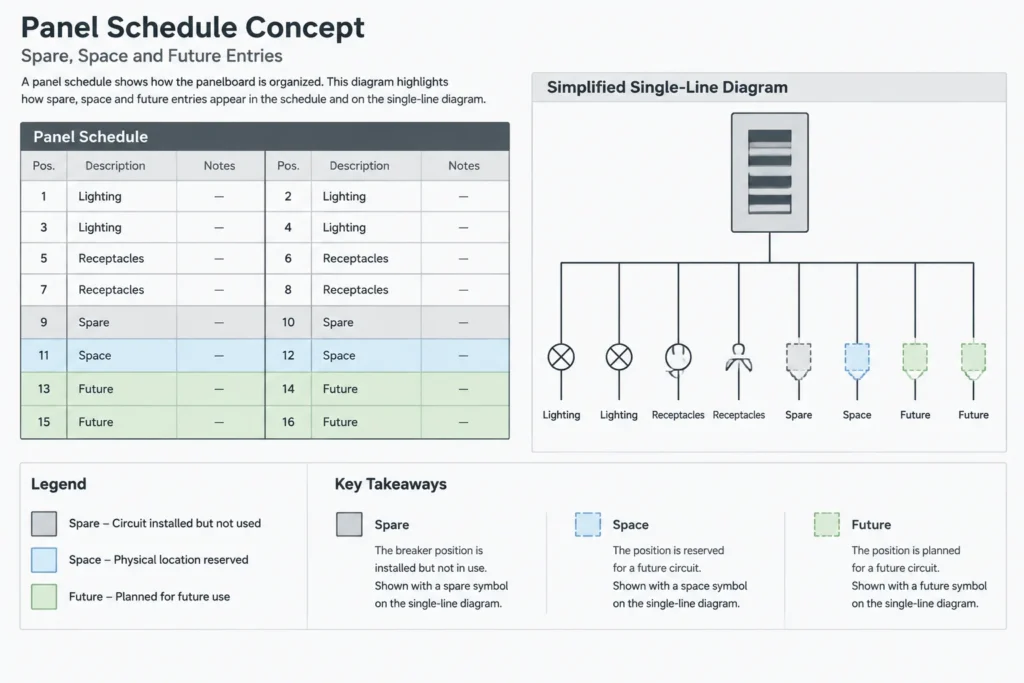
| Spare | Installed capacity or an installed component not currently assigned to a load or function | Confirm that the term matches the schedule, diagram, and project definition |
| Space | A reserved physical position where a component is not presently installed | Do not graphically represent it as installed equipment unless the project convention explicitly does so |
Why “Spare” and “Space” Need Special Attention
In distribution documentation, spare and space can communicate different physical conditions. A spare commonly indicates something installed but unassigned, while a space commonly indicates an available position without the corresponding installed component. Treating both as empty capacity can mislead estimators, reviewers, and future designers.
Use the exact project convention in panel schedules, equipment schedules, and diagrams. If a block or schedule template contains a generic status field, do not assume that its default wording is correct for every project.
Build a Status System That Works Without Color
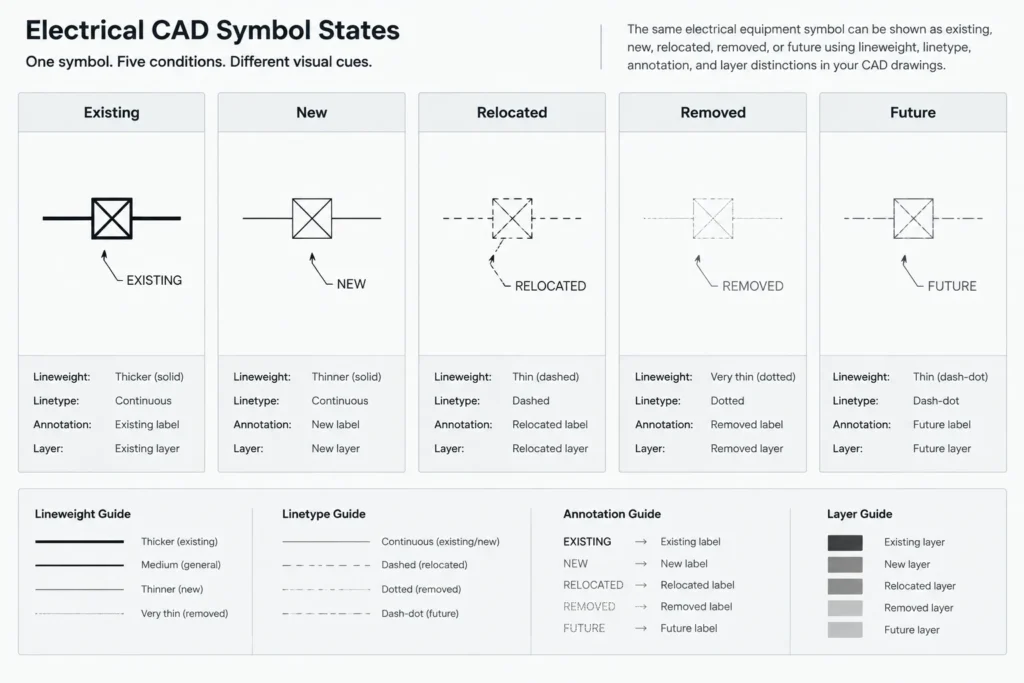
Color can help during CAD production and review, but issued drawings may be printed in grayscale or viewed with altered display settings. Status should therefore remain understandable through linework, text, symbols, or drawing separation.
A robust system may combine:
- Dedicated layers for existing, new, demolition, and future graphics
- Distinct but readable linetypes for non-current or removal work
- Tag suffixes or adjacent status notes where needed
- Keynotes that explain unusual conditions
- Separate demolition and new-work views when an overlaid plan becomes crowded
- A legend showing the actual plotted appearance of each convention
Avoid relying on faint screening alone. Light linework can disappear in reduced prints, while overly heavy demolition graphics can overpower the new work. Test the intended plot output rather than judging status graphics only from the model-space display.
Coordinate Status Across Plans, Diagrams, and Schedules
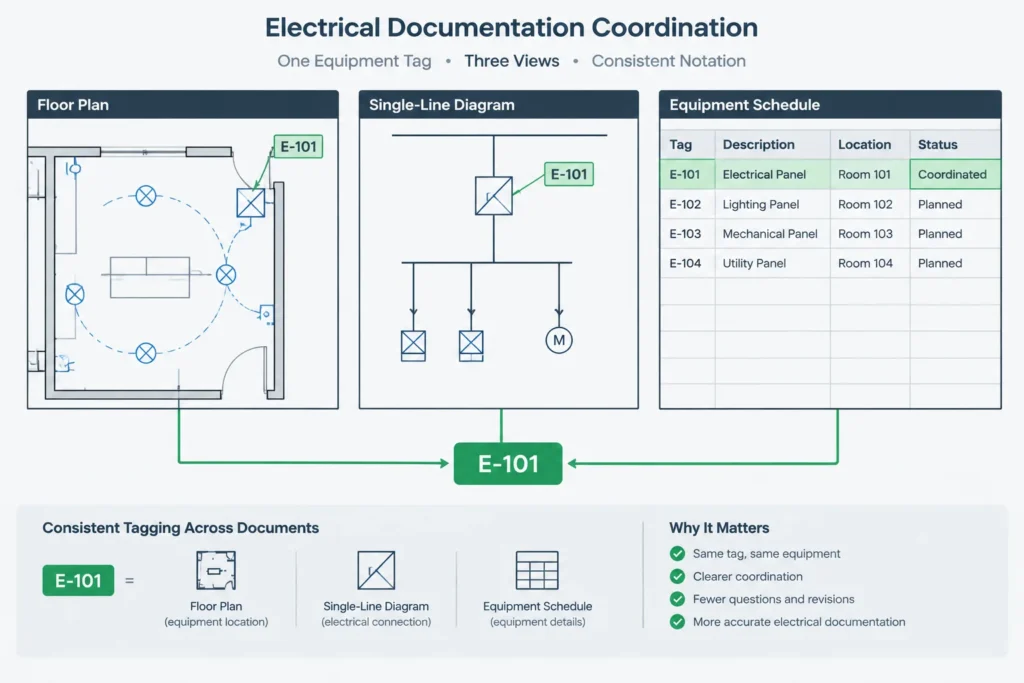
Status notation fails when each drawing type tells a different story. A piece of equipment shown as existing on a floor plan should not appear as unqualified new equipment on a single-line diagram. A future load should not look like a connected current load in a schedule unless the notation clearly explains the relationship.
Floor Plans
Floor plans establish location and spatial context. Show whether an item remains, moves, is removed, or is anticipated for the future. For relocated devices, use notes or cross-references that connect the original location to the destination without creating two apparently active devices.
Single-Line and Riser Diagrams
Diagrams should distinguish installed electrical paths from future or removed connections. If current work includes a pathway or distribution provision for a future load, show which part is installed now and which part is only anticipated. A single “future” label applied to the entire branch may conceal this distinction.
Panel and Equipment Schedules
Schedule wording should agree with diagram and plan status. Status may be communicated through a dedicated column, description field, remarks field, or controlled naming convention. Keep “spare,” “space,” and “future” separate unless the project’s documented convention intentionally combines them.
Details and Elevations
Details often reuse standard or typical graphics. If a detail includes optional, future, or existing components, identify them clearly. Do not allow a generic library detail to imply that every illustrated component is part of the current installation.
Use CAD Blocks Without Hiding Status
A block should represent the equipment or symbol, while the drawing context communicates its project status. Creating unrelated blocks for every possible status can make a library difficult to maintain. On the other hand, placing all conditions on one layer and differentiating them only with nearby text can make global editing unreliable.
A practical workflow is to keep symbol geometry consistent while controlling status through approved layers, visible attributes, adjacent notes, or clearly managed block variations. If attributes are used, choose controlled terms rather than allowing many informal versions such as “EX,” “EXIST,” “existing,” and “existing item.” Consistent values make schedules, searches, and quality checks more dependable.
Do not bury essential status information inside a block attribute that is invisible on the plotted sheet. Invisible data can support drawing management, but critical construction intent must also appear in the issued documentation.
A Practical Drafting Workflow
- List the required conditions. Identify which statuses actually occur in the project before creating layers and notes.
- Define each term. Record what spare, space, future, existing, relocated, and removed mean for the drawing set.
- Select graphic conventions. Decide how each condition will appear in plotted plans, diagrams, and details.
- Configure reusable content. Prepare layers, legend samples, status attributes, and schedule fields using controlled terminology.
- Apply status at the source. Assign the condition when an object is created or reviewed instead of waiting until sheet production.
- Coordinate related views. Compare the plan, single-line diagram, riser, schedule, detail, and demolition documents for the same item.
- Test the plotted result. Review monochrome output, reduced sheets, and PDF visibility.
- Perform a status audit. Search tags and status values, then resolve conflicting or undefined terms before issue.
Common Documentation Errors
- Showing future equipment with the same linework as currently installed equipment
- Using “existing” without stating whether the item remains, moves, or is removed
- Using “by others” as a substitute for physical or scope status
- Showing a relocated item at both locations without an explanatory relationship
- Calling an uninstalled position a spare on one sheet and a space on another
- Using color as the only distinction between new and demolition work
- Leaving generic library-detail components unqualified
- Changing a plan status without updating connected schedules and diagrams
Final Quality-Control Questions
Before issuing the drawings, select representative equipment and trace it through every relevant view. Can a reviewer determine whether it exists now, changes under the current work, or is only planned for the future? Are installed provisions separated from uninstalled future components? Do spare and space have consistent meanings? Does the notation remain legible without color?
Good electrical drawing status notation is less about adding more labels and more about controlling meaning. When terms, CAD layers, symbols, schedules, and diagrams use one coordinated system, the drawing set becomes easier to review, estimate, revise, and maintain.
Write Status Notes as Complete Drawing Instructions
A useful status note should answer the questions relevant to the item without forcing the reader to infer missing information. Depending on the drawing context, that may include the item identity, present physical condition, required change, current scope, and responsible party.
For example, a responsibility note alone does not establish whether equipment is installed, removed, relocated, or merely anticipated. Likewise, an existing-equipment label does not explain whether that equipment remains operational, is disconnected, or is affected by adjacent work. Separate fields or coordinated notes are often clearer than a single overloaded abbreviation.
Use a Controlled Status Vocabulary
A controlled vocabulary improves consistency across block attributes, layer names, schedules, keynotes, and diagram labels. The approved list should be short enough to manage but specific enough to prevent materially different conditions from receiving the same description.
- Assign one approved term to each defined condition.
- Document permitted abbreviations in the legend or drafting standard.
- Avoid casual synonyms that make searches and schedule comparisons unreliable.
- Keep responsibility language separate from physical and planning status.
- Review imported blocks and referenced drawings for conflicting terminology.
Manage Status Changes During Revisions
Status is not necessarily permanent. A future item may enter the current scope, an existing item may become a removal item, or a reserved position may receive an installed component. When this happens, changing the visible label is only part of the revision.
The drafter should also review associated layers, attributes, schedules, diagram connections, keynotes, demolition views, and detail callouts. Where data is extracted from CAD objects, confirm that the underlying status value changed with the plotted annotation. This prevents an item from appearing correct on a plan while retaining an obsolete classification in schedules or drawing-management data.
A Useful Review Method
Choose a representative item and follow its identifier through every document where it appears. Compare its status, source relationship, location, schedule description, and applicable notes. Repeat this trace for items with different conditions, especially relocated equipment and current provisions associated with future work. This object-based review often reveals coordination problems that are difficult to detect through a sheet-by-sheet visual check.
Frequently Asked Questions
Are spare and space interchangeable on an electrical drawing?
They should not be treated as interchangeable unless the project documents explicitly define them that way. A spare commonly describes an installed but unassigned component or capacity, while a space commonly identifies a reserved position without the corresponding component installed.
Should existing electrical equipment be shown only with screened linework?
Screening may support the convention, but it should not be the only source of meaning. Reduced prints, grayscale output, and display settings can make light graphics difficult to interpret. Text, linetype, layers, symbols, or separate views can provide additional clarity.
Does “by others” describe equipment status?
No. It identifies responsibility but does not explain whether the item is existing, new, relocated, removed, or future. Responsibility and physical status should be documented separately when both affect interpretation.
How should relocated equipment appear in CAD documents?
The original location and destination should be related through consistent identifiers, notes, or cross-references. The documentation should make clear that the graphics represent one relocated item rather than separate active items.
Can future equipment be shown on a single-line diagram?
Yes, when its status is unmistakable and the diagram distinguishes the future component from infrastructure included in the current work. The legend and related schedules should use the same interpretation.
Should status be stored inside a CAD block?
A controlled attribute can support searching, extraction, and quality control, but essential status must remain visible in the issued documentation. Hidden data should not be the only indication of project intent.
Leave a Reply
You must be logged in to post a comment.