
A fire hose cabinet detail AutoCAD drawing helps document the cabinet’s appearance, placement, and relationship to the surrounding wall construction. Commonly identified as an FHC on plans, this equipment should be coordinated across fire protection, architectural, structural, and applicable building-services drawings.
The downloadable content below provides the original drawing resource. Before incorporating it into a project set, review the geometry, notes, dimensions, symbols, and represented components against the approved equipment information and project requirements.
Explore our comprehensive **FIRE HOSE CABINET DETAIL (FHC)** DWG file, a high-quality CAD block designed for architects, engineers, and designers working on fire safety systems. This downloadable file provides precise details and dimensions of a standard fire hose cabinet, ensuring compliance with safety regulations and accurate implementation in your building projects. Compatible with AutoCAD and other leading CAD software, this FHC detail is ideal for use in commercial, residential, and industrial applications. Optimize your fire protection plans by integrating this ready-to-use, editable CAD block into your designs for efficient and professional results.
Please log in or register to download this file.
How to Review an FHC CAD Detail
A fire hose cabinet drawing may contain an elevation, plan, section, or a combination of views. Each view serves a different documentation purpose. The elevation communicates the visible cabinet arrangement, the plan clarifies its relationship to the wall, and a section can show recess conditions, trim, or surrounding construction when those items are included.
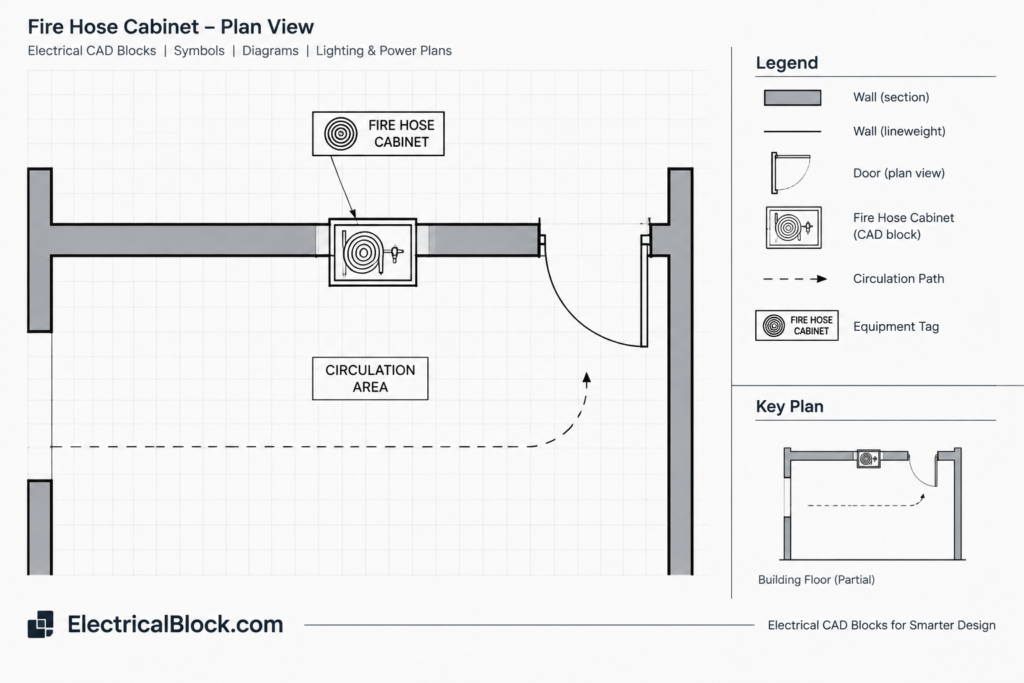
Do not assume every line or component is appropriate for the current project. Cabinet configurations and contents can vary, so the detail should be compared with the approved equipment submittal, architectural wall type, fire protection design, and requirements of the authority having jurisdiction.
Drawing Review Checklist
- View identification: Confirm whether the file shows a plan, elevation, section, schematic arrangement, or fabrication-oriented detail.
- Cabinet configuration: Determine whether the geometry represents a recessed, semi-recessed, or surface-mounted condition, if identified.
- Wall coordination: Check the wall type, opening, framing, finish, and depth relationships against the architectural drawings.
- Door operation: Review the indicated door swing, hinge side, access area, and possible conflicts with adjacent doors or equipment.
- Represented contents: Identify only the hose, valve, extinguisher, rack, reel, or accessories actually shown or labeled. Do not infer omitted equipment.
- Annotations: Check abbreviations, leaders, dimensions, detail references, and notes for consistency with the project’s drafting conventions.
- Drawing scale: Verify the inserted geometry and plotted view rather than relying on the apparent size of the block.
- Project verification: Compare the CAD detail with current design documents, approved product information, and applicable requirements before issue.
Using the Detail in an AutoCAD Workflow
Insert or reference the detail using the project’s established CAD workflow. After placement, inspect units, scale, insertion point, layers, lineweights, linetypes, text styles, and dimension styles. Imported content often requires layer mapping or annotation cleanup so that it plots consistently with the rest of the drawing set.
Keep equipment geometry separate from project-specific notes where practical. This makes it easier to update the cabinet representation without overwriting sheet annotations. If the original file contains unrelated objects, unused definitions, or duplicate geometry, review them carefully before cleanup so required information is not removed.
Plan and Detail Coordination
The FHC location shown on a floor plan should correspond with the enlarged detail and related schedules or legends. Use consistent equipment tags and detail references so reviewers can trace the cabinet from its plan location to the supporting information. Where disciplines use different backgrounds, compare current files to identify wall, structural, door, and circulation conflicts.
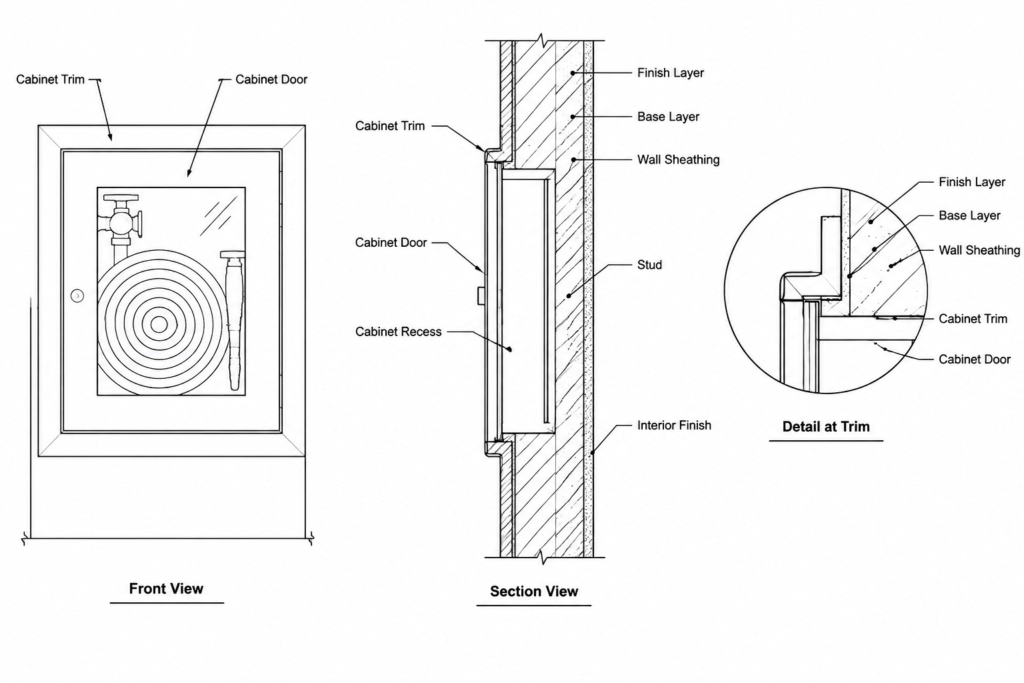
A generic CAD detail is a drafting starting point, not confirmation of code compliance or product suitability. Final documentation should reflect the selected cabinet, coordinated wall assembly, fire protection design, accessibility considerations, and review requirements for the specific project.
Related Drawing Topics
- Fire protection plans and equipment symbols
- Wall-mounted equipment elevations and sections
- CAD legends, abbreviations, and equipment tags
- Architectural background coordination
- Layer standards and plotting workflows
- Detail callouts and sheet-reference organization
Frequently Asked Questions
What does FHC mean on a drawing?
FHC commonly identifies a fire hose cabinet. The project legend, equipment schedule, and drawing notes should be checked because abbreviations can vary between drawing sets.
What should a fire hose cabinet CAD detail show?
The required content depends on the documentation purpose. A useful detail may show the cabinet outline, door, represented internal components, wall relationship, dimensions, labels, and relevant references. Only information verified for the project should remain in an issued drawing.
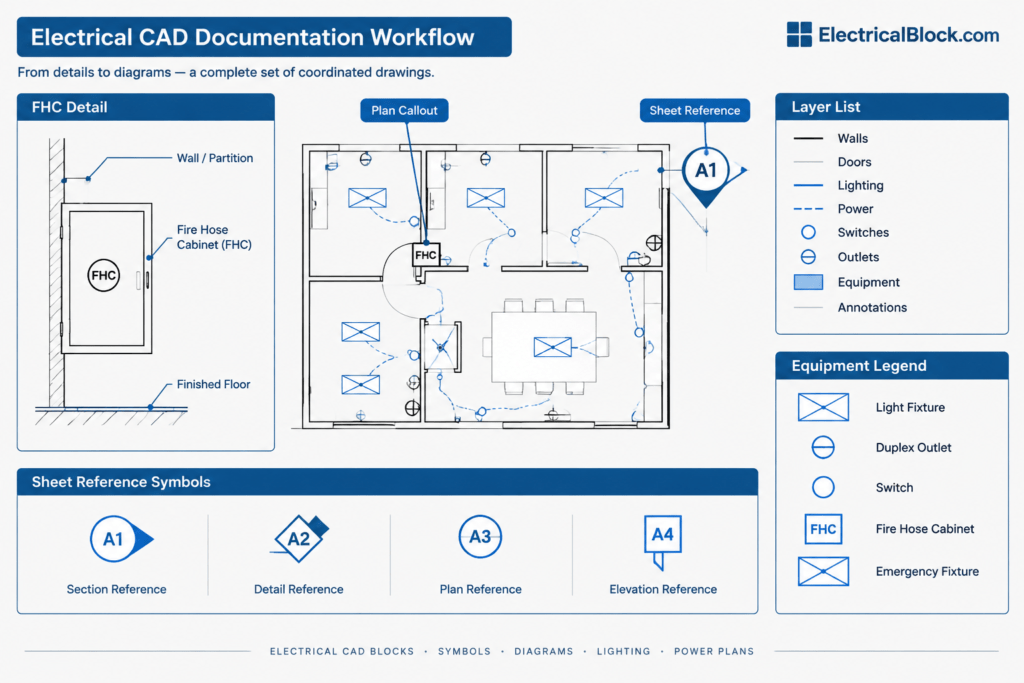
Can the same FHC detail be used for every wall type?
No assumption should be made that one detail fits every condition. Wall thickness, construction, finish, framing, and cabinet mounting configuration can affect how the detail is documented.
Why should layers and units be checked after importing the DWG?
External CAD files may use different drawing units, layer names, colors, lineweights, or annotation settings. Reviewing these properties helps prevent scaling errors, plotting problems, and conflicts with office CAD standards.
Does a generic FHC drawing establish regulatory compliance?
No. A generic drawing can support drafting and coordination, but compliance depends on the complete project design, selected equipment, applicable requirements, and review by qualified professionals and relevant authorities.




Leave a Reply
You must be logged in to post a comment.