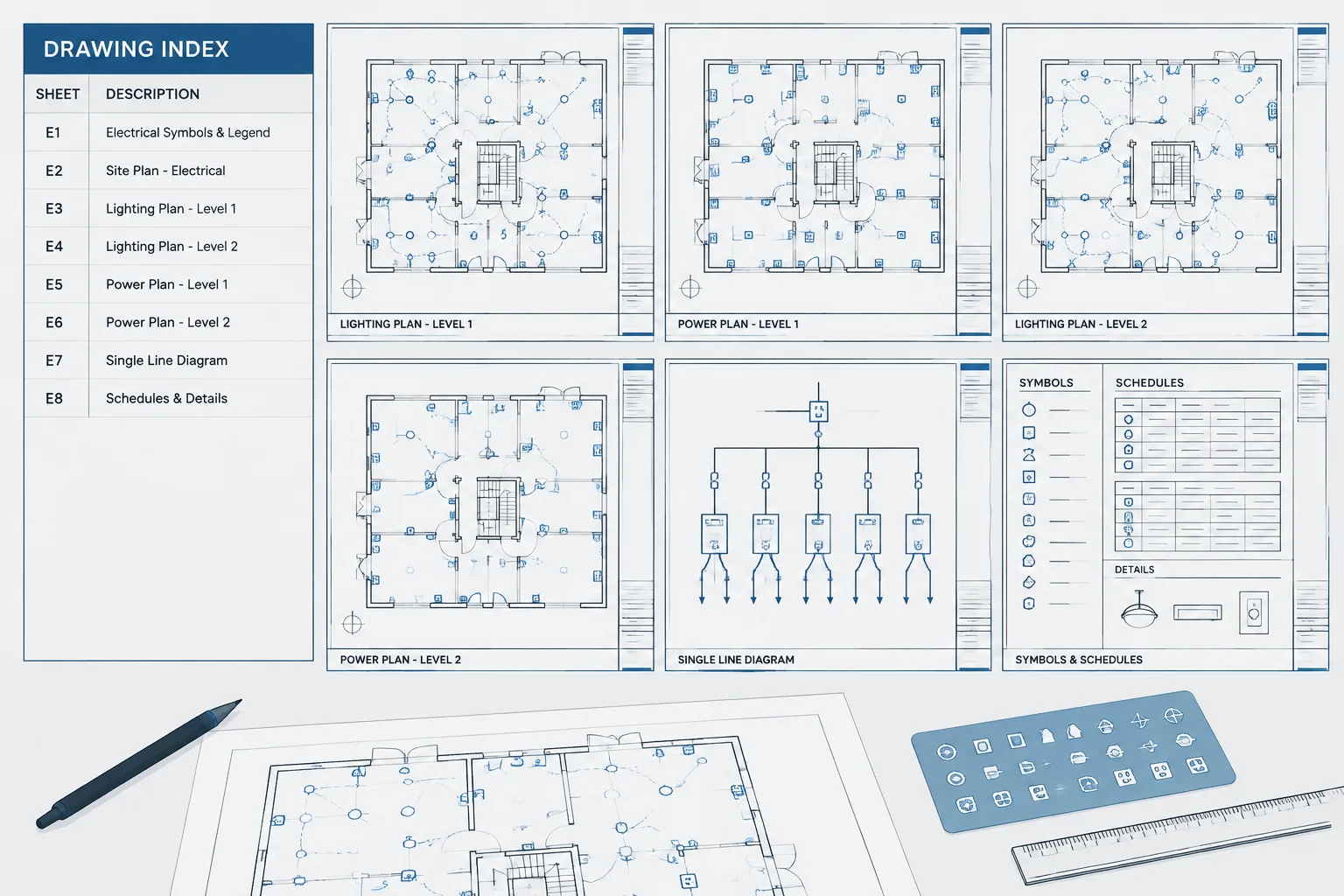
An electrical drawing index connects sheet organization with CAD production and issue control. It gives project participants a concise view of the electrical set while helping the drafting team detect missing sheets, conflicting titles, outdated references, and publishing errors.
This guide explains how to organize sheet identities, coordinate indexes with title blocks and file names, and review the resulting package before release. The methods should be adapted to the owner’s requirements, office procedures, and project document-control plan.
An electrical drawing index is more than a list of sheets. It is the navigation structure for the electrical document set, helping reviewers find plans, diagrams, schedules, and details while showing which documents belong to a particular issue. When the index, title blocks, file names, and published PDFs disagree, even a well-drafted project becomes difficult to use.
A reliable index begins with a clear sheet-numbering strategy and continues through every project milestone. The CAD workflow should support additions, deleted sheets, consultant coordination, revisions, and final deliverables without creating ambiguous document identities.
What an Electrical Drawing Index Should Communicate
At a minimum, the index should identify each included electrical sheet by its official sheet number and title. Depending on the project documentation method, it may also communicate discipline groups, drawing categories, issue status, revision information, or whether a sheet is intentionally omitted from a particular package.
The index should answer several practical questions:
- Which electrical sheets are part of the current issue?
- What subject is covered by each sheet?
- Where can a user find plans, diagrams, schedules, or details?
- Have sheet identities changed since an earlier issue?
- Are gaps in the sequence intentional?
- Does the index match the title block and published file?
An index should not be treated as a manually typed summary that is updated only before plotting. It is a controlled project record that must remain coordinated with the actual sheet files.
Build a Sheet-Numbering Structure Before Production Expands
Sheet numbers often contain a discipline identifier followed by a category, sequence, or project-specific grouping. The exact format depends on the owner, client, design team, or established office standard. The important drafting principle is consistency rather than adoption of an unverified universal format.
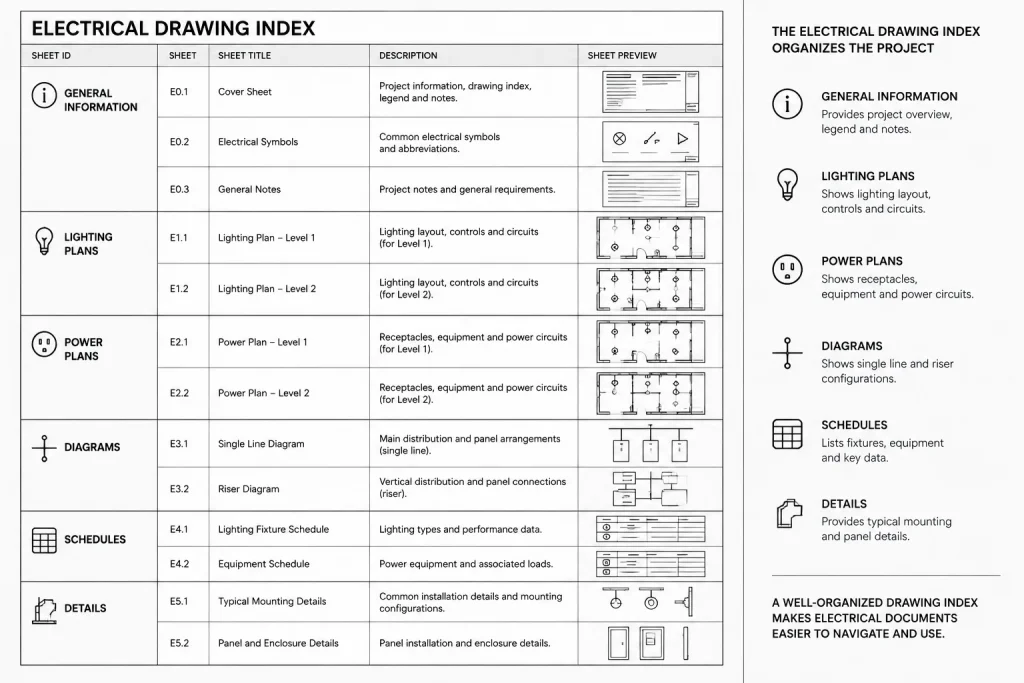
Before creating numerous sheet files, define how the electrical set will distinguish major drawing types. Possible groups may include:
- Cover sheets, legends, and general information
- Site or exterior electrical plans
- Lighting plans
- Power plans
- Low-voltage or special-system plans
- Single-line diagrams and risers
- Schedules
- Details and enlarged views
- Control or schematic drawings
Not every project needs every group. A small project may use a compact sequence, while a large campus or multi-building project may need building, area, level, or package identifiers. Avoid making the number carry more information than the project team can maintain reliably.
Leave Room Without Creating Confusion
Adding sheets late in design is common. A sequence that is too tightly planned may force widespread renumbering, while a sequence with unexplained gaps can look incomplete. Select a method that allows reasonable growth and document intentional gaps in the project control record.
If a new sheet must be inserted between established sheets, use the project team’s approved insertion convention. Do not improvise suffixes or renumber a published series without checking the effect on references, issue records, PDF bookmarks, schedules, and consultant documents.
Write Sheet Titles for Retrieval, Not Just Appearance
A useful title tells readers what the sheet contains and, when necessary, where the content applies. Titles such as Electrical Plan or Details may be too broad when several sheets contain similar material.
Effective titles usually combine a drawing type with a location or scope qualifier. Examples of title structure include:
- Lighting Plan — Building Area
- Power Plan — Floor or Zone
- Electrical Site Plan — Defined Scope
- Single-Line Diagram — Distribution Group
- Electrical Details — Subject Group
These are structural examples, not mandatory naming formats. Use terminology that agrees with the project, architectural backgrounds, room or level naming, and contractual package organization.
Keep titles stable after issue whenever possible. Changing capitalization or wording may appear harmless, but it can create differences among the index, title block, transmittal, PDF bookmark, and document management system. When a title must change, treat it as a controlled documentation change.
Coordinate Four Versions of Every Sheet Identity
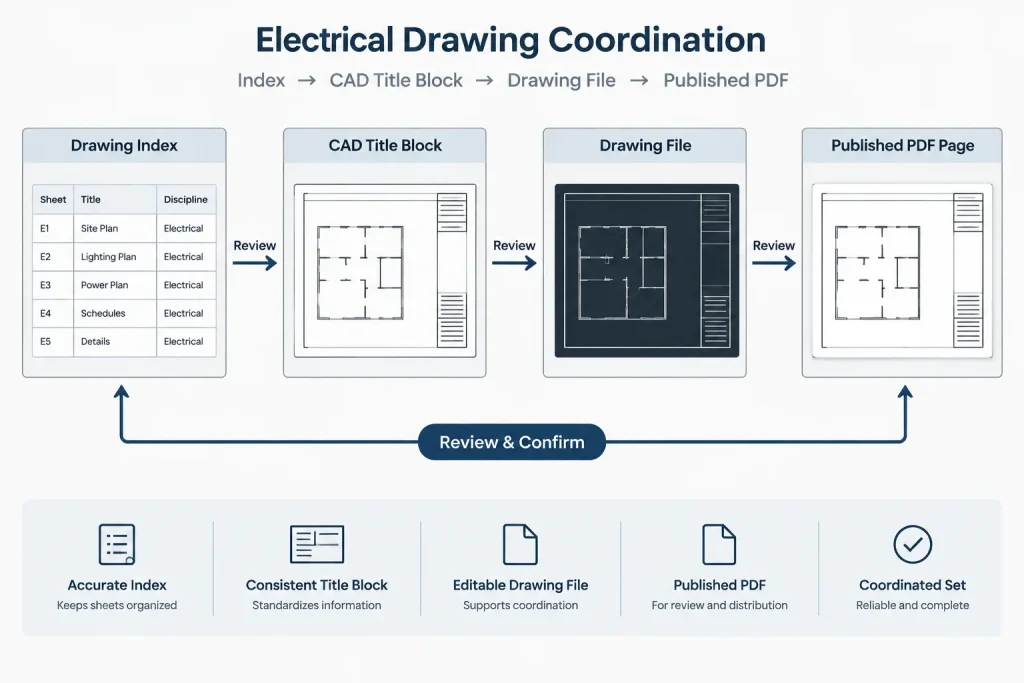
Electrical teams frequently maintain the same identity in several places. At minimum, check the following:
| Location | Information to Verify | Common Problem |
|---|---|---|
| Drawing index | Sheet number, title, and inclusion status | Old title remains after a scope change |
| Title block | Official sheet number and title | Copied sheet retains another sheet’s data |
| CAD file name | Project-approved file identity | File name no longer matches the sheet |
| Published PDF | Page label, bookmark, and visible title block | Pages are plotted or assembled in the wrong order |
A fifth identity may exist in a cloud document platform, drawing register, transmittal, or project database. The authoritative source should be defined by the project team. If multiple systems can overwrite sheet data independently, discrepancies are likely.
Choose a Controlled CAD Index Workflow
The index can be maintained as CAD text, a table, attributed blocks, external data, or a project-managed sheet database. Each approach can work if responsibilities and update procedures are clear.
Manual CAD Table
A manual table is straightforward and visually controllable, but every addition and title change must be entered deliberately. Use consistent row spacing, text styles, alignment, and sorting. Avoid assembling the list from unrelated text objects that are difficult to reorder.
Attribute-Based or Data-Driven Index
A data-driven workflow can reduce repetitive entry by collecting sheet information from title blocks or another controlled source. However, automation does not guarantee accuracy. Duplicate sheet numbers, empty attributes, inconsistent title fields, and excluded sheets still require review.
Externally Managed Register
Some teams manage sheet data outside CAD and import or reference it for publication. This can support broader document control, but the connection between the register and visible drawing index must be verified. A current spreadsheet or database does not help if the plotted index still shows an older snapshot.
Handle Added, Deleted, and Renumbered Sheets Deliberately
Each type of sheet change has different coordination consequences.
Added Sheets
Add the sheet to the index, create the correct title-block data, update cross-references, and confirm its position in the published set. Review callouts from other sheets that direct users to the new content.
Deleted Sheets
Do not simply erase a previously issued sheet from every record without considering document history. The current issue should make the intended status understandable according to the project’s issue-control method. Remove obsolete references that would otherwise send readers to missing content.
Renumbered Sheets
Renumbering can affect detail references, section callouts, key plans, diagram references, schedule notes, transmittals, and external consultant sheets. Search both visible text and block attributes. A file-name change alone does not update references embedded in drawings.
Coordinate the Index with Package Boundaries
A project may have separate permit, pricing, construction, early-release, addendum, or record packages. The electrical drawing index should clearly correspond to the package being published. Avoid reusing an index from a full set when only a partial package is being issued unless excluded sheets are handled clearly.
For multi-building or multi-discipline projects, determine whether electrical sheets appear in a combined project index, an electrical-only index, or both. If two indexes list the same sheets, establish who updates each one and compare them before issue.
Vendor drawings, shop drawings, and reference documents should not be presented as design sheets merely because they are stored in the same project folder. Distinguish contractual drawing identities from supporting files according to the project’s document-control process.
Perform an Index Audit Before Every Issue
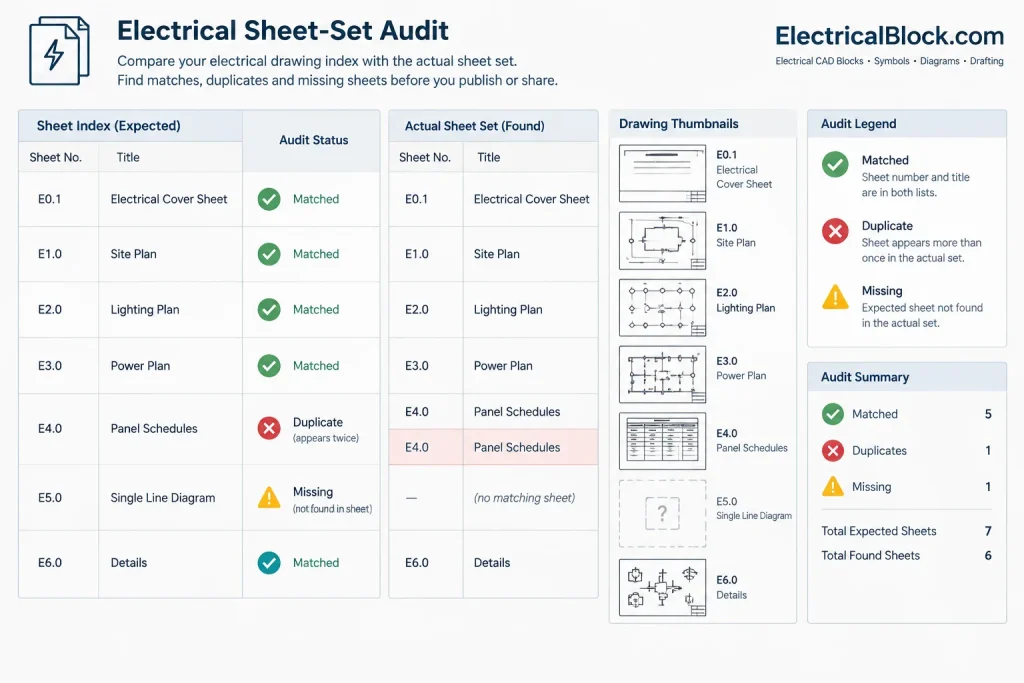
A useful pre-issue check compares the index against the actual sheet set rather than reviewing the index in isolation.
- Sort the published sheets in the intended order.
- Compare every visible sheet number with the index.
- Compare every title block title with the indexed title.
- Check for duplicate numbers and duplicate file identities.
- Identify indexed sheets that are missing from the published set.
- Identify published sheets that are missing from the index.
- Review gaps, suffixes, and renamed sheets.
- Confirm that cross-references point to current sheet identities.
- Check PDF page labels and bookmarks where they are part of the deliverable.
- Verify that issue and revision information follows the project procedure.
This audit is especially important after copying files from another project, splitting a plan into additional sheets, or combining work from multiple team members.
Use the Index as a Navigation Tool
A strong electrical drawing index reflects the organization of the set. Related plan types should be grouped logically, titles should use consistent geographic language, and users should be able to predict where information is located.
The index can also reveal weaknesses in the drawing set. Several nearly identical titles may indicate unclear scope boundaries. A long miscellaneous-detail group may need better subject organization. Plans arranged differently from the architectural set may make coordination harder. Reviewing the index early provides a high-level check before those problems spread through the CAD files.
Final Drafting Principle
Treat each sheet number and title as controlled project data. The drawing index, title block, CAD file, published page, and cross-references should all describe the same document. A disciplined index workflow reduces navigation errors, supports cleaner issue records, and makes the entire electrical drawing set easier to review and use.
Practical Index-Control Workflow
Index coordination is most reliable when sheet identity is managed throughout production rather than checked only at publication. The team should identify the authoritative source for sheet numbers and titles, define who may change that information, and establish how approved changes reach every affected drawing and deliverable.
Before Sheet Creation
- Define the project’s numbering and title structure.
- Decide which drawing groups and package boundaries the index must represent.
- Identify the authoritative location for sheet data.
- Set consistent title-block fields, file-naming rules, and status terminology.
During CAD Production
- Record new sheets as they are authorized rather than waiting for publication.
- Review copied title blocks and templates for retained project data.
- Keep cross-references synchronized with added, deleted, or renamed sheets.
- Flag reserved positions and intentional gaps in the project control record.
- Compare consultant and discipline indexes when the same electrical sheets appear in more than one register.
During Publication
- Compare the visible index with the sheets actually included in the package.
- Check that page order, labels, bookmarks, file names, and title blocks describe the same documents.
- Confirm that partial packages do not imply the inclusion of omitted sheets.
- Archive the issued index with the corresponding deliverable so later changes can be traced.
Common Coordination Warning Signs
Certain patterns indicate that the electrical sheet register needs closer review. These include duplicate sheet numbers, repeated generic titles, unexplained sequence gaps, title blocks that disagree with file names, references to absent sheets, and PDF bookmarks that preserve earlier identities.
Another warning sign is reliance on visual memory. A sheet can appear correct while containing stale attribute data, hidden annotation, or an old reference elsewhere in the set. Use searchable fields and structured comparison tools where available, but confirm the plotted output because that is the form most reviewers will use.
Document the Decision, Not Just the Result
When a sheet is inserted, withdrawn, renamed, or moved to another package, retain enough project-control information to explain the change. This does not require filling the drawing index with internal notes. It means preserving the decision in the appropriate register, issue log, or document-management workflow while keeping the published index clear for its intended audience.
A coordinated electrical drawing index is therefore both a navigation aid and a quality-control view of the set. If its organization is difficult to understand, the underlying sheet structure, title vocabulary, or package strategy may also need refinement.
Frequently Asked Questions
What is the difference between a drawing index and a sheet list?
The terms are sometimes used interchangeably. In practice, a drawing index often serves a broader navigation and issue-control role, while a sheet list may simply enumerate documents. The project team should define the intended meaning and use it consistently.
Should the CAD file name always match the sheet number?
The file name should follow the project’s approved naming method. It may incorporate the sheet identity, but the exact relationship depends on the CAD and document-management workflow. The essential requirement is that users can reliably connect the file with the official sheet shown in the title block and index.
How should an intentionally unused sheet number be handled?
Follow the project’s approved control procedure. An intentional gap may be retained to avoid disruptive renumbering, but its purpose should be clear in the internal record so it is not mistaken for a missing deliverable.
Should withdrawn sheets remain visible in the current index?
That decision depends on the package and issue-control method. Previously issued documents should not disappear from project history without explanation, but the current index must also communicate what is actually included. Coordinate the presentation with the responsible document-control team.
Can an automated index replace a manual quality check?
No. Automation can collect and format sheet data, but it may also reproduce blank fields, duplicate identities, incorrect attributes, or outdated source information. Review the visible index against the published sheet set.
Who should approve sheet-number or title changes?
The project should assign that authority explicitly. Changes should be coordinated with the people responsible for drawing production, document control, consultant integration, and package publication before revised identities are distributed.
Leave a Reply
You must be logged in to post a comment.