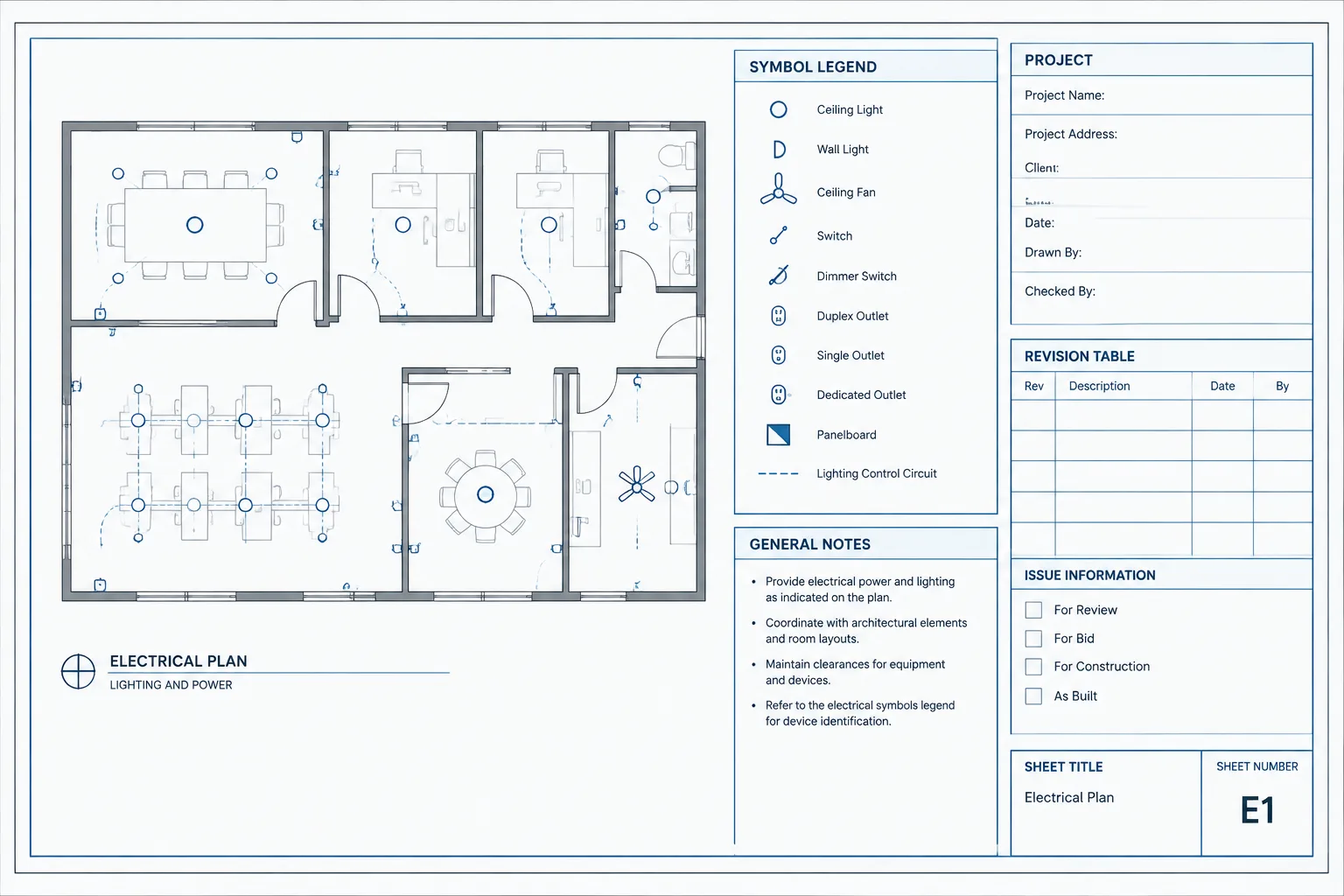
Electrical title blocks in CAD connect sheet identification with the broader documentation workflow. Their variable fields must remain coordinated with layouts, drawing indexes, revision records, issue data, and published output.
This drafting reference explains how to organize that information, distinguish fixed graphics from managed values, and review title block data as part of an electrical sheet set. Project requirements still govern the final format, terminology, and approval process.
An electrical title block is more than a border around a drawing. It is the controlled interface between the technical content on a sheet and the information used to identify, issue, review, print, and archive that sheet. If title block data is inconsistent, even a technically accurate plan can be difficult to track.
A reliable CAD workflow separates project-wide information from sheet-specific information, assigns clear ownership to each field, and minimizes repeated manual entry. This guide explains how to structure electrical title blocks without treating a generic template as automatically suitable for every client, jurisdiction, or project.
What an Electrical Title Block Should Accomplish
The title block should let a reader identify the drawing without searching through the plan area. Its exact format varies, but its core functions are generally consistent:
- Identify the project and drawing package.
- Identify the individual sheet.
- Show the current issue or revision context.
- Record relevant preparation, review, and authorization roles.
- Communicate scale and drawing-status information where applicable.
- Provide space for client, consultant, or project-specific identifiers.
The title block should not become a storage area for every project note. General electrical notes, design criteria, symbol legends, and technical schedules usually belong in dedicated drawing regions or on separate sheets. Keeping those functions separate makes the title block easier to maintain and less likely to change size from sheet to sheet.
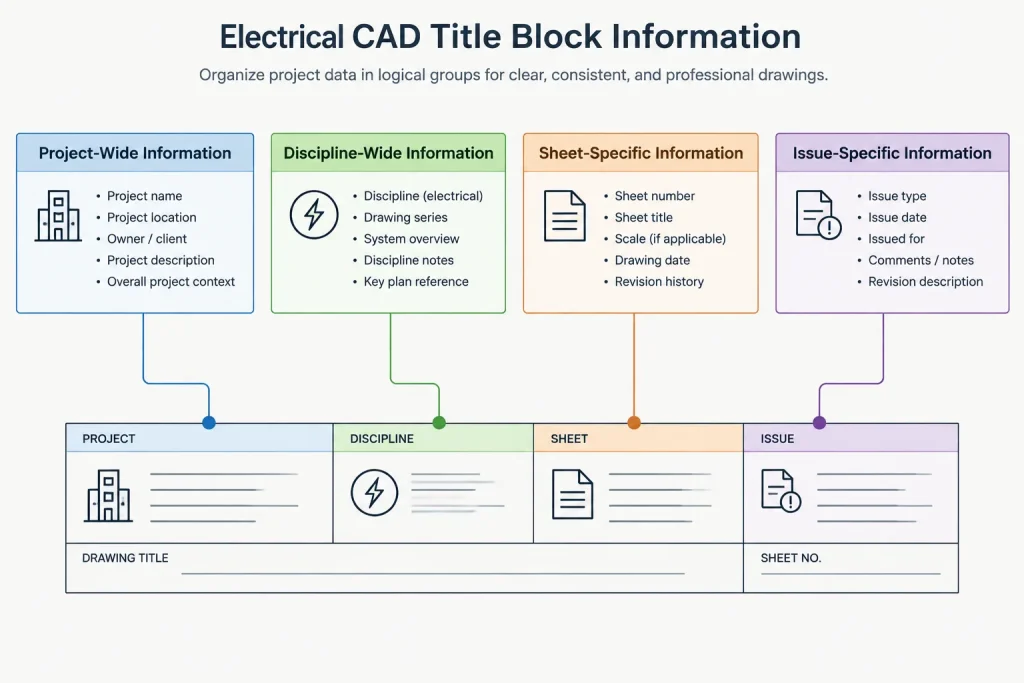
Divide Data by Its Scope
A useful way to design title block data is to classify each field by how broadly it applies. This reduces duplicate editing and helps the CAD team decide whether information belongs in a shared reference, a sheet attribute, or an external sheet-management process.
| Data scope | Typical examples | Recommended control |
|---|---|---|
| Project-wide | Project name, site identification, client name, project number | Maintain from a controlled project source and reuse consistently |
| Discipline-wide | Electrical discipline name, discipline code, consultant information | Standardize within the electrical drawing package |
| Sheet-specific | Sheet number, sheet title, scale statement, drawn-by field | Assign and verify for each layout or sheet |
| Issue-specific | Issue date, issue purpose, revision identifier | Update through the project issue workflow |
| Client- or authority-specific | Owner reference, filing identifier, approval area | Include only after confirming project requirements |
This classification also exposes fields that should not be hard-coded into the title block geometry. A project name used across an entire set, for example, should have one controlled source whenever the selected CAD workflow permits it. Manually typing it on every sheet creates unnecessary opportunities for spelling and revision differences.
Build a Stable Graphic Framework
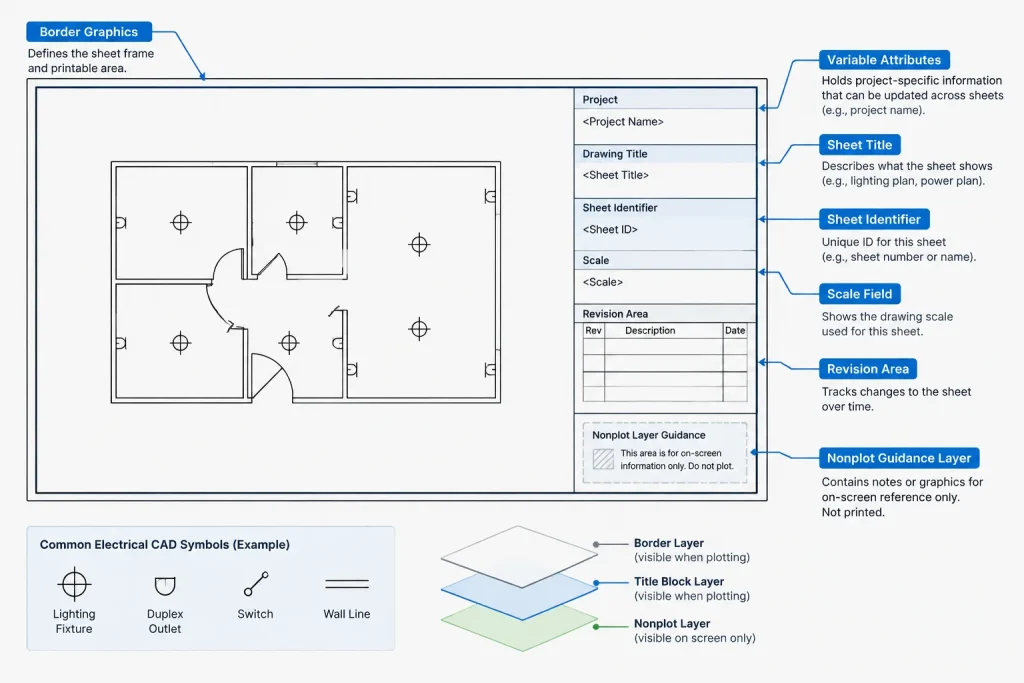
The graphic portion of the title block should remain stable across the electrical set. Border lines, field labels, logos supplied for authorized project use, and dividing lines can be treated as fixed content. Values that change should be handled separately as attributes, fields, or other managed text objects.
When building or reviewing the framework, consider the following:
- Plot readability: Field labels and values must remain distinguishable at the intended output size.
- Visual hierarchy: The sheet number and title should be easy to find, while administrative information can be less prominent.
- Text capacity: Fields need enough room for realistic project names and sheet titles without uncontrolled text compression.
- Consistent origin: Use a documented insertion or reference point so borders align predictably in layouts.
- Layer control: Place border graphics, title block labels, variable values, and nonplot guidance on intentional layers according to the project CAD standard.
Do not assume a title block copied from another project is ready to use. It may contain obsolete contacts, hidden text, old issue records, incorrect plot behavior, or client information that does not belong in the new file.
Use Attributes and Managed Fields Carefully
Block attributes can make variable title block information easier to edit and extract. Suitable candidates include the sheet number, sheet title, project identifier, and drafting initials. The attribute tag names should be understandable to CAD users and stable enough to support schedules or data extraction.
Automated fields can also reduce typing by displaying information derived from a drawing, layout, or managed sheet record. However, automation needs a verification step. A value can update correctly from its source and still be wrong for the intended issue if the source itself is outdated.
Good attribute and field practices include:
- Use one attribute for one defined purpose.
- Avoid duplicate attributes that display the same information in different locations.
- Give prompts clear names that tell users what to enter.
- Keep default values neutral so template text is not mistaken for project data.
- Test whether values remain legible when longer entries are used.
- Confirm that extracted data matches what is visibly plotted.
Hidden attributes should be documented. Otherwise, they may carry stale project data into copied sheets or exports without being noticed during a visual review.
Coordinate Sheet Numbers and Titles
The title block, drawing index, file organization, and any sheet-management system should agree on sheet identity. A sheet number should refer to one sheet in the issued package, and its title should describe the primary content clearly enough to distinguish it from neighboring sheets.
Common coordination problems include a renamed plan that remains unchanged in the drawing index, a copied layout retaining the previous sheet number, or a file name that no longer matches the active sheet. File names do not always need to duplicate sheet numbers, but the relationship should be intentional and documented.
Review Sheet Identity in Both Directions
Start at the drawing index and confirm that each listed electrical sheet exists with the same number and title. Then start at each electrical sheet and confirm that it is represented correctly in the index. This two-direction review catches both missing sheets and unlisted layouts.
Separate Revision History from Issue Status
Revision information and issue information are related, but they are not always interchangeable. An issue may identify why or when a drawing package was released, while a revision record identifies changes associated with a sheet. Project procedures determine how these records are displayed.
The title block should make the current status understandable without forcing users to interpret abandoned entries or template placeholders. Before publishing, check that:
- The current issue information matches the package being released.
- Revision identifiers agree with revision clouds and other change markers where those are used.
- Dates follow the project’s chosen format consistently.
- Superseded or unused template entries are not shown as active information.
- Sheet-specific revisions are not accidentally applied to unaffected sheets.
A revision table can be part of the title block or located nearby, but it should not expand unpredictably into the drawing area. Projects with extensive histories may require a separate continuation method defined by the project documentation plan.
Control Scale Statements
An electrical sheet may contain a main plan, enlarged views, diagrams, schedules, and details with different scale conditions. A single title block scale field can therefore be misleading if it implies that every view uses the same scale.
Use the title block scale value only in a way that agrees with the sheet content and project drafting rules. Individual view titles should identify their own scale where needed. Diagrams and schematic views that are not intended for dimensional measurement should be described accordingly rather than assigned an arbitrary graphic scale.
Always review plotted sheets at their intended output size. Correct model geometry does not guarantee readable text, symbols, or title block data after plotting or reduction.
Create a Controlled Update Workflow
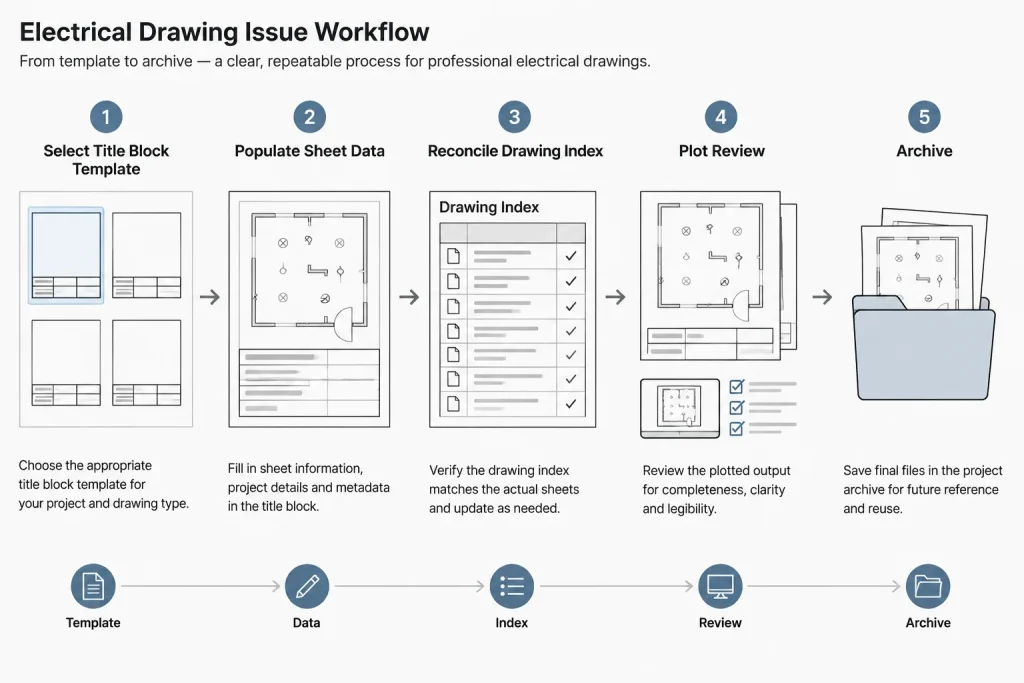
Title block changes should be deliberate because a small edit can affect every sheet in the electrical package. A practical workflow is:
- Confirm the governing template. Identify the client, owner, consultant, or internal title block required for the project.
- List required fields. Determine which values are project-wide, sheet-specific, issue-specific, or externally supplied.
- Assign data ownership. Decide who controls project names, sheet numbers, revision information, and review records.
- Populate shared data. Enter project-wide values through the chosen controlled method.
- Create sheet records. Assign each layout its correct sheet number and title.
- Test plots. Check lineweights, text visibility, clipping, and output orientation.
- Reconcile the package. Compare title blocks against the drawing index and issue record.
- Archive the issued state. Preserve the files and output associated with the published package according to project procedures.
Pre-Issue Title Block Checklist
- Project name and project identifier are consistent across all electrical sheets.
- Every sheet has a unique, intentional number and title.
- The drawing index matches the actual sheet set.
- Issue dates and status descriptions match the release package.
- Revision entries correspond to the affected sheets.
- Scale information does not conflict with individual view titles.
- Drafting and review fields follow the project’s documentation policy.
- No placeholder text, old client data, or unused attributes remain.
- The border and title block plot completely without clipping.
- Text remains readable in the final published output.
Final Drafting Perspective
A strong electrical title block is quiet, consistent, and easy to audit. It should help readers identify a sheet immediately while helping the project team control data across the full drawing package. The best results come from treating the title block as structured project information rather than decorative CAD geometry.
Templates, blocks, and automated fields can support that goal, but they do not replace project verification. Before issue, confirm the title block against the actual drawing index, revision scope, client requirements, and published sheet content.
Use a Data Authority Map to Prevent Conflicts
A title block can display information from several sources, including block attributes, layout properties, project records, and manually maintained issue data. Before automating fields, document which source controls each displayed value. This prevents two systems from appearing to manage the same information.
A practical data authority map should identify:
- Displayed field: The value visible in the plotted title block.
- Authoritative source: The location where that value is approved and maintained.
- Editing responsibility: The project role permitted to change it.
- Update method: Whether the value is entered manually, inherited, referenced, or synchronized.
- Verification point: The review step that confirms the plotted result.
If a title block value disagrees with the drawing index or issue record, the team should correct the governing source rather than repeatedly overriding individual sheets. Local overrides may solve an immediate display problem while leaving the underlying coordination error in place.
Review Changes by Their Package Impact
Not every title block edit has the same scope. A sheet title change may affect one layout and its index entry, while a project-name correction may affect the entire electrical package. Classifying the impact before editing helps avoid partial updates.
- Single-sheet change: Review the affected layout, index entry, revision context, and published sheet.
- Package-wide change: Review every electrical title block and any shared project record that supplies the value.
- Issue change: Confirm that release descriptions, dates, and status fields represent the same package.
- Template change: Test field behavior, plotting, attribute visibility, and copied-sheet behavior before broad use.
Compare Visible Output with Extracted Data
Data extraction can reveal duplicate sheet numbers, blank fields, or inconsistent titles, but it does not replace visual review. Conversely, a plotted sheet may look correct even when hidden or extracted attributes still contain obsolete information.
For a dependable audit, compare the visible title block, the underlying attribute or field values, the drawing index, and the published output. Agreement among these views is more reliable than checking the CAD display alone.
Frequently Asked Questions
What is the difference between a CAD border and an electrical title block?
The border defines the sheet framework and printable drawing area. The title block organizes identifying and administrative data such as the project, sheet, issue, revision, and responsible roles. They may be combined in one CAD reference, but they serve different documentation functions.
Which title block information should be automated?
Automation is most useful for values that have a clear authoritative source and repeat across a sheet set. A field should remain manually controlled when automation would obscure responsibility or cannot reliably represent the project workflow.
Should the drawing file name match the sheet number?
Not necessarily. File naming and sheet numbering may follow different project rules. Their relationship should be documented, consistent, and easy to reconcile during review and publishing.
Why can a correctly linked field still display incorrect information?
A field can be technically linked to the intended source while that source contains outdated or incorrect data. Field updates therefore require both a functional check and a content review.
How should copied title blocks be checked?
Review visible text, attributes, fields, hidden data, revision entries, client information, layer behavior, and plot results. Copied layouts should also be checked for retained sheet numbers or titles.
Does a revision entry apply to every sheet in an issue package?
Not automatically. Issue status may describe the released package, while revision history may be sheet-specific. The project documentation procedure determines how each record is applied and displayed.
What should be checked in the final published output?
Confirm that the title block is complete, readable, unclipped, and consistent with the drawing index and issue record. The review should use the actual published output rather than relying only on the CAD workspace.
Leave a Reply
You must be logged in to post a comment.