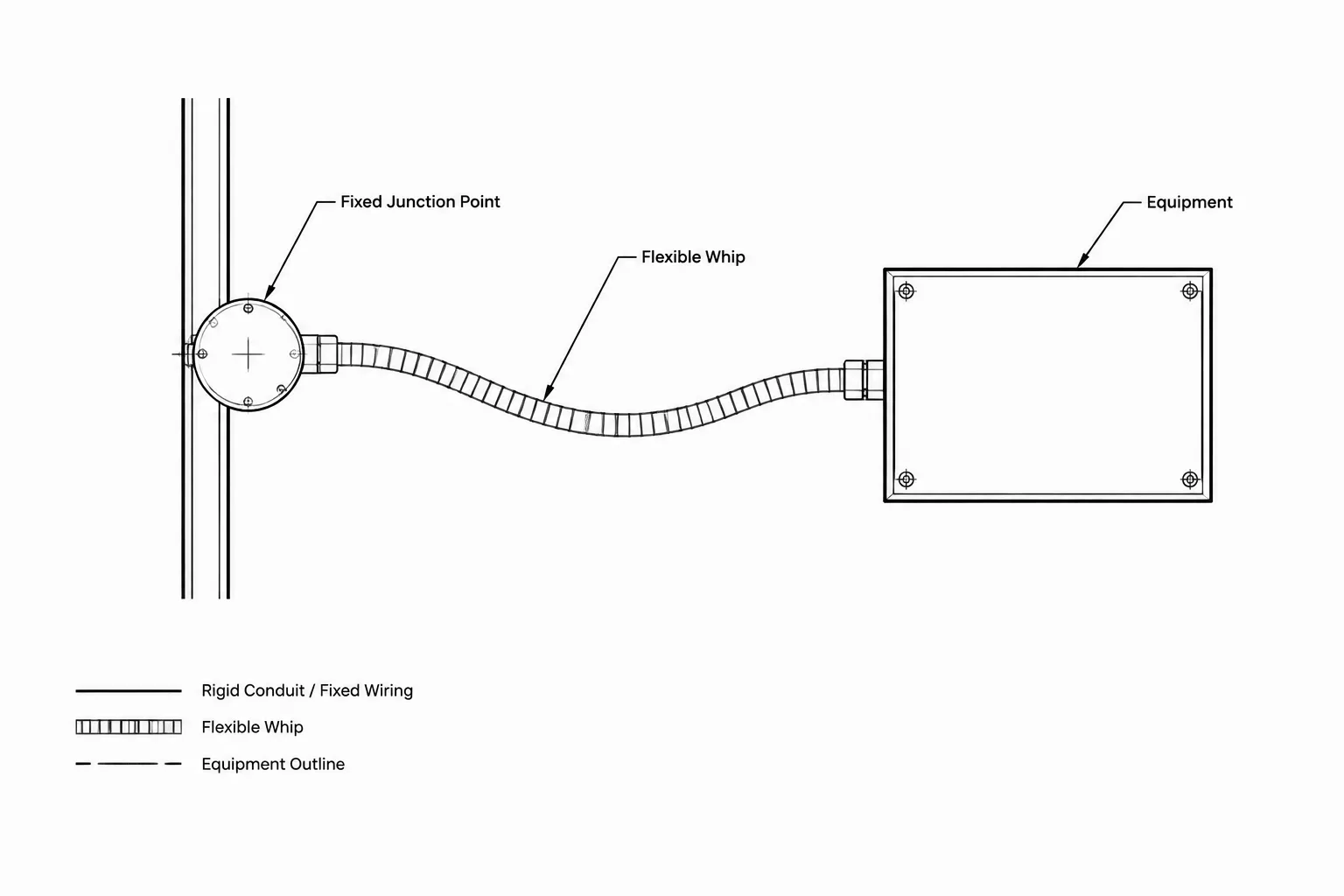
Flexible connections and equipment whips are small drawing elements with significant coordination value. A curved line between a fixed electrical point and a piece of equipment may look self-explanatory, yet it does not automatically define the connection method, routing, furnishing responsibility, or exact equipment interface.
This reference explains how to represent that transition without overstating what has been verified. It focuses on endpoint clarity, consistent CAD conventions, coordinated annotations, and the relationship among plans, schedules, details, and diagrams.
Electrical plans often show a raceway or circuit reaching a piece of equipment without explaining the final physical transition. That missing segment may involve flexible raceway, a factory cable, a cord-and-plug connection, a short equipment whip, or another project-specific arrangement. Although this portion of the installation can appear minor on a floor plan, unclear documentation may create questions about routing, connection responsibility, disconnects, equipment movement, and coordination with other trades.
Flexible electrical connections in CAD should communicate design intent without implying unverified product details. The goal is not to draw every conductor or fitting. The goal is to identify where the fixed distribution system ends, how the equipment connection is represented, and where readers can find the information needed to complete coordination.
What Is a Flexible Connection in Drawing Terms?
In drafting, a flexible connection is a graphical or noted transition between a fixed electrical pathway and equipment that may vibrate, move for service, arrive with a factory lead, or require a connection arrangement that cannot be shown accurately as rigid geometry.
Depending on the project and equipment, drawings may need to distinguish among:
- A flexible raceway segment between a fixed junction point and equipment.
- An equipment whip furnished with a device, fixture, or packaged unit.
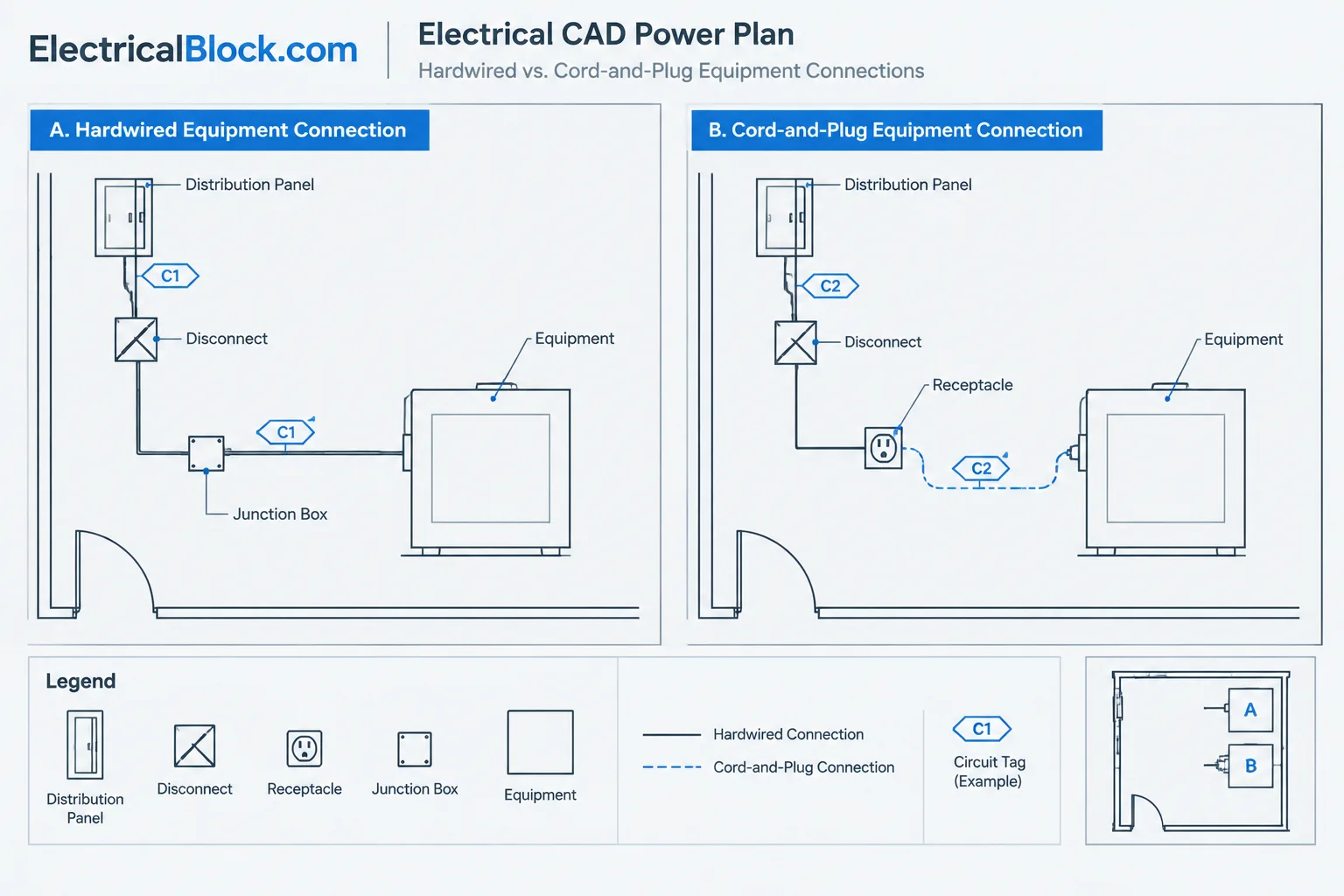
- A cord-and-plug connection associated with a receptacle.
- A factory cable or lead that connects to a field-provided point.
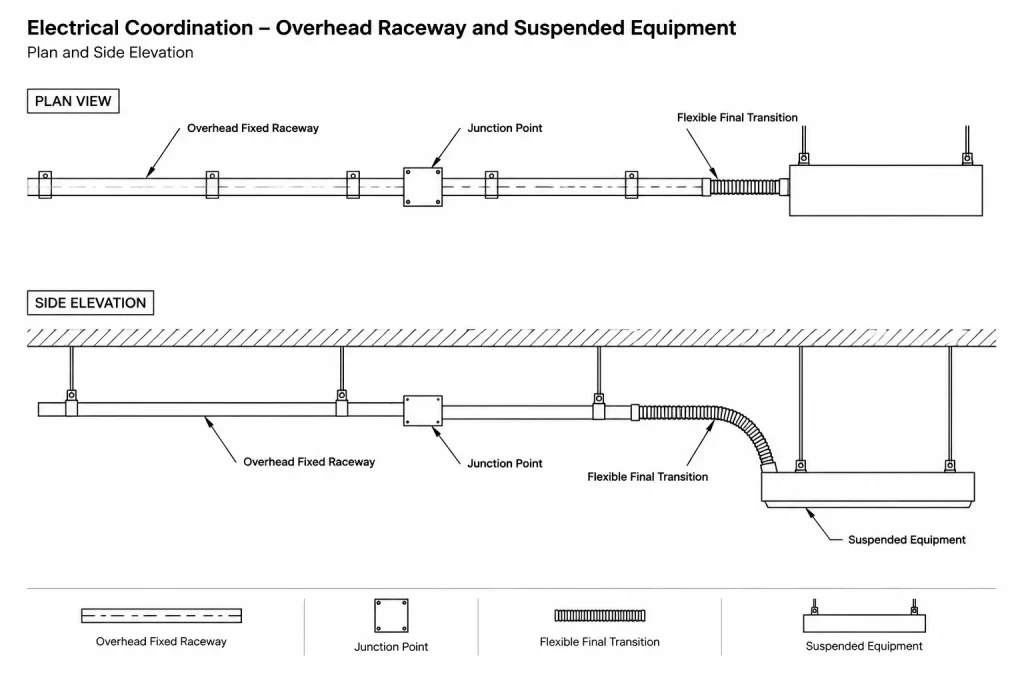
- A flexible final transition from an overhead pathway to suspended equipment.
- A conceptual connection whose exact method must be verified against approved equipment information.
These terms should not be treated as interchangeable automatically. A graphic that looks like a flexible whip may represent different responsibilities and connection methods on different projects. Define the intended meaning in the legend, notes, schedule, or equipment detail.
Decide What the Plan Must Communicate
Before adding a whip symbol or curved line, determine which documentation questions the drawing needs to answer:
- Where does the fixed raceway or cable pathway terminate?
- Is a junction box, receptacle, disconnect, controller, or other connection point shown?
- Which portion is field routed and which portion is furnished with equipment?
- Does the equipment require movement, vibration isolation, removal, or service access?
- Is the connection visible in plan, elevation, section, or only through a note?
- Which schedule or diagram identifies the circuit and source?
- Is final routing dependent on coordinated equipment submittals?
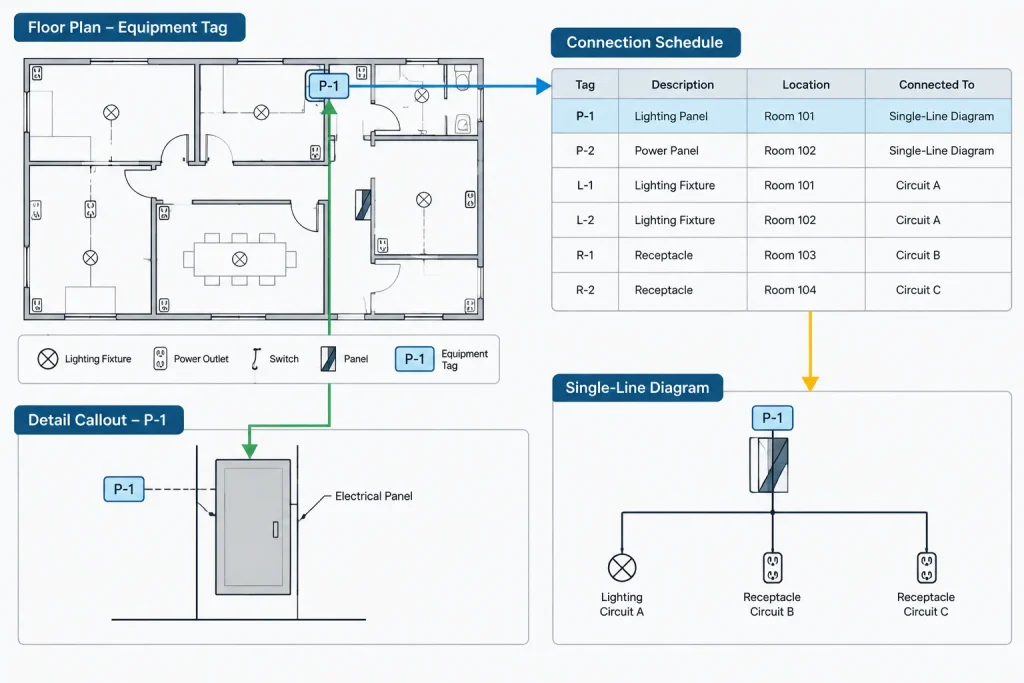
Not every answer belongs on the floor plan. A readable drawing set distributes information intentionally: location on the plan, configuration in a detail, electrical source in a schedule or diagram, and responsibility in notes.

Common CAD Representation Methods
Short Curved Connection Line
A short curved or relaxed line is a common conceptual representation for a flexible final connection. It can visually separate the connection from fixed raceway geometry, but its meaning must be defined. Without a legend entry, users may mistake it for loose cable, a circuit arc, or a general connection line.
Place the line so that it clearly begins at the fixed connection point and ends at the equipment symbol or connection location. Avoid routing it through unrelated devices, text, or architectural lines.
Dashed or Distinct Linetype
A project may use a dedicated linetype to differentiate flexible connections from fixed pathways. This can be effective when the plotted difference remains visible at the sheet scale. Do not rely on linetype alone if background screening or reduced-size printing makes it difficult to recognize.
Combine the linetype with a concise tag or note where the distinction affects coordination.
Tagged Connection Symbol
A small connection-point block can carry attributes such as equipment ID, circuit reference, connection type, or detail reference. This approach is useful on equipment-heavy plans because it supports consistent placement and review.
Keep the block focused on stable documentation data. Avoid embedding unverified cable, fitting, or product information merely because attribute fields are available.
Leader Note
A leader can identify an unusual final connection without adding another symbol to the legend. This works well for isolated conditions but can clutter drawings when repeated many times. If the same note appears across the plan, consider a keyed note or equipment-connection convention instead.
Plan-to-Detail Reference
Some conditions cannot be explained adequately in plan view. A callout to an elevation, section, or typical connection detail may show the fixed pathway, support zone, junction point, disconnect, flexible segment, and equipment interface more clearly.
Choosing Where to Show the Information
| Drawing location | Best use | Common limitation |
|---|---|---|
| Floor plan | Equipment location, connection point, circuit relationship, and general route | Limited vertical and physical configuration information |
| Reflected ceiling plan | Connections to ceiling-mounted or suspended electrical devices | May not show above-ceiling pathway elevation clearly |
| Equipment plan | Dense layouts with many coordinated connection points | Requires careful cross-referencing to electrical source information |
| Elevation or section | Vertical transition, suspended equipment, overhead junction point, and access relationship | Usually covers only selected or typical conditions |
| Connection schedule | Repeated equipment IDs, source references, connection descriptions, and remarks | Cannot replace spatial coordination on plans |
| Single-line or riser diagram | Electrical relationship between source, protective devices, disconnects, and loads | Generally does not represent the physical shape of a flexible connection |
Coordinate the Fixed Endpoint First
A flexible line should not conceal uncertainty about where the permanent electrical system ends. Identify the fixed endpoint using the appropriate project symbol. It may be a junction box, receptacle, disconnect, controller, outlet point, or another defined interface.
That endpoint should coordinate with architectural and equipment information. For example, an overhead junction point may need to align with the service side of equipment rather than its geometric center. A wall connection may need to relate to an equipment connection zone shown by the manufacturer. If the exact connection location is not confirmed, flag it for verification rather than drafting false precision.
Separate Geometry from Connection Data
The drawn whip line communicates a relationship, not a complete specification. Use other documentation elements for data that must remain coordinated:
- Equipment tags identify the load or packaged unit.
- Circuit annotations connect the plan symbol to panel or source documentation.
- Schedules collect repeated connection descriptions and remarks.
- Keynotes explain project-specific scope or coordination conditions.
- Details clarify physical arrangement where plan view is insufficient.
- Diagrams show the functional electrical relationship.
This separation makes revisions safer. If equipment data changes, the drafter can update the appropriate schedule or note without redrawing every conceptual connection line.
Use Layers and Blocks Consistently
Place flexible connection graphics on a purposeful electrical layer rather than the equipment, architectural background, or generic annotation layer. The layer should support plotting and visibility control appropriate to the plan type.
If connection symbols are reusable, build them as simple blocks with:
- A predictable insertion point at the fixed or equipment endpoint.
- Geometry that remains readable at the intended plotted scale.
- Attributes only for information that users will maintain reliably.
- A documented rotation and mirroring convention.
- A block name that distinguishes the symbol from fixed raceway and circuiting graphics.
Do not create many nearly identical blocks for minor wording differences. A stable symbol paired with a tag, keynote, or schedule is generally easier to audit.
Document Scope Boundaries Clearly
Equipment connections often involve multiple parties. Electrical drawings may need to coordinate with mechanical, plumbing, kitchen, laboratory, audiovisual, controls, or equipment-vendor documents. Avoid vague notes such as “connect as required” when a more precise documentation boundary can be stated.
Useful scope language identifies the interface without inventing installation requirements. It may state that the drawing shows the intended connection point, that final location must be coordinated with approved equipment information, or that a factory-provided lead is represented diagrammatically. Responsibility language should follow the project’s established specifications and contract documents rather than being improvised in a CAD note.
A Practical Drafting Workflow
- Review the equipment information. Locate the equipment ID, electrical connection zone, service orientation, and any known factory-provided connection component.
- Place the equipment footprint. Use coordinated background or equipment geometry and avoid assuming the geometric center is the connection point.
- Locate the fixed electrical endpoint. Show the applicable junction box, outlet, receptacle, disconnect, or other interface.
- Add the flexible connection graphic. Use the office or project convention and keep the route diagrammatic unless physical routing is specifically coordinated.
- Add source identification. Coordinate the circuit, feeder, or system reference with schedules and diagrams.
- Add a detail or keynote when needed. Use additional documentation for unusual, inaccessible, or vertically complex conditions.
- Review scope and terminology. Confirm that the legend, notes, and schedule use the same name for the connection type.
- Plot-test the sheet. Verify that the flexible line remains distinguishable from circuiting, leaders, architectural arcs, and hidden geometry.
Quality-Control Checks
Before issuing the drawing, inspect flexible connections as a coordinated system rather than as isolated linework:
- Every flexible connection has an identifiable start and endpoint.
- The symbol or linetype is defined in the drawing set.
- Connection graphics do not imply an unverified exact route.
- Equipment tags agree with schedules and other disciplines.
- Circuit and source references are present where required by the project workflow.
- Disconnects, receptacles, junction points, and controls are not duplicated accidentally.
- Plan graphics agree with relevant elevations, sections, and diagrams.
- Factory-furnished and field-documented portions are not shown as the same component without clarification.
- Revision clouds and notes capture connection changes that affect coordination.
Make the Graphic Carry the Right Amount of Meaning
A flexible connection should be simple enough to read quickly but specific enough to avoid a coordination gap. Over-drafting can imply unsupported product or installation details, while under-drafting can leave the fixed endpoint and responsibility unclear.
The strongest CAD documentation treats the whip or flexible segment as one part of a larger information chain: equipment footprint, connection point, source reference, schedule entry, diagram relationship, and project note. When those elements agree, a small curved line becomes a useful coordination device rather than an ambiguous symbol.
Interpret the Connection by Its Documentation Context
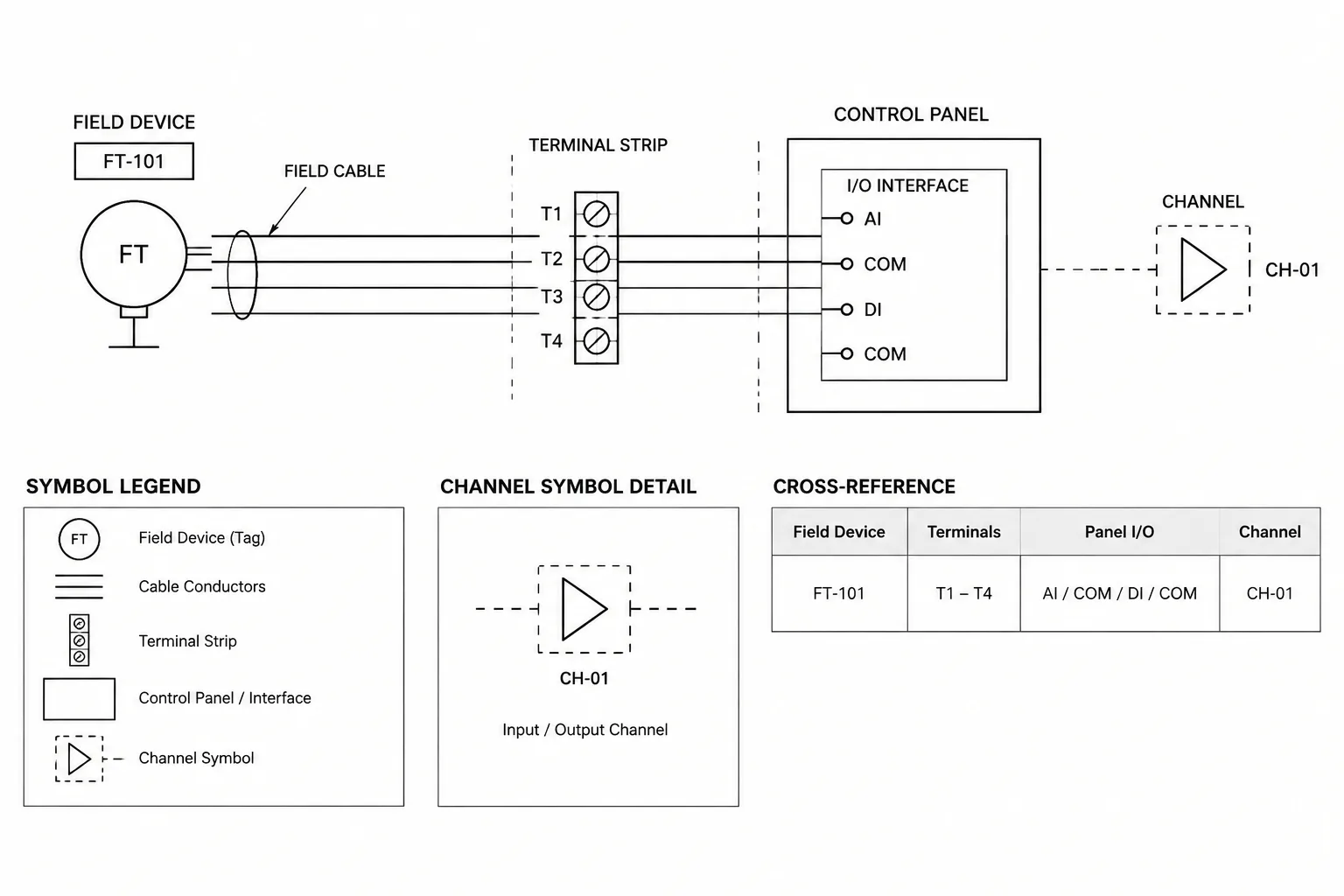
A flexible connection graphic should be read together with the symbols and references around it. The fixed endpoint identifies where the permanent distribution pathway stops. The equipment tag identifies the served item. Circuit annotations establish the source relationship, while notes, schedules, and details explain conditions that cannot be communicated reliably by linework alone.
This context also helps reviewers distinguish between three levels of drawing intent:
- Diagrammatic intent: The line confirms that a relationship exists, but it does not define the final route or physical arrangement.
- Coordinated endpoint intent: The drawing identifies the fixed connection point and equipment interface while leaving the final transition subject to coordinated information.
- Product-dependent intent: The connection depends on approved equipment data, a factory lead, or another component that should not be assumed from the plan graphic.
Using notes and references to make the intended level clear reduces the risk that conceptual geometry will be interpreted as a product specification or exact installation route.
Manage Flexible Connections During Revisions
Equipment movement can affect more than the whip line. When a footprint or connection zone changes, review the fixed endpoint, circuit annotation, disconnect or receptacle relationship, schedule entry, detail reference, and any coordination note associated with that equipment.
A useful CAD review method is to isolate the connection layer together with equipment tags and fixed endpoint symbols. This makes missing endpoints, disconnected graphics, duplicated symbols, and obsolete references easier to identify. The full sheet should then be reviewed at its intended plotted appearance so the isolated linework is not confused with leaders, circuit arcs, or background geometry.
Avoid Common Interpretation Errors
- Do not assume every curved connection line represents the same wiring method.
- Do not use the flexible graphic to hide an unresolved fixed endpoint.
- Do not infer furnishing responsibility solely from which discipline drew the line.
- Do not treat diagrammatic routing as a verified field path.
- Do not repeat detailed connection data in multiple locations unless the project workflow includes a method for keeping it coordinated.
The most dependable convention assigns each piece of information a clear home: geometry on the plan, repeated data in a schedule, functional relationships in a diagram, and unusual physical conditions in a detail or note.
Frequently Asked Questions
Does a curved line always mean flexible raceway?
No. It may represent flexible raceway, a cable, a factory lead, a cord connection, or a general equipment transition. Its meaning should be defined by the project legend, notes, schedule, or detail.
Should an equipment whip be drawn to its exact field route?
Only when that route has been coordinated and the drawing is intended to document it. Otherwise, the graphic should remain diagrammatic and should not imply unsupported precision.
What should appear at the fixed end of a flexible connection?
The applicable project-defined endpoint should be identifiable, such as a junction point, receptacle, disconnect, controller, outlet point, or another documented interface. The correct symbol depends on the design and coordinated equipment information.
When is a detail more useful than a plan symbol?
A detail is useful when plan view cannot clearly communicate a vertical transition, overhead connection, service relationship, support zone, access condition, or unusual interface. The plan can then show the location and direct the reader to that detail.
Can the whip graphic replace circuit or source information?
No. The graphic shows a connection relationship. Circuit, feeder, panel, or system information should remain coordinated through the project’s established annotations, schedules, and diagrams.
How should factory-furnished leads be documented?
Identify the interface and describe the factory-furnished portion only to the extent supported by approved equipment information. Avoid adding assumed product details or depicting the factory lead as field-provided work without clarification.
Leave a Reply
You must be logged in to post a comment.