
A fire hydrant system schematic diagram presents the system as a connected technical arrangement rather than showing only the physical location of equipment. It can help CAD users understand drawing relationships, review the indicated flow path, and coordinate fire-protection information with related building documentation.
The existing content and DWG download below provide the original drawing resource. The editorial guidance on this page explains how to evaluate and incorporate a schematic into a controlled CAD workflow without treating it as a substitute for project-specific engineering or approval.
Discover a comprehensive Schematic Diagram For Fire Hydrant System available as a high-quality DWG file and CAD Block. This detailed drawing is ideal for architects, engineers, and designers working on fire protection and safety projects. The file clearly illustrates the layout and components of a fire hydrant system, making it perfect for planning, installation, and maintenance purposes. Fully compatible with AutoCAD and other popular CAD software, this resource streamlines your workflow and ensures accuracy in building design. Enhance your project documentation with this essential schematic diagram today.
Please log in or register to download this file.
How to Read a Fire Hydrant System Schematic
Begin by identifying the drawing’s intended direction of flow and tracing each connected line from its origin to its termination. Follow branches carefully and note where symbols, labels, or line-style changes indicate a transition, control point, equipment connection, or continuation beyond the displayed diagram.
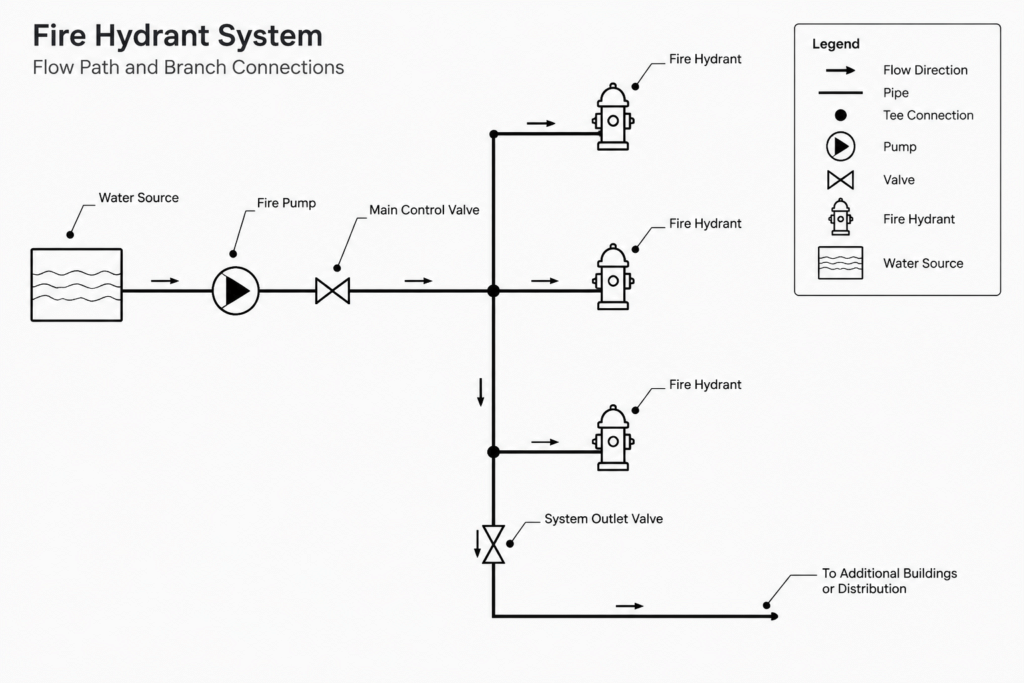
A schematic emphasizes functional relationships. It may not represent actual routing, spacing, elevation, or equipment placement. Those details are normally coordinated through plan views, equipment layouts, sections, riser diagrams, and applicable project schedules.
CAD Review and Documentation Checklist
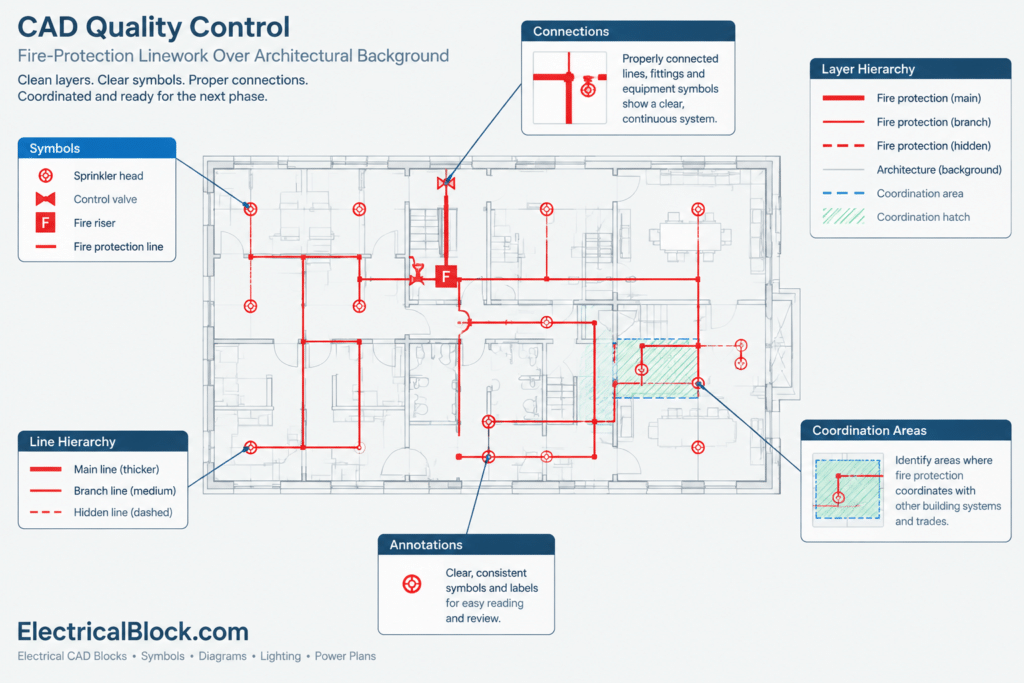
- Symbols: Compare every symbol with the drawing legend and the project’s approved symbol library.
- Connections: Confirm that intersections, branches, and crossing lines are graphically unambiguous.
- Annotations: Review tags, notes, abbreviations, and references for consistency with related sheets.
- Layers: Move imported geometry onto the project’s established layer structure rather than relying on unfamiliar source layers.
- Line hierarchy: Use suitable lineweights and linetypes so primary paths, secondary information, and references remain readable when plotted.
- Coordination: Compare the schematic with fire-protection plans, equipment layouts, architectural backgrounds, and relevant utility information.
- Revision control: Record the source and revision status before incorporating the drawing into a working set.
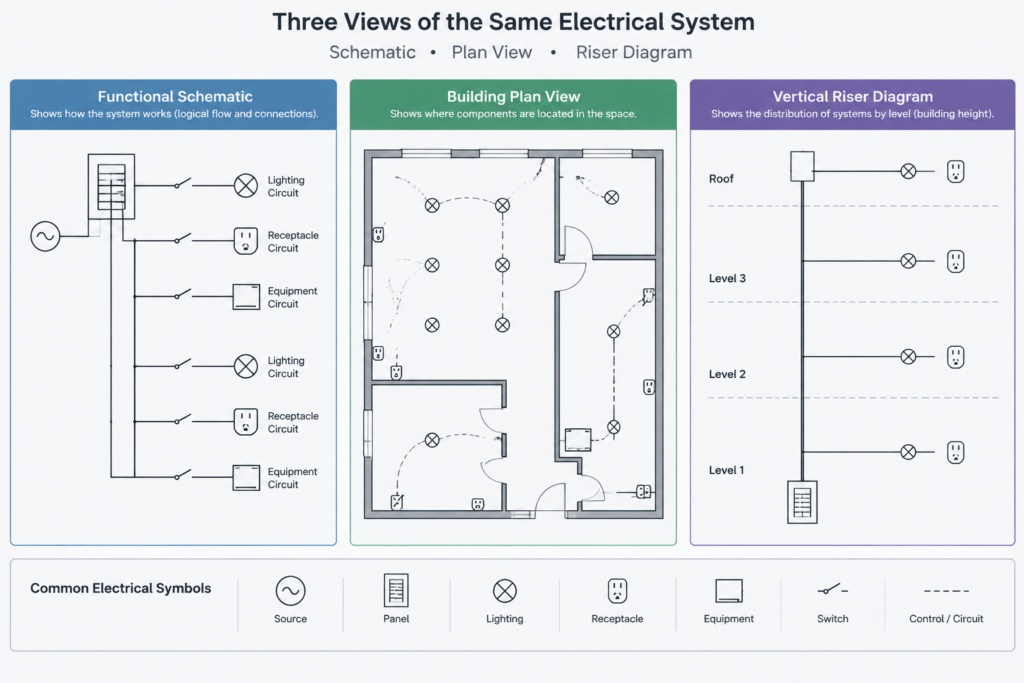
Schematic, Plan, and Riser Drawing Differences
Schematic diagram
A schematic explains how system elements relate and connect. Its primary purpose is functional clarity, so the geometry should not automatically be interpreted as a scaled route.
Plan drawing
A plan places system information within a building or site background. It is used to coordinate routing and equipment locations with rooms, walls, access areas, and other disciplines.
Riser diagram
A riser diagram organizes connections vertically or by system level. It can clarify relationships that may be difficult to follow in plan view, but it still requires coordination with the project drawings and schedules.
Using the DWG in a Project Workflow
Open the file in a controlled working location and inspect its units, layers, text styles, blocks, external references, and line conventions before copying content into a project file. Remove unrelated geometry only from a working copy, preserve the original resource, and avoid assuming that source symbols match the conventions used by the current drawing set.
Any reused diagram should be checked by the responsible design professional against the actual system design, project requirements, governing criteria, and approval process. A reference CAD drawing can accelerate drafting, but it does not establish the suitability of a system for a specific building or site.
Related Drawing Topics
Useful related references include fire-protection symbols, CAD legends, equipment layout drawings, riser diagrams, lineweight standards, layer-management practices, and multidisciplinary drawing coordination. Reviewing these topics together helps keep the schematic consistent with the wider documentation set.
Frequently Asked Questions
What does a fire hydrant system schematic diagram show?
It shows functional relationships among the represented system elements and the connections between them. The exact content must be confirmed from the symbols, notes, and legend included with the drawing.
Is a schematic diagram the same as a fire-protection plan?
No. A schematic focuses on system relationships, while a plan typically coordinates routing and locations with a building or site background. Both may be needed to document a project clearly.
Can the DWG be inserted directly into a project drawing?
It should first be reviewed for units, layers, blocks, text styles, line conventions, and drawing origin. Imported content should then be coordinated with the project’s CAD standards and verified design information.
Why should symbols be checked against a legend?
Symbol meanings can vary among offices, projects, and drawing sets. A legend provides the intended interpretation and reduces the risk of assigning the wrong meaning to a graphic.
Does the downloaded schematic define an approved installation?
No. It is a drafting and reference resource. Project-specific design, coordination, review, and approval remain the responsibility of the qualified professionals involved.




Leave a Reply
You must be logged in to post a comment.