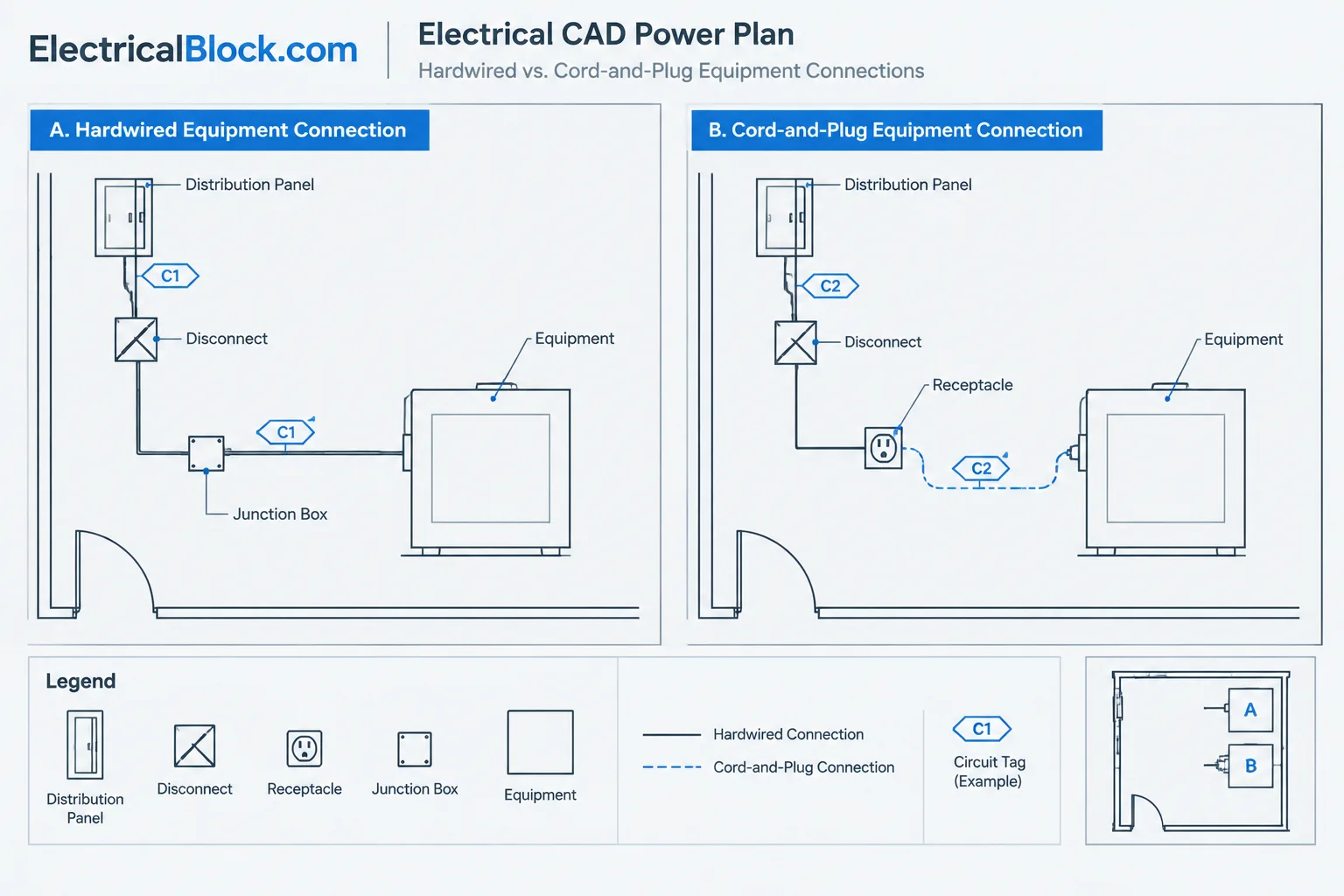
Hardwired vs. cord-and-plug connections in electrical CAD drawings should be treated as a documentation distinction, not as a visual guess based on equipment shape. The selected interface affects which device symbol appears on the plan, how the equipment is identified, and what reviewers expect to find in schedules, diagrams, details, and consultant information.
The existing guide below explains a verification-first approach. Use it as a drafting and quality-control reference for making connection intent traceable while leaving installation requirements to verified project documents and equipment data.
Electrical plans often show where equipment receives power without clearly explaining how the final connection is intended to occur. A receptacle beside an appliance, a disconnect adjacent to mechanical equipment, and a junction box near a casework elevation may all represent different connection methods. If the drawings do not distinguish those methods, estimators, coordinators, and field teams may interpret the same symbol differently.
Documenting hardwired vs. cord-and-plug connections in CAD is therefore more than a symbol-selection task. The connection method should remain consistent across the power plan, equipment schedule, panel information, diagrams, details, and specifications. This guide presents a verification-first workflow for making that intent readable without adding unsupported installation requirements.
What the connection method communicates
A cord-and-plug connection generally indicates that equipment connects through a matching receptacle or similar outlet device. A hardwired connection generally indicates a permanent wiring connection at the equipment, a disconnecting device, a junction box, or another designated termination point.
These broad descriptions are useful for drafting, but they do not determine the complete installation. The drawings may also need to identify a disconnect, controller, starter, local switch, flexible connection, special receptacle configuration, or vendor-provided connection assembly. Project requirements and verified equipment data must establish those details.
The drafter’s objective is to show the design intent and coordination relationships clearly. It is not to infer a connection method from appearance, equipment type, or a generic CAD block.
Where connection intent appears in a drawing set
Connection information is frequently distributed among several documents. A reliable review considers all relevant sources rather than treating the floor plan as the sole authority.
| Drawing or document | Typical information | Common coordination risk |
|---|---|---|
| Power plan | Outlet, junction box, disconnect, equipment tag, circuit tag, and approximate connection location | The symbol suggests one method while the note suggests another |
| Equipment schedule | Equipment ID, electrical characteristics, connection method, and source references | Schedule data changes without a corresponding plan update |
| Panel schedule | Circuit assignment and load description | The circuit description does not match the equipment tag |
| Single-line or riser diagram | Source, protective device relationships, feeders, and major disconnecting elements | A disconnect shown diagrammatically is omitted from the plan |
| Detail or elevation | Connection position, adjacent devices, casework relationships, and mounting context | The detail conflicts with the plan location or device type |
| Vendor or consultant information | Equipment connection point and interface requirements | Preliminary information is treated as final |
Use symbols to identify devices, not assumptions
A receptacle symbol should represent a receptacle, and a junction box symbol should represent a junction box. Avoid using one as a convenient placeholder for the other. Even if both symbols indicate that power is available near the equipment, they describe different interfaces.
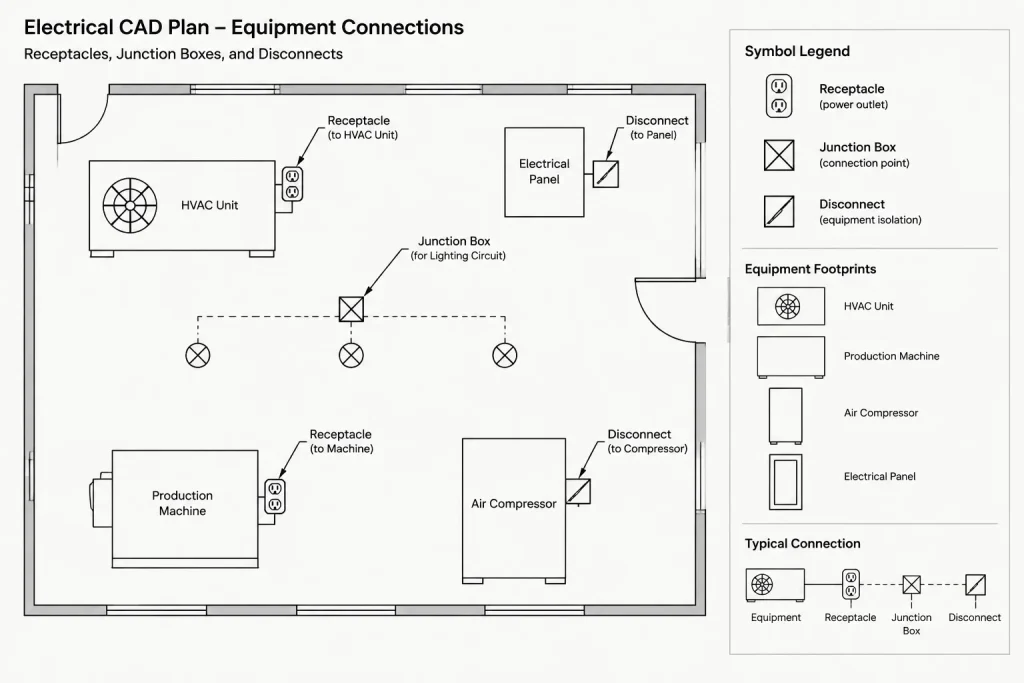
Likewise, an equipment outline is not normally enough to communicate a hardwired connection. Add the appropriate connection symbol, circuit annotation, or keyed note according to the project’s graphic conventions. When equipment is furnished by another discipline, show the electrical interface in a way that remains distinguishable from the background equipment geometry.
Recommended symbol attributes
Well-managed CAD blocks can carry attributes that help coordinate the connection without crowding the plan. Useful fields may include:
- Device or connection tag
- Equipment identifier
- Circuit or source reference
- Connection method classification
- Schedule or detail reference
- Verification status or internal review note
Not every attribute needs to be visible. Some can support schedules, extraction, or quality-control checks. Keep displayed text limited to information that readers need on the plotted sheet.
A practical CAD documentation workflow
1. Begin with an equipment connection list
Before placing symbols, assemble a working list of equipment requiring electrical service. Use stable equipment IDs that can be reconciled with mechanical, plumbing, kitchen, process, architectural, or vendor documents. Record the proposed connection method as verified, provisional, or unresolved.
This list does not need to become a published schedule. It can function as an internal coordination tool and prevent the drafter from making silent assumptions.
2. Place the interface, not just the equipment
Show the electrical connection point in relation to the equipment footprint. Depending on the documented design, that interface may be a receptacle, outlet box, junction box, disconnect, controller, or combination of devices.
Keep the device readable at the intended plot scale. If the actual point is concealed by dense equipment geometry, use a controlled symbol offset and leader rather than placing the symbol ambiguously in open space. The leader should terminate at the intended interface or connection area.
3. Add circuit and equipment references
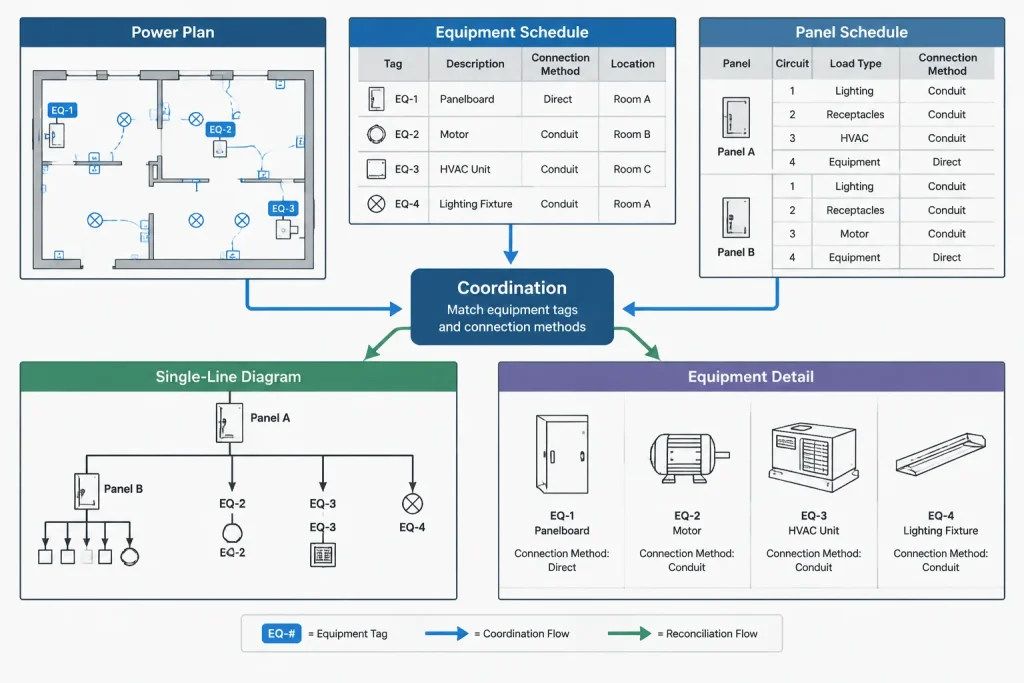
Associate the connection with both its electrical source and its served equipment. A circuit tag alone may identify the panel relationship but still leave readers uncertain about which nearby item is served. An equipment tag alone may omit the source. Use the project’s annotation system to make both relationships recoverable.
4. Coordinate local devices
A hardwired connection may involve more than a final outlet point. Review whether project documents identify a local disconnect, controller, starter, or vendor interface. If such a device is shown, its tag and location should agree across plans, diagrams, schedules, and details.
Do not add devices solely because similar equipment used them on another project. Generic details and legacy drawings are references, not proof of current requirements.
5. Reconcile schedules and diagrams
Compare the plan symbol with the equipment schedule’s connection-method field. Then confirm that the panel schedule or source documentation identifies the same equipment. For major equipment, review the single-line or riser diagram for corresponding disconnects, feeders, and equipment tags.
A useful review sequence is:
- Equipment ID to plan location
- Plan connection symbol to connection-method entry
- Plan circuit tag to panel schedule
- Plan disconnect tag to diagram or equipment schedule
- Plan callout to detail or elevation
- Electrical information to the latest coordinated equipment data
6. Mark unresolved information visibly
When the final connection method is unknown, do not disguise uncertainty with a definitive symbol. Use an approved project convention for pending coordination, such as a keyed note, review marker, or tracked issue outside the published drawing area. The convention should be easy to find and remove before issue.
Layer and block strategies
Separate electrical connection graphics from architectural or consultant equipment backgrounds. This allows the team to update underlays without losing electrical annotations and makes discipline ownership clear.
A practical layer structure may distinguish outlet devices, equipment connections, disconnecting devices, circuiting, tags, and coordination markers. Exact layer names should follow the project or client standard. Avoid creating a separate layer for every equipment type unless that granularity supports an actual visibility, plotting, or data-management need.
Build blocks around device meaning rather than a specific manufacturer’s appearance. A generic receptacle or junction box block can contain consistent insertion points, attributes, and display behavior. Project-specific requirements can then be expressed through attributes, schedule references, or dedicated verified symbols.
Common drawing conflicts
- Receptacle on plan, hardwired in schedule: Determine which source reflects the current design and update all affected views.
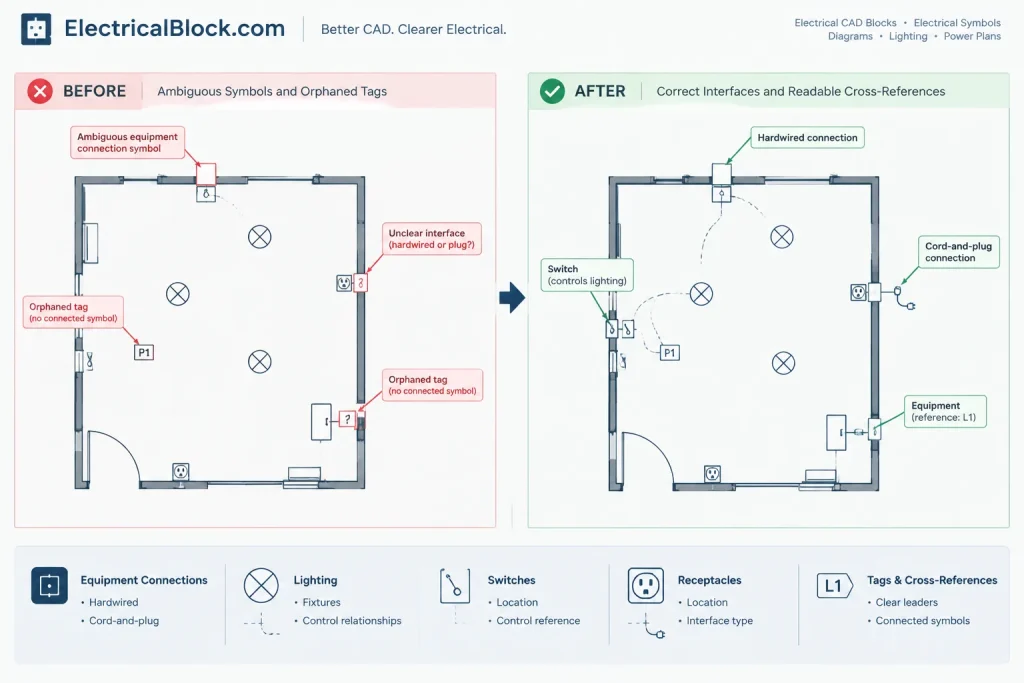
- Junction box with no served equipment: Add a clear equipment reference or leader so the box is not mistaken for a general outlet.
- Disconnect shown without circuit continuity: Make the source-to-disconnect-to-equipment relationship traceable through tags, linework, or cross-references.
- Equipment moved but connection left behind: Review electrical devices after every coordinated equipment-background update.
- Generic note applied too broadly: Use local or scheduled information where equipment connection methods differ.
- Detail contradicts plan: Revise the detail, plan, or callout so readers are not forced to choose between them.
- Overlapping symbols: Offset and lead the electrical symbol while preserving the actual connection relationship.
Plan readability without excessive annotation
Connection documentation must be complete, but repeating every fact beside every symbol can make a power plan difficult to read. Divide information according to purpose. Use the plan for location, device identity, and circuit relationship; use schedules for structured equipment data; use details for physical coordination; and use diagrams for system relationships.
A concise connection code can be useful when it is defined in a legend or schedule and applied consistently. Avoid unexplained abbreviations, especially if they could be mistaken for equipment tags, circuit identifiers, or drawing references.
Final quality-control checklist
- Each served item has a recognizable electrical interface.
- Receptacle, outlet box, junction box, and disconnect symbols are not used interchangeably.
- Equipment IDs match the latest coordinated background or schedule.
- Circuit tags correspond with the source documentation.
- Connection methods agree between plans and schedules.
- Required diagram and detail references are present and valid.
- Moved or deleted equipment has not left orphaned connection symbols.
- Pending decisions are tracked rather than represented as verified design.
- Symbols, leaders, and tags remain legible at the plotted scale.
A clear electrical drawing does not merely show that equipment needs power. It identifies the intended interface and lets readers trace that interface to its source, schedule data, and supporting detail. Treating hardwired and cord-and-plug connections as coordinated documentation categories helps reduce ambiguity while keeping the CAD plan concise and maintainable.
Managing connection decisions through revisions
Connection information often develops as equipment selections and coordinated backgrounds change. A sound CAD workflow separates confirmed information from provisional information so that an early assumption does not become an apparently final drawing requirement.
When a connection method changes, review the complete documentation chain rather than editing only the nearest symbol. The affected items may include the device block, equipment tag, circuit annotation, schedule entry, diagram relationship, detail callout, legend, and coordination record. This review also helps identify obsolete symbols or notes left behind after equipment is moved or replaced.
Establish document responsibility
Teams benefit from identifying where the controlling connection description is maintained. The authoritative location may vary by project, but duplicate information should still agree wherever it appears. If the plan, schedule, and equipment information conflict, flag the discrepancy for resolution instead of selecting whichever source is easiest to edit.
Keep CAD intelligence separate from plotted content
Block attributes and internal status fields can support checking without placing every coordination note on the issued sheet. Visible annotations should communicate what drawing users need, while nonplotting data can help the design team filter unresolved items, compare tags, or prepare schedule information.
Review the drawing as a reader
A final review should test whether someone unfamiliar with the model can identify the served equipment, recognize the intended electrical interface, trace the source, and locate supporting information. If that path depends on hidden layer knowledge or an unexplained drafting convention, the drawing needs clearer annotation or cross-referencing.
Frequently asked questions
Can an equipment outline show whether a connection is hardwired?
No. An equipment footprint communicates location and extent, but it does not reliably define the electrical interface. Use the verified device symbol, tag, note, schedule reference, or detail required by the project documentation system.
Should a generic receptacle symbol be used when the connection method is unresolved?
A definitive receptacle symbol can imply that a cord-and-plug connection has already been established. Use the project’s approved coordination convention to identify unresolved information until the connection method is verified.
Where should the connection method be recorded?
Record it where the project manages equipment data and make the corresponding plan graphics consistent with that source. The information may also appear in schedules, details, or diagrams, but repeated entries should remain coordinated.
Does a manufacturer-style CAD block establish the required connection?
No. Block appearance is not a substitute for verified equipment information. Manufacturer or consultant geometry can help locate an interface, but the electrical documents should use approved symbols and references to state the design intent.
How should a connection symbol be shown when equipment geometry is dense?
Keep the symbol legible and use a controlled offset with a clear leader when necessary. The leader should identify the intended interface without suggesting that the connection is located elsewhere.
What should be checked after equipment moves?
Review the associated connection device, leader, circuit tag, equipment identifier, local device, detail reference, and schedule entry. Remove or revise orphaned graphics so the previous location cannot be mistaken for an active connection point.



Leave a Reply
You must be logged in to post a comment.